
Fujifilm Instax Mini 8
Fujifilm Instax Mini 8 Instant Film Camera User Manual
Model: Instax Mini 8
1. Introduction
This manual provides essential instructions for the safe and effective use of your Fujifilm Instax Mini 8 Instant Film Camera. Please read this manual thoroughly before using the camera and retain it for future reference. The Instax Mini 8 is designed to produce instant credit-card sized prints, offering a unique photographic experience.
2. Safety Precautions
- Do not disassemble, modify, or attempt to repair the camera.
- Keep the camera away from water and moisture.
- Avoid exposing the camera to direct sunlight or high temperatures for extended periods.
- Use only specified batteries (AA size) and Instax Mini film.
- Keep batteries and film out of reach of small children.
- Do not touch the film ejection slot during printing.
3. Package Contents
Verify that all items are present in your package:
- Fujifilm Instax Mini 8 Camera
- Hand Strap
- AA Batteries (x2)
- Instruction Manual (this document)
4. Setup
4.1 Battery Installation
- Open the battery cover located on the side of the camera.
- Insert two new AA 1.5V alkaline batteries, ensuring correct polarity (+/-).
- Close the battery cover securely.

Figure 1: Front view of the Fujifilm Instax Mini 8 camera, showcasing its compact design and lens. The battery compartment is on the side, not visible in this image.
4.2 Film Pack Installation
- Open the film chamber cover on the back of the camera.
- Align the yellow mark on the film pack with the yellow mark on the camera's film chamber.
- Insert the film pack straight into the chamber. Do not press down on the film pack.
- Close the film chamber cover. The camera will automatically eject the black film cover sheet.
- The film counter will display "10" (or the number of films in the pack).
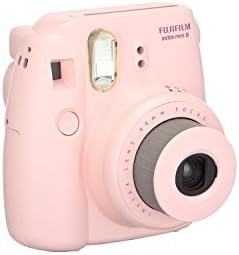
Figure 2: Angled view of the Fujifilm Instax Mini 8 camera, highlighting the lens and flash unit. The film chamber is located on the rear of the camera.
5. Operating the Camera
5.1 Turning On/Off
- To turn on: Press the button next to the lens. The lens will extend, and the flash charging lamp will light up.
- To turn off: Push the lens back into the camera body.
5.2 Taking a Picture
- Turn on the camera.
- Rotate the brightness adjustment dial to the recommended setting indicated by the lit lamp.
- Hold the camera firmly and compose your shot using the viewfinder.
- Press the shutter button. The picture will be ejected from the top slot.
- Allow the picture to develop naturally. Do not shake or bend the print.
5.3 Brightness Adjustment Dial
The Instax Mini 8 features a brightness adjustment dial to optimize exposure for different lighting conditions. When the camera is turned on, a lamp next to one of the five settings will light up, indicating the recommended brightness setting. Rotate the dial to align with the lit lamp.
- Indoor/Night: For indoor shots or night scenes.
- Cloudy: For cloudy or overcast outdoor conditions.
- Shade: For subjects in shade outdoors.
- Fine: For bright, clear outdoor conditions.
- Hi-Key: For softer, brighter portraits.

Figure 3: Rear view of the Fujifilm Instax Mini 8 camera, displaying the film door and viewfinder. The brightness adjustment dial is visible on the front of the camera.
6. Maintenance
- Cleaning: Use a soft, dry cloth to clean the camera body. For the lens and viewfinder, use a lens cleaning cloth. Do not use organic solvents.
- Storage: Store the camera in a cool, dry place away from direct sunlight and extreme temperatures. Remove batteries if the camera will not be used for an extended period.
- Film Handling: Store film packs in a cool, dry place. Once loaded, use the film within the recommended timeframe.
7. Troubleshooting
| Problem | Solution |
|---|---|
| Camera does not turn on. | Check battery installation and ensure batteries are fresh. Replace if necessary. |
| Film does not eject. | Ensure film pack is correctly installed and not expired. Check battery level. |
| Photos are too dark/light. | Adjust the brightness dial to the recommended setting for the current lighting conditions. |
| Flash does not fire. | Wait for the flash charging lamp to light up before taking a picture. Ensure batteries are sufficient. |
8. Specifications
| Feature | Detail |
|---|---|
| Film | Fujifilm Instax Mini Instant Film |
| Picture Size | 62mm x 46mm |
| Lens | 2 components, 2 elements, f=60mm, 1:12.7 |
| Viewfinder | Real image finder, 0.37x with target spot |
| Focusing | 0.6m - ∞ (infinity) |
| Shutter Speed | 1/60 sec. |
| Flash | Constant firing flash (automatic light adjustment) |
| Power Supply | Two AA-size 1.5V alkaline batteries |
| Dimensions | 116mm x 118.3mm x 68.2mm (W x H x D) |
| Weight | 307g (without batteries, strap, and film pack) |
| Model Number | 4332059053 |
| UPC | 635934442413 |
9. Warranty and Support
This product is offered as a renewed item. Renewed products are typically inspected and tested to work and look like new by qualified suppliers. For specific warranty details and support regarding renewed products, please refer to the Amazon Renewed Guarantee policy or contact the seller directly. General product support for Fujifilm products can be found on the official Fujifilm website.
For further assistance, please visit the Fujifilm official website or contact their customer service.
Related documentsInstax Mini 8


Ask a question about this manual
Ask about setup, troubleshooting, compatibility, parts, safety, or missing instructions. Manuals+ will review the question and use this page’s manual context to help answer it.