
Introduction
This manual provides essential information for the safe and effective use of your Jocca 6158N Mini Exercise Bike. This compact and versatile device is designed for both arm and leg training, offering a convenient way to maintain physical activity.

Figure 1: Front view of the Jocca 6158N Mini Exercise Bike.
The Jocca 6158N Mini Exercise Bike features an anti-slip pedal design for secure use and a digital LCD screen to monitor your workout progress. It includes a resistance regulator for adjustable intensity, helping to increase energy levels, stimulate muscle movement, improve joint mobility, and enhance blood circulation.
Safety Information
- Read all instructions before using the device.
- Place the exercise bike on a stable, flat surface during use.
- Ensure pedals are securely attached before starting any exercise.
- Consult a physician before starting any new exercise program.
- Keep children and pets away from the device during operation.
- Do not exceed the maximum weight capacity of 100 kg.
- Stop exercising immediately if you feel pain, dizziness, or discomfort.
Setup and Assembly
The Jocca 6158N Mini Exercise Bike requires minimal assembly. Follow these steps to prepare your device for use:
- Unpack Components: Carefully remove all parts from the packaging. Verify that all components are present according to the packing list.
- Attach Stabilizer Bars: Securely attach the front and rear stabilizer bars to the main unit using the provided screws and tools.
- Install Pedals: Identify the left (L) and right (R) pedals. Screw the pedals into their respective crank arms. Note that the left pedal often has a reverse thread. Tighten firmly.
- Insert Battery: Open the battery compartment on the LCD display unit and insert one AAA battery (not included).
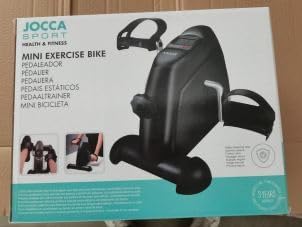
Figure 2: Product packaging for the Jocca Mini Exercise Bike.
Once assembled, place the exercise bike on a flat, stable surface. Its compact dimensions and light weight (2 kg) allow for easy placement in various locations.

Figure 3: Dimensions of the Jocca 6158N Mini Exercise Bike (Length: 36 cm, Width: 32 cm, Height: 50 cm).
Operating Instructions
Adjusting Resistance
The exercise bike features an adjustable resistance knob. Turn the knob clockwise (+) to increase resistance for a more challenging workout, and counter-clockwise (-) to decrease resistance for an easier session.

Figure 4: Resistance adjustment knob. Turn towards '+' for higher resistance, '-' for lower.
Using the LCD Display
The digital LCD screen provides real-time feedback on your workout. It tracks 5 key functions:
- SCAN: Automatically cycles through all functions.
- TIME: Displays the duration of your current workout.
- DIST (Distance): Shows the estimated distance covered.
- COUNT: Tracks the number of pedal strokes during the current session.
- T-COUNT (Total Count): Displays the total accumulated pedal strokes since the last reset.
- CALORIES: Estimates the calories burned during your workout.
Press the red button below the display to cycle through the functions or to reset certain values (refer to specific display instructions for reset procedure, usually a long press).

Figure 5: LCD display showing workout metrics.
Exercise Modes
The Jocca 6158N can be used for both arm and leg exercises:
- Leg Exercise: Place the unit on the floor in front of a chair. Sit comfortably and place your feet into the pedal straps. Begin pedaling at a comfortable pace and resistance.
- Arm Exercise: Place the unit on a sturdy table or desk. Sit comfortably and place your hands into the pedal straps. Begin pedaling with your arms at a comfortable pace and resistance.

Figure 6: Using the exercise bike for leg training.

Figure 7: Using the exercise bike for arm training.
Maintenance
Regular maintenance ensures the longevity and optimal performance of your Jocca Mini Exercise Bike.
- Cleaning: Wipe the unit with a damp cloth after each use. Avoid abrasive cleaners or solvents.
- Storage: Store the exercise bike in a cool, dry place away from direct sunlight and extreme temperatures.
- Battery Replacement: Replace the AAA battery in the LCD display when the screen becomes dim or unresponsive.
- Check Connections: Periodically check that all screws and bolts are tight, especially those securing the pedals and stabilizer bars.
Troubleshooting
| Problem | Possible Cause | Solution |
|---|---|---|
| LCD display is blank or dim. | Battery is dead or incorrectly inserted. | Replace the AAA battery. Ensure it is inserted with correct polarity. |
| Display readings are inaccurate or stuck. | Sensor issue or temporary malfunction. | Remove and reinsert the battery to reset the display. If the problem persists, contact customer support. |
| Pedals are loose or wobbly. | Pedals not tightened sufficiently during assembly. | Retighten the pedals firmly. Remember the left pedal may have a reverse thread. |
| Device slides during use. | Used on a smooth surface without anti-slip mat. | Place the exercise bike on a non-slip mat or carpet. |
Specifications
| Feature | Detail |
|---|---|
| Model Number | 6158N |
| Brand | JOCCA |
| Product Dimensions | Length: 36 cm, Width: 32 cm, Height: 50 cm |
| Item Weight | 2 kg |
| Color | Black |
| Material | Polypropylene |
| Maximum Weight Capacity | 100 kg |
| Resistance Mechanism | Magnetic |
| Display Type | LCD |
| Power Source | Battery (1 AAA battery required) |
| Meter Functions | Distance, Time, Calories Burned, Pedal Count, Total Pedal Count |
| Special Features | Portable |
| Recommended Use | Indoor |
| Country of Origin | China |
Warranty and Support
For warranty information or technical support, please contact JOCCA customer service. Refer to your purchase documentation for specific warranty terms and contact details.
Manufacturer: JOCCA
Model: 6158N
