
Introduction
This manual provides comprehensive instructions for the safe and proper installation and use of the RACO 296 4-Inch by 1-1/2-Inch Deep Ceiling Fan Support Box. This product is designed to provide secure support for ceiling fans and light fixtures in residential and commercial applications. Please read all instructions carefully before beginning installation.
Safety Information
Always follow basic safety precautions when installing electrical equipment to reduce the risk of fire, electric shock, and personal injury. This includes, but is not limited to:
- Disconnect Power: Always turn off power at the circuit breaker or fuse box before beginning any electrical work. Verify power is off using a voltage tester.
- Qualified Electrician: If you are unsure about any part of the installation process, consult a qualified electrician.
- Local Codes: Ensure all wiring and installation procedures comply with local electrical codes and ordinances.
- Proper Tools: Use appropriate tools for electrical work, including insulated tools.
- Grounding: Ensure proper grounding of the electrical box and any connected fixtures.
Package Contents
Verify that all components are present before beginning installation:
- One (1) RACO 296 4-Inch by 1-1/2-Inch Deep Ceiling Fan Support Box
- Two (2) fixture mounting screws (pre-installed)
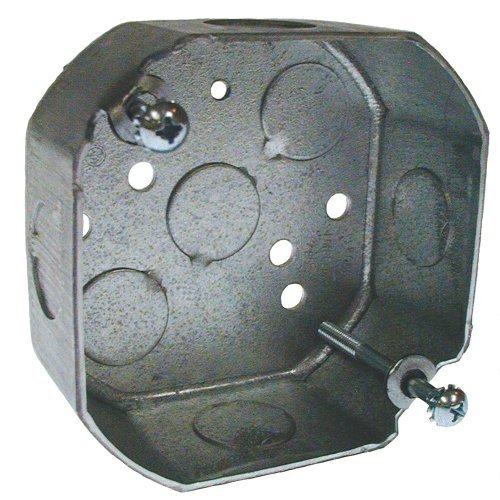
Figure 1: RACO 296 4-Inch by 1-1/2-Inch Deep Ceiling Fan Support Box. This image displays the RACO 296 ceiling fan support box, a galvanized steel octagonal electrical box designed for securely mounting ceiling fans and light fixtures. It features multiple knockouts for wiring entry and two pre-installed screws for fixture attachment.
Setup and Installation
The RACO 296 box is designed for new work or old work applications, typically mounted to a joist or blocking. Ensure the mounting surface is structurally sound and capable of supporting the combined weight of the fan/fixture and the box.
- Prepare the Location:
- Turn off power to the circuit at the main service panel.
- Locate the desired installation point for the ceiling fan or fixture. This should ideally be centered on a ceiling joist or between two joists with appropriate blocking installed.
- Cut an opening in the ceiling material (e.g., drywall) that is appropriate for the size of the box, typically a 4-inch diameter hole for this octagonal box.
- Mount the Box:
- The RACO 296 box is designed to be mounted directly to a structural member (joist or blocking) using appropriate fasteners (not included).
- Position the box flush with the ceiling surface.
- Secure the box firmly to the joist/blocking using screws through the designated mounting holes. Ensure the box is stable and does not wobble.
- Wire Connections:
- Remove the appropriate knockouts for your wiring. Use a screwdriver and hammer to gently tap out the desired knockouts.
- Run electrical wires into the box through the opened knockouts. Use appropriate cable connectors or clamps to secure the wires and protect them from abrasion.
- Make all necessary electrical connections according to the wiring diagram of your ceiling fan or fixture and local electrical codes. This typically involves connecting hot, neutral, and ground wires.
- Ensure all wire connections are secure and insulated with wire nuts or other approved connectors.
- Install Fixture:
- Once wiring is complete, carefully tuck all wires into the box.
- Mount the ceiling fan or light fixture to the box using the pre-installed mounting screws. Ensure the fixture is securely fastened to the box and the box is capable of supporting its weight.
- Restore Power:
- Once the installation is complete and all connections are secure, restore power at the circuit breaker.
- Test the functionality of the installed ceiling fan or light fixture.
Operating
The RACO 296 Ceiling Fan Support Box is a passive component designed to provide a secure and code-compliant enclosure for electrical connections and a robust mounting point for ceiling fans and light fixtures. Once properly installed, its operation is integrated with the electrical circuit it serves. It does not have active operational controls.
Maintenance
The RACO 296 Ceiling Fan Support Box requires minimal maintenance once installed. It is designed for long-term, reliable performance.
- Periodic Inspection: Periodically inspect the area around the box for any signs of damage, loose connections, or wear, especially if the ceiling fan or fixture is frequently used or vibrates.
- Cleaning: If accessible, the exterior of the box can be wiped clean with a dry cloth. Do not use liquid cleaners inside the box.
- Professional Check: If you notice any flickering lights, unusual noises from the fan, or other electrical anomalies, consult a qualified electrician to inspect the wiring and connections within the box.
Troubleshooting
Most issues related to a ceiling fan support box stem from improper installation or wiring. If you experience problems, consider the following:
- Fan/Fixture Not Working:
- Check the circuit breaker to ensure power is on.
- Verify all wire connections inside the box are secure and correctly matched (hot to hot, neutral to neutral, ground to ground).
- Ensure the light switch or fan control is functioning correctly.
- Loose Fan/Fixture:
- Turn off power.
- Check that the mounting screws securing the fan/fixture to the box are tight.
- Verify that the box itself is securely fastened to the ceiling joist or blocking.
- Humming or Buzzing:
- While often related to the fan motor itself, ensure all electrical connections are tight and properly insulated within the box. Loose connections can sometimes cause humming.
Warning: Do not attempt to repair electrical issues if you are not qualified. Always consult a licensed electrician for complex electrical problems.
Specifications
| Model Number | 296 |
| Brand | RACO |
| Dimensions | 4-Inch Diameter x 1-1/2-Inch Deep (Octagonal) |
| Material | Galvanized Steel (Note: Input data listed "copper", but product is typically steel) |
| Style | Compact |
| Finish Type | Painted |
| ASIN | B018A19N08 |
Warranty Information
RACO products are manufactured to high-quality standards. For specific warranty details regarding the RACO 296 Ceiling Fan Support Box, please refer to the official RACO website or contact their customer support directly. Keep your purchase receipt as proof of purchase.
Support
For technical assistance, installation questions, or further information about RACO products, please visit the official RACO website or contact their customer service department. You can also find more information on the RACO Brand Store on Amazon.

