
Coby CSBT-317-WHT
Coby CSBT-317-WHT Tune Box Portable Bluetooth Speaker User Manual
Model: CSBT-317-WHT
Introduction
Thank you for purchasing the Coby CSBT-317-WHT Tune Box Portable Bluetooth Speaker. This device is designed to provide high-quality wireless audio from your Bluetooth-enabled devices, such as cell phones and computers. Its compact design and built-in features make it ideal for portable use. Please read this manual thoroughly before operating the speaker to ensure proper use and to maximize its performance.
Safety Information
- Do not expose the speaker to extreme temperatures, humidity, or direct sunlight.
- Do not disassemble or modify the speaker. This will void the warranty and may cause damage.
- Keep the speaker away from water and other liquids. This product is not waterproof.
- Use only the specified charging cable and power adapter.
- Avoid listening at high volume levels for extended periods to prevent hearing damage.
Package Contents
Please check the package for the following items:
- Coby CSBT-317-WHT Tune Box Portable Bluetooth Speaker
- USB Charging Cable
- 3.5mm Audio Cable
- User Manual
Product Overview
Familiarize yourself with the various parts of your Coby Tune Box speaker.

Figure 1: Front and Side View. This image displays the speaker's main grille on the front face and a black carrying strap attached to the side.
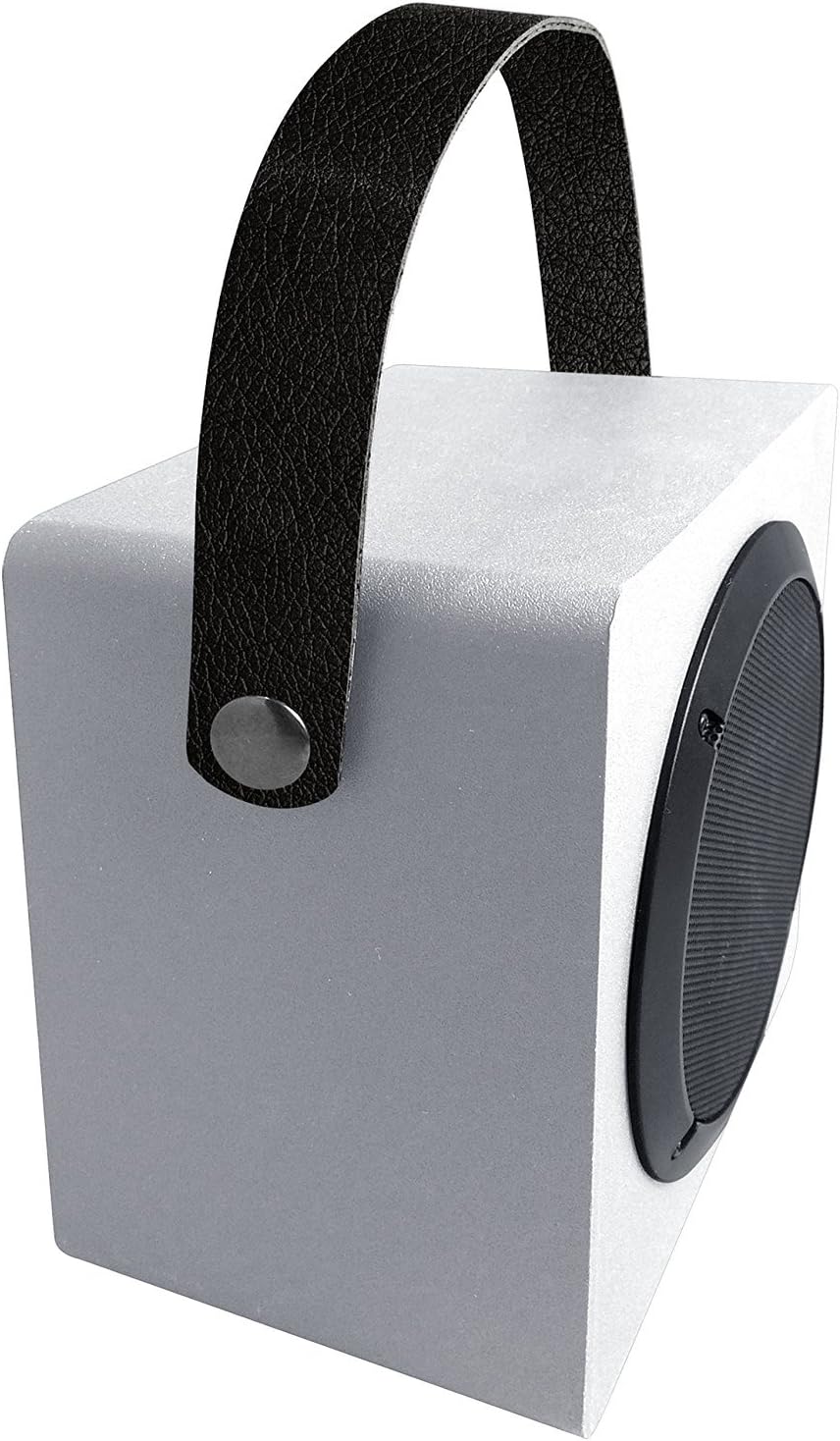
Figure 2: Top and Side View with Handle. This image shows the speaker from an elevated angle, emphasizing the integrated carrying handle and the overall compact design.
Key Components:
- Speaker Grille: Protects the speaker driver and allows sound to project.
- Carrying Handle: For easy portability.
- Control Panel: (Typically located on the side or back) Includes power button, volume controls, and mode selection.
- Charging Port: For connecting the USB charging cable.
- AUX Input: 3.5mm jack for wired audio connection.
- Built-in Microphone: For hands-free calling.
Setup
Charging the Speaker:
- Connect the small end of the USB charging cable to the charging port on the speaker.
- Connect the large end of the USB charging cable to a USB power adapter (not included) or a computer's USB port.
- The charging indicator light will illuminate, typically red, while charging.
- Once fully charged, the indicator light will change color or turn off. A full charge typically takes 2-3 hours.
Operating
Power On/Off:
- To Power On: Press and hold the Power button for approximately 3 seconds. You will hear an audible tone or voice prompt indicating the speaker is on.
- To Power Off: Press and hold the Power button for approximately 3 seconds. You will hear an audible tone or voice prompt indicating the speaker is off.
Bluetooth Pairing:
- Ensure the speaker is powered on and in Bluetooth pairing mode. The Bluetooth indicator light will typically flash rapidly.
- On your Bluetooth-enabled device (smartphone, tablet, computer), go to the Bluetooth settings.
- Search for available devices. You should see "Coby CSBT-317-WHT" or a similar name in the list.
- Select the speaker from the list to initiate pairing.
- Once successfully paired, the Bluetooth indicator light will stop flashing and remain solid, and you will hear a confirmation tone.
- The speaker will automatically connect to the last paired device when powered on, if the device is within range and Bluetooth is enabled.
Connecting via AUX Input:
- Connect one end of the 3.5mm audio cable to the AUX input port on the speaker.
- Connect the other end of the 3.5mm audio cable to the headphone jack or audio output of your external device (e.g., MP3 player, non-Bluetooth computer).
- The speaker will automatically switch to AUX mode.
Volume Control:
- Use the Volume Up (+) and Volume Down (-) buttons on the speaker to adjust the playback volume.
- You can also control the volume from your connected Bluetooth device or external audio source.
Making/Receiving Calls (Built-in Microphone):
- When connected via Bluetooth, incoming calls will be routed through the speaker.
- Press the Play/Pause button (often doubles as call answer/end) to answer an incoming call.
- Press the Play/Pause button again to end a call.
- To reject an incoming call, press and hold the Play/Pause button.
Maintenance
- Cleaning: Use a soft, dry cloth to wipe the exterior of the speaker. Do not use liquid cleaners or abrasive materials.
- Storage: When not in use for extended periods, store the speaker in a cool, dry place, away from direct sunlight and extreme temperatures.
- Battery Care: To prolong battery life, avoid fully discharging the battery frequently. Charge the speaker regularly, even if not in use.
Troubleshooting
| Problem | Possible Cause | Solution |
|---|---|---|
| Speaker does not power on. | Battery is depleted. | Charge the speaker for at least 30 minutes. |
| Cannot pair with Bluetooth device. | Speaker is not in pairing mode. Device's Bluetooth is off. Speaker is already connected to another device. Device is out of range. | Ensure speaker is in pairing mode (flashing light). Turn on Bluetooth on your device. Disconnect from other devices or restart the speaker. Move device closer to the speaker (within 33ft/10m). |
| No sound or low volume. | Volume is too low on speaker or device. Incorrect input mode selected. Audio cable not fully inserted (AUX mode). | Increase volume on both speaker and connected device. Ensure correct mode (Bluetooth/AUX) is active. Check 3.5mm cable connection. |
| Sound distortion. | Volume too high. Device too far from speaker. Interference. | Reduce volume. Move device closer. Move away from other electronic devices. |
Specifications
| Feature | Detail |
|---|---|
| Model Number | CSBT-317-WHT |
| Connectivity Technology | Bluetooth |
| Wireless Range | Up to 33 feet (10 meters) |
| Power Source | Battery Powered |
| Speaker Type | Portable Bluetooth Speaker |
| Special Features | Bass-boosting sound, Built-in microphone, Durable aluminum grill |
| Color | White |
| Product Dimensions (D x W x H) | 3.7" x 6.1" x 1.4" |
| Item Weight | 0.99 Pounds (15.8 ounces) |
| Material | Aluminum |
| Manufacturer | Summit Electronics, US |
| UPC | 812180024789 |
Warranty and Support
For warranty information or technical support, please refer to the warranty card included in your product packaging or visit the official Coby website. Please have your model number (CSBT-317-WHT) and proof of purchase ready when contacting support.
Manufacturer: Summit Electronics, US
Related documentsCSBT-317-WHT


Ask a question about this manual
Ask about setup, troubleshooting, compatibility, parts, safety, or missing instructions. Manuals+ will review the question and use this page’s manual context to help answer it.