
Introduction
This manual provides essential instructions for the installation, proper operation, and maintenance of your Durpower replacement stylus. This stylus is designed for compatibility with specific Sanyo turntable models, ensuring optimal audio playback when correctly installed and cared for.
Setup and Installation
Proper installation is crucial for the performance and longevity of your new stylus. Please follow these steps carefully:
- Compatibility Check: Before proceeding, visually confirm that the replacement stylus matches your existing stylus. This Durpower stylus is specifically designed for Sanyo turntable models TP1005, TP-1010, TP-30, and TP-B2. It will not fit if your turntable's cartridge has been replaced with an incompatible model.
- Power Off: Always ensure your turntable is powered off and unplugged from the electrical outlet before handling any components.
- Remove Old Stylus: Gently grasp the old stylus assembly and carefully pull it forward and down, away from the cartridge body. Avoid applying excessive force.
- Install New Stylus: Hold the new Durpower stylus by its plastic housing. Align the stylus with the cartridge body and gently push it upwards and backwards until it clicks securely into place. Ensure it is fully seated and level.
- Verify Fit: Double-check that the stylus is firmly attached and does not wobble.
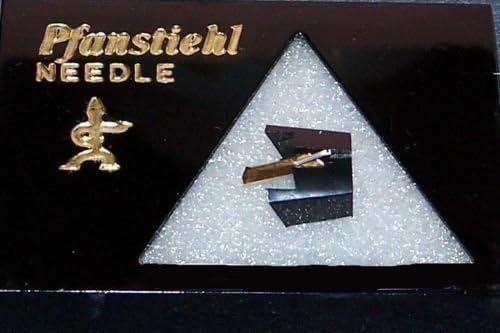
This image displays the Durpower replacement stylus, packaged in a clear triangular case, with the Pfanstiehl brand and 'NEEDLE' text visible. The stylus itself, a small gold-colored cantilever with a diamond tip, is clearly visible within the packaging.
Operating Instructions
Once the stylus is installed, follow these guidelines for optimal playback:
- Stylus Condition: Before playing a record, visually inspect the stylus for any visible dust or debris.
- Gentle Handling: Always lower the tonearm gently onto the record's lead-in groove. Avoid dropping the tonearm, as this can damage both the stylus and the record.
- Record Condition: Ensure records are clean and free of dust to prevent premature stylus wear and improve sound quality.
Maintenance
Regular maintenance extends the life of your stylus and preserves sound quality:
- Stylus Cleaning: Regularly clean the stylus using a soft stylus brush or a specialized stylus cleaning fluid. Always brush gently from the back of the stylus towards the front, never side-to-side or front-to-back.
- Dust Cover: Keep your turntable's dust cover closed when not in use to protect the stylus and turntable from dust accumulation.
- Replacement: A stylus has a finite lifespan. Replace your stylus periodically (typically every 500-1000 hours of playback, depending on usage and record condition) to maintain sound quality and prevent damage to your records.
Troubleshooting
If you encounter issues, consider the following:
- Poor Sound Quality: Check the stylus for debris and clean it if necessary. Ensure the stylus is fully and correctly seated in the cartridge. Verify that your turntable's tracking force and anti-skate settings are properly adjusted according to your turntable's specifications.
- Skipping: Clean the record and the stylus. Ensure the turntable is on a stable, level surface. Check tracking force and anti-skate settings.
- Stylus Does Not Fit: Reconfirm that your turntable's cartridge is the original Sanyo cartridge compatible with this stylus. If the cartridge has been replaced with a different model, this stylus may not be compatible.
Specifications
- Product Type: Replacement Phonograph Stylus (Needle)
- Stylus Tip: Diamond
- Compatibility: SANYO TP1005, SANYO TP-1010, SANYO TP1010, SANYO TP-30, SANYO TP30, SANYO TP-B2 Turntables
- ASIN: B0187BF3A0
- Date First Available: November 19, 2015
Support
For any questions, concerns, or further assistance regarding your Durpower replacement stylus, please contact the seller directly through your purchase platform. They can provide specific guidance and support for your product.