
1. Introduction
The Bellman & Symfon Visit Door Chime Transmitter (BE1410) is a component of the Bellman & Symfon Visit smart home system. This device is designed to detect when a door or window is opened or closed and wirelessly send a signal to a compatible Bellman & Symfon Visit receiver. It helps individuals with hearing impairments or those who need an alert for door activity within their home environment.
2. Safety Information
- Battery Safety: Use only the specified battery type. Do not mix old and new batteries, or different types of batteries. Dispose of used batteries according to local regulations. Keep batteries out of reach of children.
- Water and Moisture: This device is not waterproof. Avoid exposure to water, high humidity, or extreme temperatures.
- Handling: Do not drop, disassemble, or attempt to repair the device yourself. Refer all servicing to qualified personnel.
- Interference: Keep the device away from strong electromagnetic fields, which may interfere with its operation.
3. Package Contents
Verify that your package contains the following items:
- Bellman & Symfon Visit Door Chime Transmitter (BE1410)
- Mounting bracket and screws
- Magnetic contact sensor
- Batteries (if included)
- User Manual (this document)
4. Setup
Follow these steps to set up your Door Chime Transmitter:
- Insert Batteries: Open the battery compartment on the back of the transmitter. Insert the specified batteries, ensuring correct polarity (+/-). Close the compartment securely.
- Mount the Transmitter: Choose a suitable location on the door frame or window frame. The main transmitter unit should be mounted on the stationary part (frame), and the magnetic contact sensor on the moving part (door/window). Ensure they are aligned and within 10mm of each other when the door/window is closed. Use the provided screws or adhesive strips for mounting.
- Pair with a Receiver: Activate the pairing mode on your Bellman & Symfon Visit receiver (refer to your receiver's manual for specific instructions). Once the receiver is in pairing mode, open and close the door or window where the transmitter is installed. The transmitter will send a signal, and the receiver should acknowledge the pairing.
- Test Functionality: Open and close the door/window to verify that the transmitter sends a signal and your Visit receiver responds as expected (e.g., flashing lights, vibration, sound).
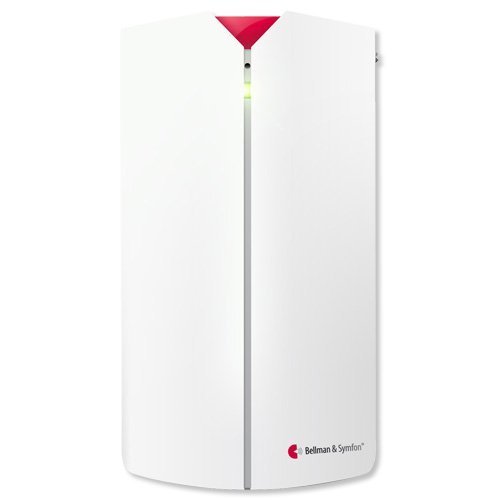
Image: The Bellman & Symfon Visit Door Chime Transmitter (BE1410) unit. This image shows the compact design of the transmitter, typically featuring a small casing with a visible indicator light and a separate magnetic contact sensor.
5. Operating Instructions
The Bellman & Symfon Visit Door Chime Transmitter operates automatically once set up and paired with a receiver.
- Detection: When the magnetic contact between the main transmitter unit and the separate magnetic sensor is broken (e.g., a door opens), the transmitter detects this change.
- Signal Transmission: Upon detection, the transmitter immediately sends a radio signal to all paired Bellman & Symfon Visit receivers within range.
- Receiver Indication: The receiver will then alert you according to its settings, which may include visual flashes, vibrations, or audible signals.
- Battery Indicator: Some models may feature a low battery indicator light on the transmitter itself. Consult the device for specific indicators.
6. Maintenance
Regular maintenance ensures optimal performance of your transmitter.
- Cleaning: Wipe the device with a soft, dry cloth. Do not use abrasive cleaners, solvents, or immerse in water.
- Battery Replacement: Replace batteries when the low battery indicator activates on the transmitter or receiver, or if the device stops functioning. Refer to the battery type specified in the specifications section. Ensure correct polarity during replacement.
- Mounting Check: Periodically check that the transmitter and magnetic sensor are securely mounted and properly aligned.
7. Troubleshooting
If you experience issues with your Door Chime Transmitter, try the following solutions:
| Problem | Possible Cause | Solution |
|---|---|---|
| Transmitter not sending signal | Dead or low batteries Not paired with receiver Out of range Improper sensor alignment | Replace batteries Re-pair the transmitter with the receiver Move receiver closer to transmitter Adjust magnetic sensor and transmitter for proper alignment |
| Receiver not responding to transmitter | Receiver not powered on Receiver not paired Receiver out of range Interference | Check receiver power supply Re-pair the transmitter with the receiver Move receiver closer to transmitter Relocate devices away from potential interference sources |
| False alarms | Loose mounting Vibrations Magnetic interference | Ensure secure mounting Mount on a stable surface Relocate away from strong magnetic fields |
If the problem persists after trying these steps, please contact Bellman & Symfon support.
8. Specifications
- Model: BE1410
- Manufacturer: Bellman & Symfon
- ASIN: B0186JX8CI
- Power Source: 1 x 9V alkaline battery (typical, check device for exact type)
- Operating Frequency: 868 MHz (typical for Visit system, may vary by region)
- Range: Up to 200 meters (650 feet) line of sight (actual range varies with environment)
- Detection Method: Magnetic contact
- Operating Temperature: 0°C to 35°C (32°F to 95°F)
- Dimensions (Transmitter): Approximately 100 x 60 x 25 mm (4 x 2.4 x 1 inches)
- Date of Availability on Amazon.com.be: August 7, 2022
9. Warranty Information
The Bellman & Symfon Visit Door Chime Transmitter (BE1410) is covered by a manufacturer's limited warranty. The specific terms and duration of the warranty may vary by region and purchase date. Please retain your proof of purchase for warranty claims. For detailed warranty information, refer to the official Bellman & Symfon website or contact their customer support.
10. Support
For further assistance, technical support, or to view frequently asked questions, please visit the official Bellman & Symfon website:
You may also find contact information for your local distributor or support center on their website.
