1. Introduction
The EXMAX ATG-100T Wireless Tour Guide System is designed for efficient voice audio transmission in various group settings. This system facilitates clear communication between a speaker (transmitter) and multiple listeners (receivers), making it ideal for guided tours, conferences, simultaneous interpretation, teaching, and more. It operates on the 195MHz-230MHz frequency band, offering 99 selectable channels to support multiple groups simultaneously without interference.
2. Package Contents
Verify that all items are present in your package:
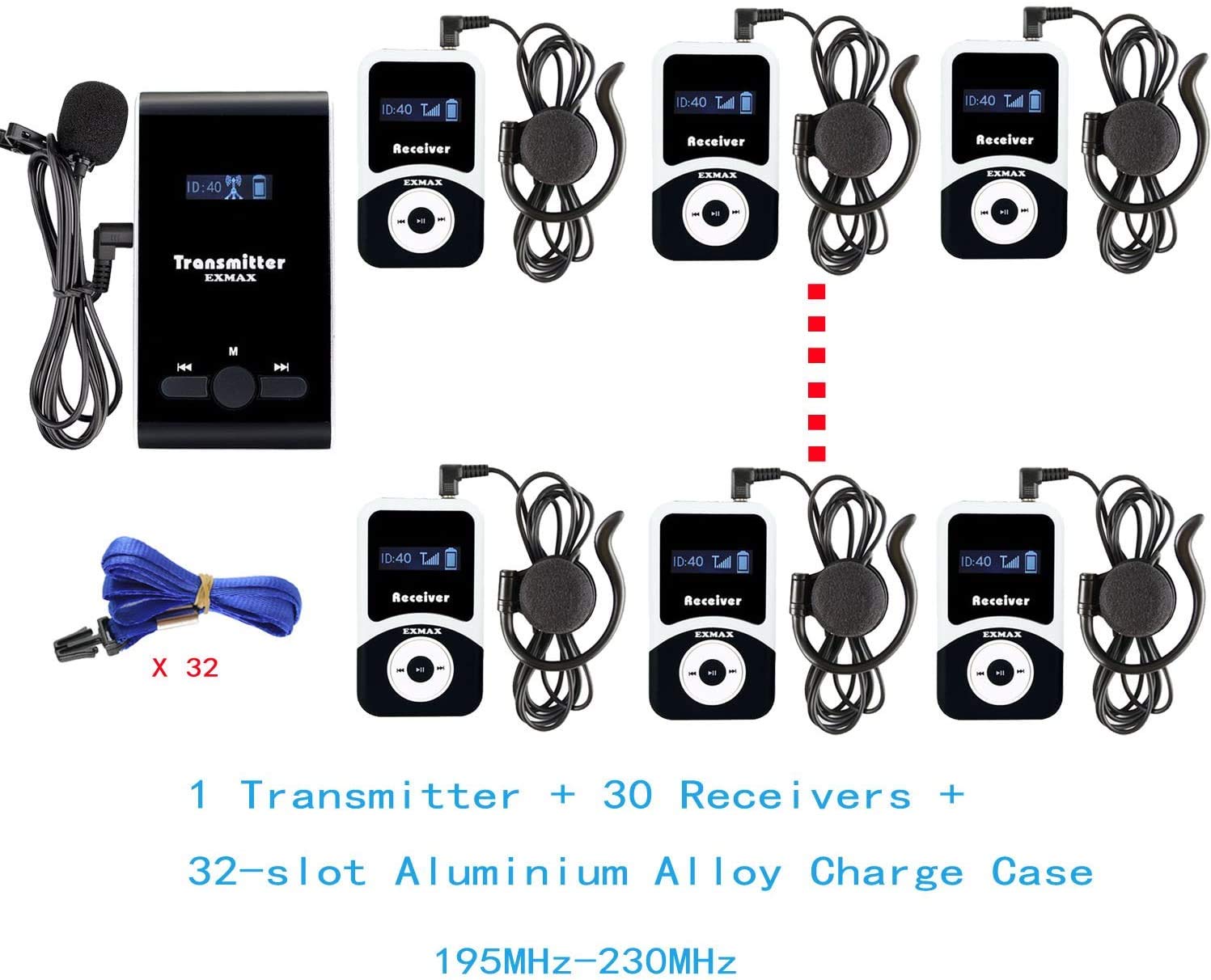
- EXMAX ATG-100T Transmitter(s)
- EXMAX ATG-100T Receiver(s)
- Aluminium Charging Case (32-slot for ATG-100T-2T30R+ChargingCase model)
- Clip-on Microphone for Transmitter
- Earphones for Receivers
- Lanyards
- USB Charging Cables

3. Product Overview
3.1. Transmitter (Speaker Unit)
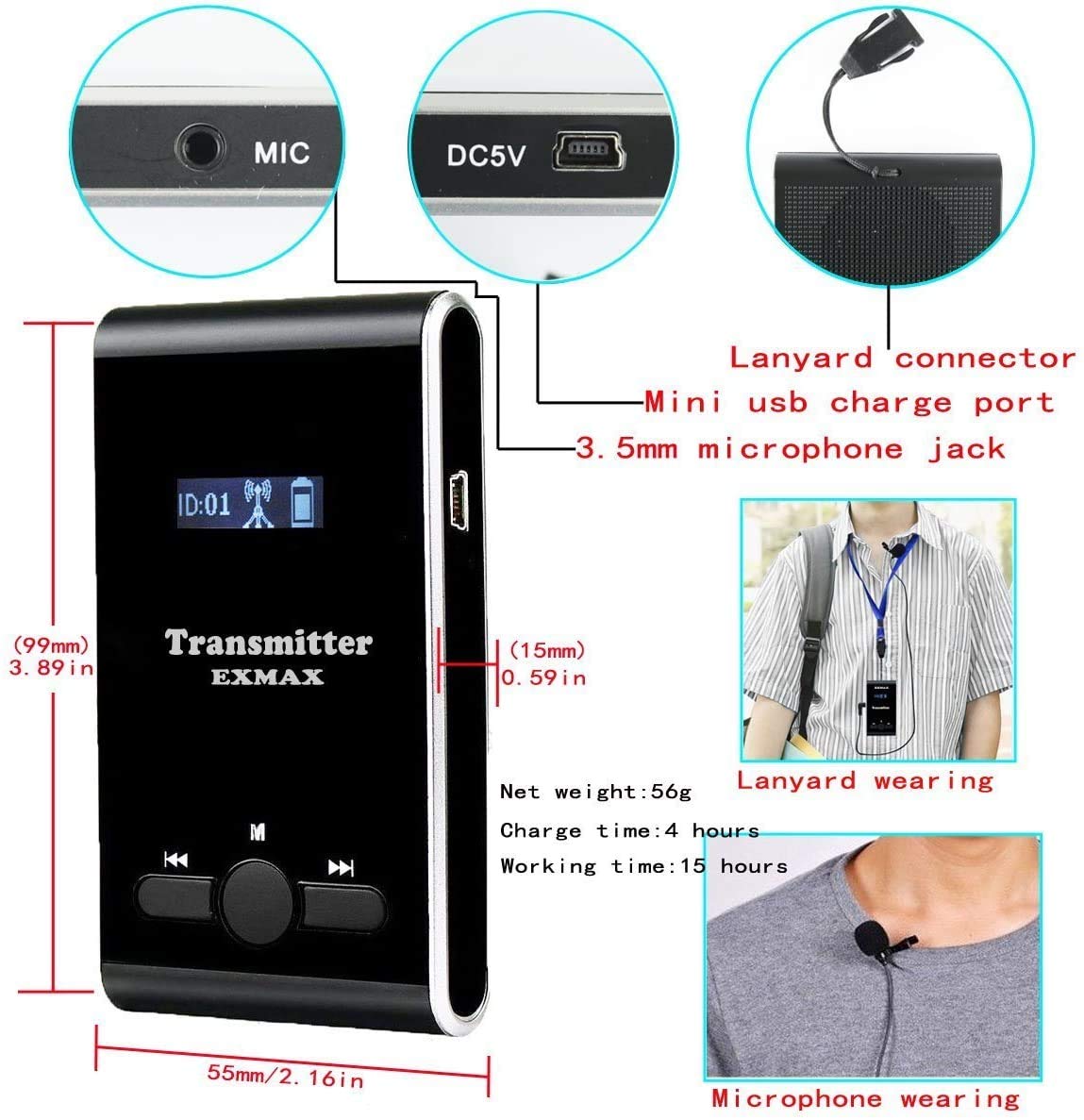
The transmitter is used by the speaker to broadcast audio. It features a microphone input, a display for channel ID and battery status, and control buttons.

- Display: Shows Channel ID, battery level, and transmitting signal.
- 3.5mm Microphone Jack: Connect the clip-on microphone.
- Mini USB Charge Port: For charging the unit.
- Control Buttons: Power, channel selection, volume.
3.2. Receiver (Listener Unit)
The receiver is worn by listeners to hear the transmitted audio. It includes an earphone jack, display, and control buttons.
- Display: Shows Channel ID, battery level, and receiving signal.
- 3.5mm Earphone Jack: Connect the provided earphones.
- Mini USB Charge Port: For charging the unit.
- Control Buttons: Power, channel selection, volume.
3.3. Charging Case
The aluminum charging case provides a convenient and secure way to store and charge multiple transmitters and receivers simultaneously.

4. Setup
4.1. Initial Charging
- Place the transmitters and receivers into the designated slots within the charging case.
- Connect the charging case to a power source using the provided power cable.
- Allow units to charge fully before first use. A full charge typically takes approximately 4 hours for individual units. The battery indicator on each unit will show charging status.
4.2. Connecting Accessories
- Transmitter: Plug the clip-on microphone into the 3.5mm microphone jack.
- Receiver: Plug the earphone into the 3.5mm earphone jack.
- Attach lanyards to both transmitters and receivers for convenient wearing.
Important: The wire of the microphone and earphone acts as an antenna. Ensure the wires are unfolded and extended to enhance signal transmission and reception.
5. Operating Instructions
5.1. Power On/Off
- To power on, press and hold the power button (usually the middle button) for approximately 2 seconds.
- To power off, press and hold the power button for approximately 2 seconds until the unit shuts down.
5.2. Setting Channel ID
For proper operation, the transmitter and all associated receivers must be set to the same Channel ID. Different groups operating simultaneously must use different Channel IDs to avoid interference.
- Ensure the earphone is plugged into the receiver and the microphone into the transmitter.
- Turn on the receiver or transmitter.
- Press and hold the middle button (power/menu button) for 2 seconds to enter the ID setting mode. The Channel ID on the display will flash.
- Use the left or right buttons to select the desired Channel ID (01-99).
- Press the middle button again to confirm the setting.
- Turn the unit off and then on again to finalize the setting process.
5.3. Volume Adjustment
- On the receiver, use the left and right buttons to adjust the volume to a comfortable listening level.
- The transmitter does not have a volume adjustment for its output; ensure the microphone is positioned correctly for optimal voice capture.
5.4. Multiple Group Operation
The system supports up to 40 groups working simultaneously by utilizing its 99 available frequency channels (195MHz-230MHz).
- Each group requires one transmitter and multiple receivers.
- Assign a unique Channel ID to each group's transmitter and its corresponding receivers.
- Ensure no two active groups are using the same Channel ID in close proximity to prevent interference.

6. Maintenance
6.1. Charging
- Always charge units using the provided charging case or USB cables.
- Ensure units are fully charged before extended storage to preserve battery life.
- The built-in 900mAh lithium batteries provide over 18 hours of working time on a full charge.
6.2. Cleaning
- Wipe units with a soft, dry cloth. Do not use liquid cleaners or abrasive materials.
- Clean earphone pads regularly for hygiene.
6.3. Storage
- Store the system in the aluminum charging case when not in use to protect components.
- Keep units in a cool, dry place away from direct sunlight and extreme temperatures.
7. Troubleshooting
| Problem | Possible Cause | Solution |
|---|---|---|
| No sound from receiver | Receiver not powered on; Incorrect Channel ID; Low battery; Earphone not connected or faulty. | Ensure receiver is on; Verify Channel ID matches transmitter; Charge receiver; Check earphone connection. |
| Interference or static | Multiple groups on same channel; External radio interference; Antenna wire not extended. | Change Channel ID for one or both interfering groups; Extend microphone/earphone wires fully. |
| Short transmission range | Obstructions; Antenna wire not extended; Environmental factors. | Ensure clear line of sight; Extend microphone/earphone wires; Reduce distance between transmitter and receivers. |
| Transmitter microphone not working | Microphone not plugged in correctly; Microphone faulty. | Ensure microphone is securely plugged into the 3.5mm jack; Test with another microphone if available. |
8. Specifications
- Model: ATG-100T
- Frequency Range: 195MHz-230MHz
- Channels: 99 selectable channels
- Transmission Distance: Approximately 50-60 meters (164-197 feet)
- Signal-to-Noise Ratio (S/N): ≥90dB
- Battery: Built-in 900mAh Lithium Polymer (Transmitter & Receiver)
- Working Time: >18 hours (Transmitter), >20 hours (Receiver)
- Charge Time: Approximately 4 hours
- Transmitter Dimensions: 99mm x 55mm x 15mm (3.89 x 2.16 x 0.59 inches)
- Transmitter Weight: 56g (1.98 ounces)
- Receiver Dimensions: 72mm x 42mm x 12mm (2.83 x 1.65 x 0.47 inches)
- Receiver Weight: 46g (1.62 ounces)
- Charging Case Dimensions (32-slot): Approx. 51cm x 30cm x 15cm (20.08 x 11.81 x 5.91 inches)
9. Warranty and Support
EXMAX provides a 2-year warranty for this product. For any questions or support needs regarding your wireless tour guide equipment, please contact EXMAX customer service.
You can typically find contact information on the EXMAX official website or through your purchase platform.
Note: This system is FCC certified.
10. Important Usage Notes
- This is not an automatic language translation machine. Human translation is required.
- One transmitter can pair with countless receivers as long as they are on the same frequency Channel ID.
- The transmitter supports AUX input for connecting external audio sources like MP3 players or smartphones.


