
1. Introduction
Thank you for purchasing the Thomson WS03 Portable Wireless Speaker. This manual provides important information regarding the setup, operation, and maintenance of your device. Please read this manual thoroughly before using the speaker and keep it for future reference.
2. Safety Information
To ensure safe operation and prevent damage, please observe the following safety precautions:
- Do not expose the speaker to extreme temperatures, humidity, or direct sunlight.
- Do not disassemble or modify the speaker. This will void the warranty.
- Use only the provided or recommended charging cable.
- Keep the speaker away from water and other liquids. It is not waterproof.
- Clean the speaker with a soft, dry cloth. Do not use abrasive cleaners.
- Avoid listening at high volume levels for extended periods to prevent hearing damage.
3. Package Contents
Verify that all items are present in the package:
- Thomson WS03 Portable Wireless Speaker
- 3.5mm Audio Cable
- Micro USB Charging Cable
- User Manual (this document)
4. Product Overview
Familiarize yourself with the components of your Thomson WS03 speaker.

Figure 4.1: Front view of the Thomson WS03 Portable Wireless Speaker, showcasing its silver grille, white base, and brown leather carrying handle.
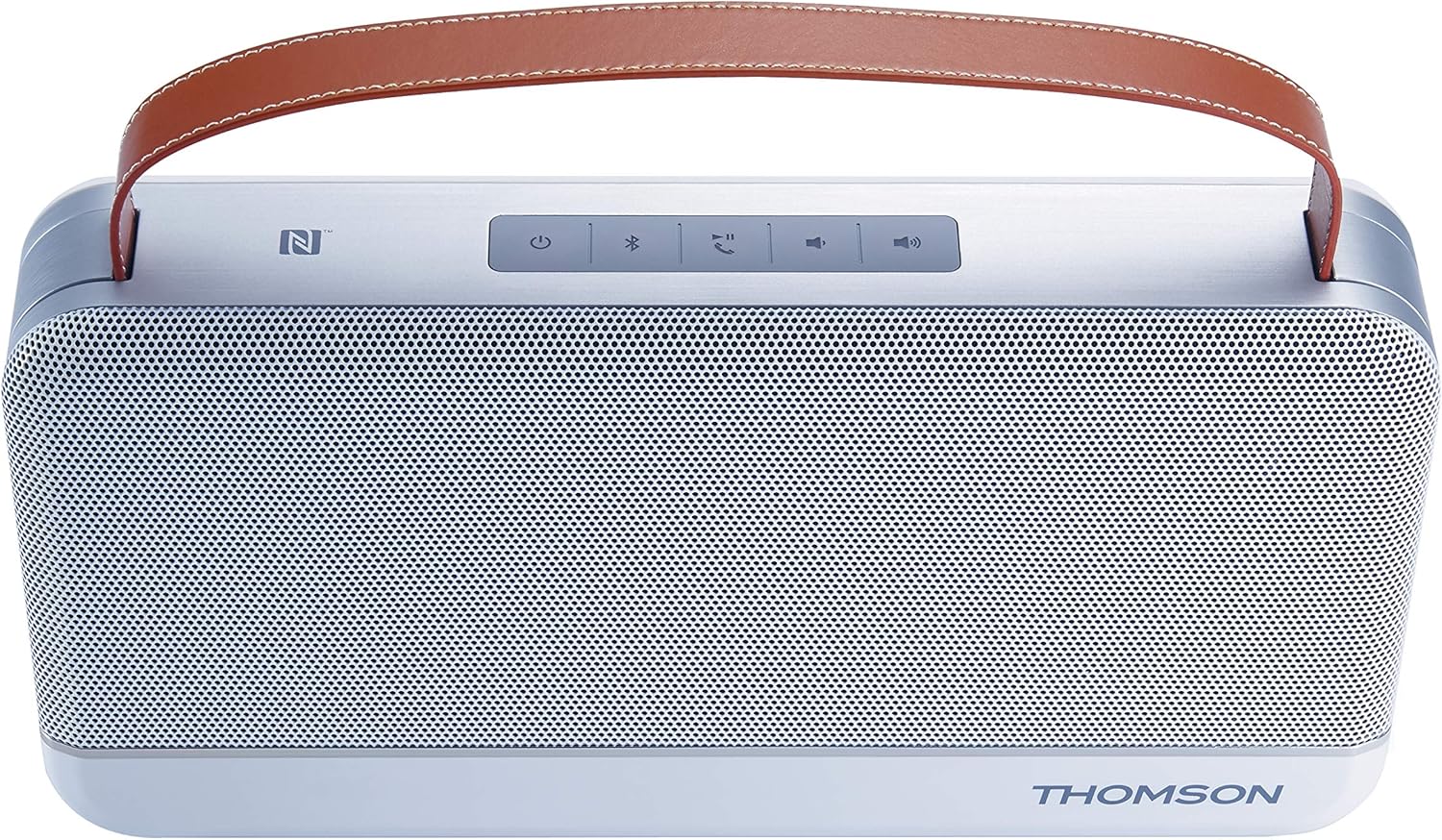
Figure 4.2: Top view of the Thomson WS03 speaker, highlighting the control panel with buttons for power, Bluetooth pairing, call management, volume control, and NFC tag.
4.1. Controls and Indicators
- Power Button: Press and hold to turn the speaker on or off.
- Bluetooth Pairing Button: Press to enter Bluetooth pairing mode.
- Call Management Button: Answer/end calls when connected to a phone.
- Volume Down Button: Decrease playback volume.
- Volume Up Button: Increase playback volume.
- NFC Tag: For quick pairing with NFC-enabled devices.
- LED Indicator: Shows power status, charging status, and Bluetooth connection status.
4.2. Ports
- Micro USB Port: For charging the speaker.
- 3.5mm Aux-in Port: For wired audio connection.
5. Setup
5.1. Charging the Speaker
- Connect the Micro USB charging cable to the speaker's Micro USB port.
- Connect the other end of the cable to a USB power adapter (not included) or a computer's USB port.
- The LED indicator will show charging status.
- Once fully charged, disconnect the charging cable.
The speaker has a 4400 mAh rechargeable battery.
6. Operating Instructions
6.1. Power On/Off
- To turn on: Press and hold the Power button until the LED indicator lights up.
- To turn off: Press and hold the Power button until the LED indicator turns off.
6.2. Bluetooth Connection
- Ensure the speaker is powered on. The LED indicator will flash, indicating it's in pairing mode.
- On your Bluetooth-enabled device (smartphone, tablet, computer), enable Bluetooth and search for available devices.
- Select "Thomson WS03" from the list of devices.
- Once connected, the LED indicator will turn solid, and you may hear a confirmation tone.
- If prompted for a password, enter "0000".
The speaker supports Bluetooth 4.0.
6.3. NFC Pairing (Near Field Communication)
For NFC-enabled devices:
- Ensure NFC is enabled on your device and the speaker is powered on.
- Tap your NFC-enabled device gently against the NFC tag area on the speaker.
- Confirm the pairing request on your device.
- The speaker will connect automatically.
6.4. Aux-in Connection
To connect a device via the 3.5mm audio cable:
- Connect one end of the 3.5mm audio cable to the Aux-in port on the speaker.
- Connect the other end to the headphone jack or audio output of your device.
- The speaker will automatically switch to Aux-in mode.
6.5. Call Management
When connected to a smartphone via Bluetooth:
- Answer Call: Press the Call Management button once.
- End Call: Press the Call Management button once during a call.
- Reject Call: Press and hold the Call Management button.
The speaker features a built-in microphone for hands-free calling.
7. Maintenance
- Cleaning: Use a soft, dry, lint-free cloth to clean the speaker's surface. Do not use liquid or aerosol cleaners.
- Storage: When not in use for extended periods, store the speaker in a cool, dry place, away from direct sunlight and extreme temperatures.
- Battery Care: To prolong battery life, avoid fully discharging the battery frequently. Charge the speaker regularly, even if not in use.
8. Troubleshooting
| Problem | Possible Cause | Solution |
|---|---|---|
| Speaker does not turn on. | Battery is depleted. | Charge the speaker using the Micro USB cable. |
| Cannot pair via Bluetooth. | Speaker is not in pairing mode; Device Bluetooth is off; Speaker is too far from device. | Ensure speaker is in pairing mode (flashing LED). Turn on Bluetooth on your device. Move speaker closer to your device (within 10 meters). |
| No sound. | Volume is too low; Device is not connected; Incorrect input mode. | Increase volume on both speaker and connected device. Ensure Bluetooth or Aux-in connection is established. Verify correct input mode. |
| Sound distortion. | Volume too high; Device too far from speaker; Interference. | Lower the volume. Move device closer to speaker. Avoid sources of strong electromagnetic interference. |
9. Specifications
| Feature | Detail |
|---|---|
| Model Number | TH343755 |
| Connectivity | Bluetooth 4.0, NFC, 3.5mm Aux-in |
| Output Power | 30 Watts |
| Battery Capacity | 4400 mAh |
| Components Included | Audio cable (3.5 mm), Micro USB cable, User manual |
| Color | Silver |
| Weight | 1.8 Kilograms |
| Special Features | Integrated Microphone, USB Port (for charging) |
| Speaker Type | Subwoofer |
| Compatible Devices | Personal computer, smartphone, laptop, tablet, television |
10. Warranty and Support
For warranty information and technical support, please refer to the warranty card included with your product or visit the official Thomson website. Keep your proof of purchase for any warranty claims.
Information regarding spare parts availability and software updates is not available at this time.


