
1. Introduction
The Nitecore P12GT is a high-performance flashlight featuring a Cree XP-L HI V3 LED, delivering up to 1000 lumens. It is designed for extreme reflector performance, boasting a peak beam intensity of 33,700cd and a throw distance of up to 367 meters. The flashlight incorporates a high-efficiency circuit board, providing up to 520 hours of runtime on its lowest setting. Its robust construction from aero-grade aluminum alloy with a HAIII military-grade hard-anodized finish ensures durability. The P12GT is waterproof in accordance with IPX-8 standards (two meters submersible) and impact resistant to 1.5 meters.
Key features include:
- Premium Cree XP-L HI V3 LED for superior illumination.
- Maximum output of 1000 lumens.
- Crystal Coating Technology combined with precision digital optics for enhanced beam concentration.
- Advanced Temperature Regulation (ATR) technology to maintain optimal performance and extend lifespan.
- Side switch interface for one-handed operation and easy access to all functions.
- Integrated power indicator displays remaining battery power and voltage (accurate to 0.1V).
- Intelligent memory function to store preferred brightness settings.
- Toughened ultra-clear mineral glass with anti-reflective coating.
- Stainless steel titanium-plated two-way clip and tail stand capability.
2. Setup
2.1 Battery Installation
The Nitecore P12GT operates on one 18650 Li-ion battery or two CR123 batteries. Batteries are not included with the flashlight and must be purchased separately.
- Unscrew the tail cap of the flashlight by turning it counter-clockwise.
- Insert the battery(ies) with the positive (+) terminal facing towards the head of the flashlight.
- Screw the tail cap back on by turning it clockwise until it is securely tightened. Ensure the tail cap is fully tightened to maintain waterproof integrity.
Note: Ensure correct battery polarity. Incorrect installation can damage the device.
3. Operating Instructions
3.1 User Interface

The tail switch provides precise momentary or constant illumination. Press fully to turn on/off, half-press for momentary on.

The side switch allows for quick selection between various modes and brightness levels once the flashlight is on.
3.2 Turning On/Off
- To Turn On: Fully press the tail switch until a click is heard.
- To Turn Off: Fully press the tail switch again until a click is heard.
- Momentary On: Half-press and hold the tail switch. Release to turn off.
3.3 Brightness Levels and Special Modes

The side switch controls the four brightness levels and three special modes.
- Brightness Adjustment: With the light on, short press the side switch repeatedly to cycle through brightness levels: Ultralow → Low → Mid → High. The flashlight will remember the last used brightness setting.
- Accessing Special Modes: With the light on, press and hold the side switch for more than one second to activate Strobe mode.
- Cycling Special Modes: Once in Strobe mode, short press the side switch repeatedly to cycle through Strobe → S.O.S. → Location Beacon.
- Exiting Special Modes: To exit special modes, short press the side switch to return to the previously used brightness level, or turn off the flashlight.
3.4 Power Indicator
The side switch features an integrated power indicator light. When the flashlight is on, this indicator will display the remaining battery power. A quick flash of the indicator when the flashlight is off will show the battery voltage (accurate to 0.1V).
3.5 Advanced Temperature Regulation (ATR)

ATR technology automatically adjusts brightness to prevent overheating and prolong flashlight life.
The P12GT incorporates Advanced Temperature Regulation (ATR) technology. This feature automatically detects the flashlight's real-time internal temperature and adjusts its brightness output gradually to maintain optimal performance and prevent overheating. This ensures stable operation and extends the lifespan of the flashlight.
3.6 Beam Performance

The P12GT offers exceptional beam throw, comparable to larger searchlights.
The Cree XP-L HI V3 LED, combined with Nitecore's Crystal Coating Technology, provides an unprecedented beam concentration and range. This allows the compact P12GT to achieve a throw distance of up to 320 meters, rivaling much larger reflector searchlights.
4. Maintenance
- Cleaning: Regularly clean the threads and O-rings with a clean cloth. Lubricate threads with silicone grease to maintain waterproof integrity.
- Battery Care: Remove batteries if the flashlight is not used for an extended period to prevent battery leakage. Store batteries in a cool, dry place.
- Lens Cleaning: Use a soft cloth and lens cleaning solution to clean the toughened ultra-clear mineral glass lens. Avoid abrasive materials.
- O-Ring Replacement: If the O-rings are damaged or worn, replace them with spare O-rings to maintain the flashlight's waterproof rating.
5. Troubleshooting
- Flashlight Not Turning On:
- Ensure batteries are inserted with correct polarity (positive terminal towards the head).
- Check if batteries are fully charged.
- Ensure the tail cap is securely tightened.
- Clean battery contacts and threads with an alcohol swab.
- Intermittent Operation or Dim Light:
- Check battery charge level.
- Ensure all connections (tail cap, head) are tight.
- Clean battery contacts and threads.
- If using CR123 batteries, ensure they are of good quality and not expired.
- Water Ingress:
- Immediately remove batteries.
- Dry all components thoroughly.
- Inspect O-rings for damage or improper seating and replace if necessary.
6. Specifications
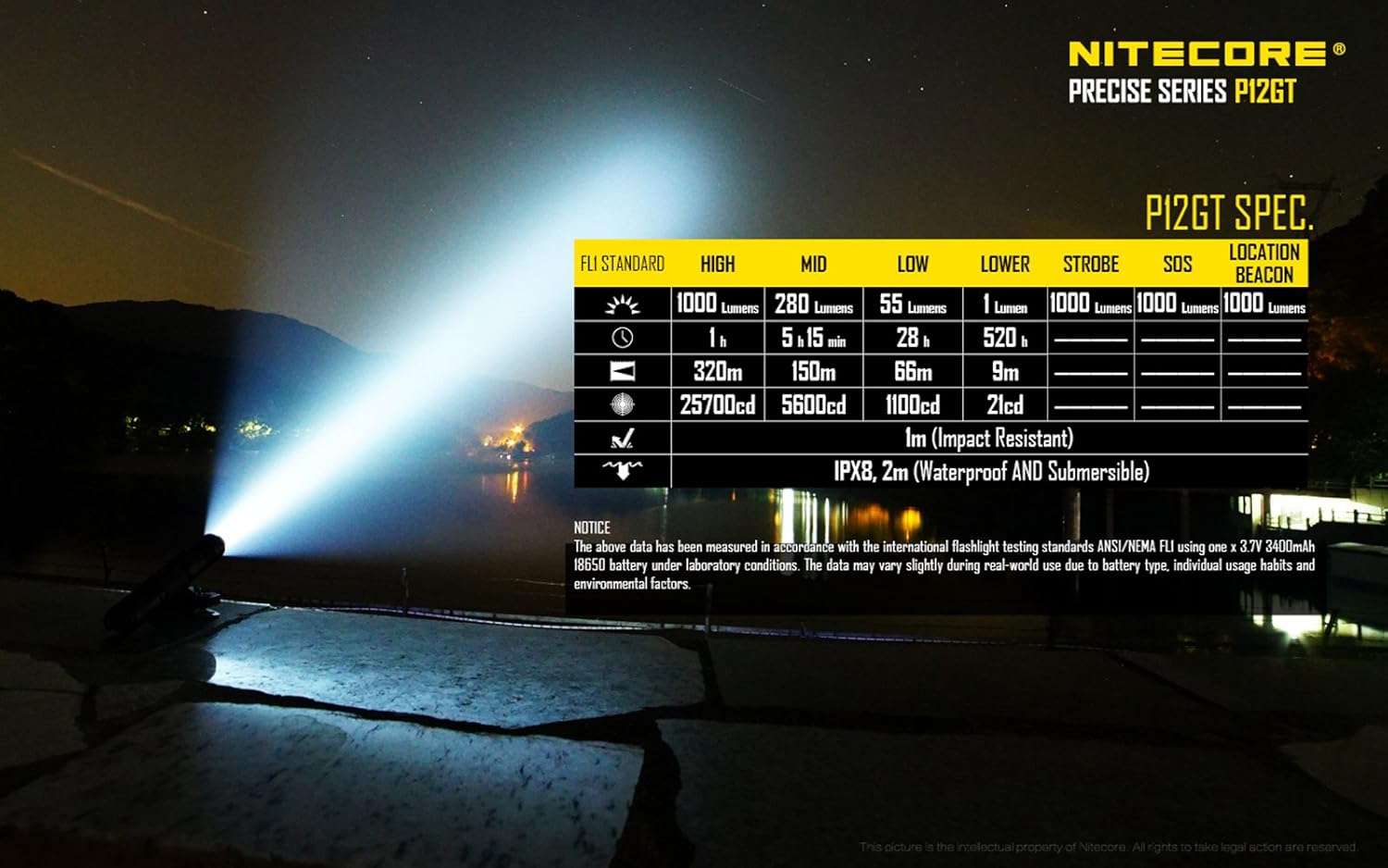
Detailed performance specifications for the Nitecore P12GT.
| Feature | Detail |
|---|---|
| Model Number | P12GT |
| LED Type | Cree XP-L HI V3 LED |
| Maximum Output | 1000 Lumens |
| Peak Beam Intensity | 33,700cd |
| Maximum Throw Distance | 367 Meters |
| Power Source | 1 x 18650 Li-ion or 2 x CR123 batteries |
| Maximum Runtime | 520 hours (on Ultralow mode) |
| Water Resistance | IPX-8 (2 meters submersible) |
| Impact Resistance | 1.5 Meters |
| Material | Aero-grade aluminum alloy with HAIII military-grade hard-anodized finish |
| Length | 5.51 inches (140mm) |
| Head Diameter | 1 inch (25.4mm) |
| Tail Diameter | 1 inch (25.4mm) |
| Weight | 3.21 oz (91g) (without battery) |
7. Warranty and Support
The Nitecore P12GT Flashlight comes with a limited warranty provided by the manufacturer. For specific warranty terms, duration, and claim procedures, please refer to the warranty card included with your product or visit the official Nitecore website.
For technical support, troubleshooting assistance, or service inquiries, please contact Nitecore customer service or your authorized Nitecore dealer. Keep your purchase receipt as proof of purchase for warranty claims.