
Futaba 2HR 2.4Ghz FHSS Transmitter with R202GF Receiver User Manual
Model: 2HR
1. Introduction
Thank you for purchasing the Futaba 2HR 2.4Ghz FHSS Transmitter and R202GF Receiver. This system is designed for reliable and precise control of your remote-controlled models. This manual provides essential information for the safe and effective operation, setup, and maintenance of your new radio system. Please read this manual thoroughly before use to ensure proper functionality and to prevent damage.
2. Safety Precautions
Always observe the following safety precautions to prevent injury to yourself or others, and to prevent damage to your equipment.
- Battery Safety: Use only the specified battery type (AA batteries for the transmitter). Do not mix old and new batteries, or different types of batteries. Remove batteries if the system will not be used for an extended period.
- Operating Environment: Do not operate your RC model in crowded areas, near power lines, or in adverse weather conditions. Ensure a clear line of sight to your model at all times.
- Pre-Operation Check: Always perform a range check and verify all control surfaces and functions are operating correctly before each use.
- Interference: The 2.4Ghz FHSS system is designed to minimize interference, but always be aware of potential sources of radio interference.
- Children: This product is not a toy. Adult supervision is required when children are operating RC models.
3. Package Contents
Verify that all items listed below are included in your package:
- Futaba 2HR 2.4Ghz FHSS Transmitter
- Futaba R202GF 2-Channel Receiver
- Instruction Manual (this document)
4. Product Overview
4.1 Futaba 2HR Transmitter

Image: Front view of the Futaba 2HR Transmitter, highlighting the main controls and the 2.4Ghz FHSS branding.

Image: The Futaba 2HR Transmitter shown with its accompanying R202GF Receiver, providing a size comparison.

Image: View of the Futaba 2HR Transmitter with the battery cover removed, revealing the battery slots for four AA batteries.

Image: Detailed view of the battery compartment, indicating the correct polarity for AA battery installation.
4.2 Futaba R202GF Receiver

Image: Close-up of the Futaba R202GF 2-channel receiver, displaying its model number, 2.4Ghz S-FHSS designation, LED, and servo connection ports.
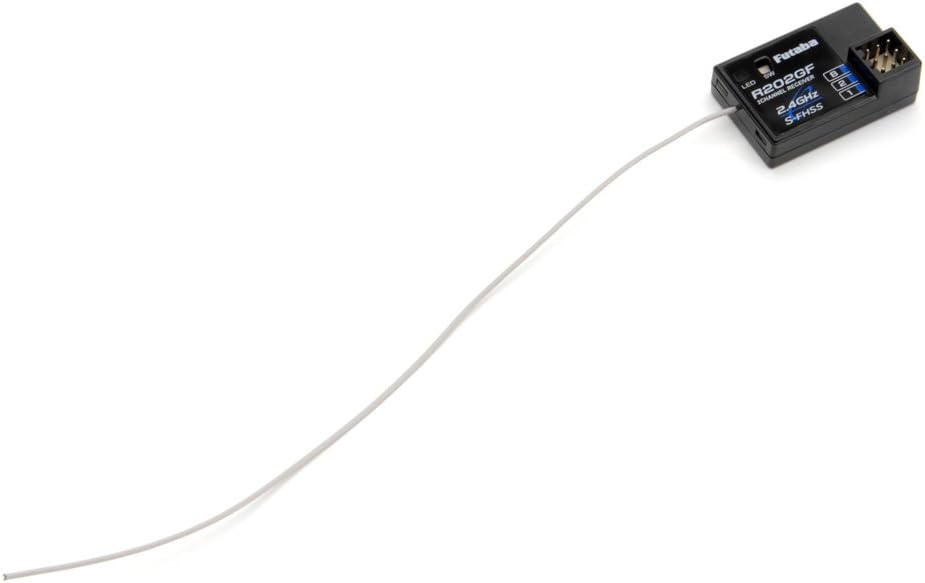
Image: The Futaba R202GF receiver with its full-length antenna wire, crucial for optimal signal reception.
5. Setup
5.1 Transmitter Battery Installation
- Locate the battery compartment on the back of the 2HR transmitter.
- Slide the battery cover open.
- Insert four (4) AA batteries, observing the correct polarity (+/-) as indicated inside the compartment.
- Close the battery cover securely.
Note: Batteries are not included with the product.
5.2 Receiver Connection
Connect the R202GF receiver to your model's electronic speed controller (ESC) and steering servo. The R202GF is a 2-channel receiver.
- Channel 1 (CH1): Connect the steering servo.
- Channel 2 (CH2): Connect the ESC (throttle).
- Ensure all connections are firm and correctly oriented.
5.3 Binding the Transmitter and Receiver
The transmitter and receiver are typically pre-bound from the factory. If re-binding is necessary, follow these steps:
- Turn on the transmitter.
- With the receiver powered on (via ESC or separate battery), press and hold the bind button (SW) on the R202GF receiver. The LED on the receiver will change its indication.
- Release the bind button. The LED should indicate a successful bind (e.g., solid green).
- Turn off both the transmitter and receiver, then turn them back on to confirm the bind.
Refer to your model's specific instructions for receiver placement and antenna routing for optimal performance.
6. Operating Instructions
6.1 Powering On/Off
- To Power On: First, turn on the transmitter. Then, turn on the receiver (via your model's power switch).
- To Power Off: First, turn off the receiver (via your model's power switch). Then, turn off the transmitter.
Always follow this sequence to prevent loss of control or damage to your model.
6.2 Basic Controls
- Steering Wheel: Rotate left or right to control the steering of your model.
- Throttle Trigger: Pull the trigger towards you for forward movement. Push the trigger away from you for brake/reverse.
6.3 Trim Adjustments
Trim levers are used to make fine adjustments to the steering and throttle neutral positions.
- Steering Trim (ST.TRIM): Adjusts the steering neutral point. If your model pulls to one side when the steering wheel is centered, use this trim to correct it.
- Throttle Trim (TH.TRIM): Adjusts the throttle neutral point. If your model creeps forward or backward when the throttle trigger is at neutral, use this trim to correct it.
6.4 Servo Reversing
The 2HR transmitter includes switches to reverse the direction of the steering and throttle servos if needed.
- Steering Reverse (ST.REV): Flips the steering direction.
- Throttle Reverse (TH.REV): Flips the throttle direction.
Always test servo directions after making any changes to ensure correct operation.
7. Maintenance
- Cleaning: Use a soft, dry cloth to clean the transmitter and receiver. Do not use solvents or abrasive cleaners.
- Battery Care: Remove batteries from the transmitter if it will not be used for more than a week to prevent leakage and damage.
- Storage: Store the radio system in a cool, dry place, away from direct sunlight and extreme temperatures.
- Inspection: Periodically check all wires and connections for signs of wear or damage.
8. Troubleshooting
| Problem | Possible Cause | Solution |
|---|---|---|
| Transmitter does not power on. | Dead or incorrectly installed batteries. | Replace batteries with fresh AA batteries, ensuring correct polarity. |
| Model does not respond to controls. | Receiver not powered, not bound, or incorrect connections. | Ensure receiver is powered. Re-bind transmitter and receiver. Check all servo and ESC connections. |
| Short control range. | Damaged antenna on receiver or transmitter, or environmental interference. | Ensure receiver antenna is properly extended and not damaged. Avoid operating near large metal objects or other radio sources. |
| Steering/Throttle operates in reverse. | Servo reverse switch is in the wrong position. | Adjust the ST.REV or TH.REV switch on the transmitter to the correct position. |
9. Specifications
| Feature | Detail |
|---|---|
| Model Name | Futaba 2HR |
| Frequency | 2.4Ghz FHSS (Frequency Hopping Spread Spectrum) |
| Channels | 2 Channels |
| Receiver Model | R202GF |
| Transmitter Power Supply | 4 x AA Batteries (not included) |
| Item Weight | 997.9 grams |
10. Warranty Information
Specific warranty details for the Futaba 2HR Transmitter and R202GF Receiver are typically provided with the product packaging or available on the official Futaba website. Please retain your proof of purchase for warranty claims. For the most current and detailed warranty information, please visit the official Futaba website or contact your local distributor.
11. Customer Support
For technical assistance, spare parts, or further inquiries regarding your Futaba 2HR system, please refer to the official Futaba website or contact their authorized customer support channels. Contact information can usually be found on the manufacturer's website or in the product packaging.


