
Introduction
The RCA DTA880 is a versatile device designed to convert free digital broadcasts for viewing on analog televisions. It also features DVR recording capabilities when an external USB drive is connected. This manual provides detailed instructions for setting up, operating, and maintaining your converter box, along with troubleshooting tips and product specifications.
Package Contents
- RCA DTA880 Digital TV Converter and Recorder Unit
- Remote Control
- Power Adapter
- A/V Cables (RCA composite)
- User Manual (this document)
Note: An HDMI cable and external USB drive are not included and must be purchased separately for full functionality.
Setup
Follow these steps to connect your RCA DTA880 converter box to your television and antenna.
1. Identify Ports
Familiarize yourself with the input and output ports on the rear panel of the converter box.
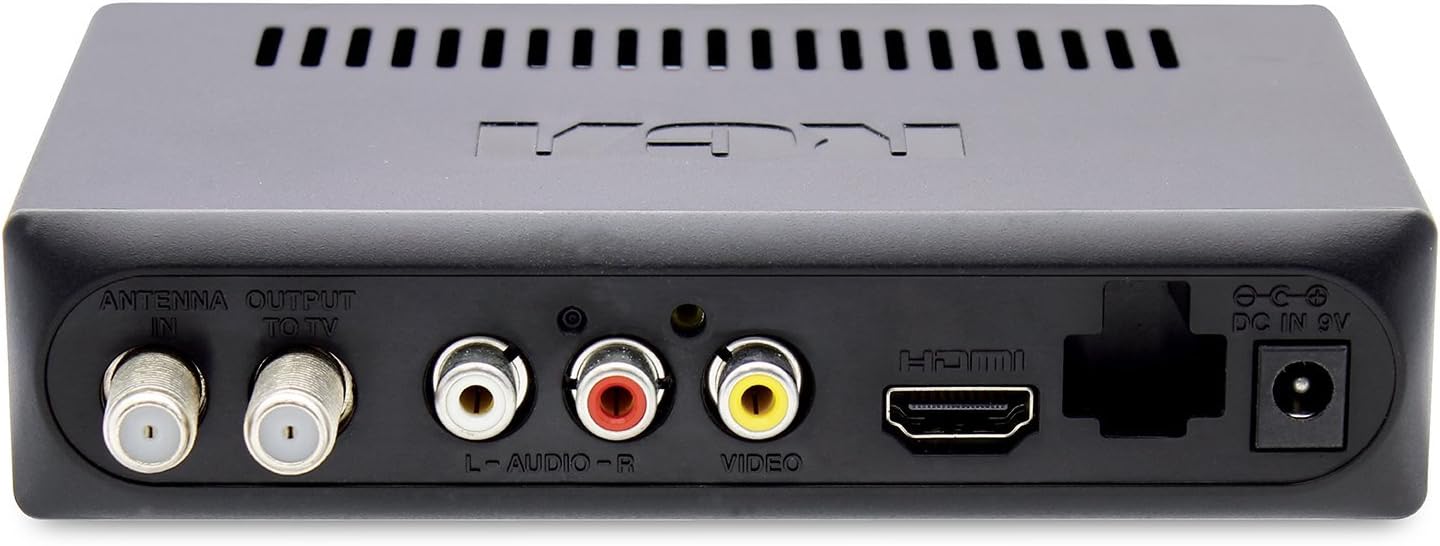
Image 1: Rear Panel Connections. This image displays the back of the RCA DTA880 unit, highlighting the 'ANTENNA IN', 'OUTPUT TO TV', 'L-AUDIO-R', 'VIDEO', 'HDMI', and 'DC IN 9V' ports. The USB port is visible on the side.
2. Connect Antenna
- Connect your digital antenna's coaxial cable to the ANTENNA IN port on the RCA DTA880.
3. Connect to TV
Choose one of the following connection methods based on your television's available inputs:
- For Analog TVs (RCA Composite): Connect the included A/V cables (red, white, yellow) from the L-AUDIO-R and VIDEO ports on the converter box to the corresponding input ports on your analog TV.
- For Digital TVs (HDMI): Connect an HDMI cable (not included) from the HDMI port on the converter box to an available HDMI input on your digital TV.
- RF Output (Coaxial): Connect a coaxial cable from the OUTPUT TO TV port on the converter box to the antenna input on your TV. This method is generally for older TVs without composite or HDMI inputs.
4. Connect Power
- Plug the power adapter into the DC IN 9V port on the converter box.
- Plug the other end of the power adapter into a standard electrical outlet.
5. Initial Scan
- Turn on your TV and select the correct input source (e.g., HDMI 1, Video 1, TV/Antenna).
- Power on the RCA DTA880 using the remote control or the power button on the unit.
- Follow the on-screen prompts to perform an initial channel scan. This will detect available digital channels in your area.
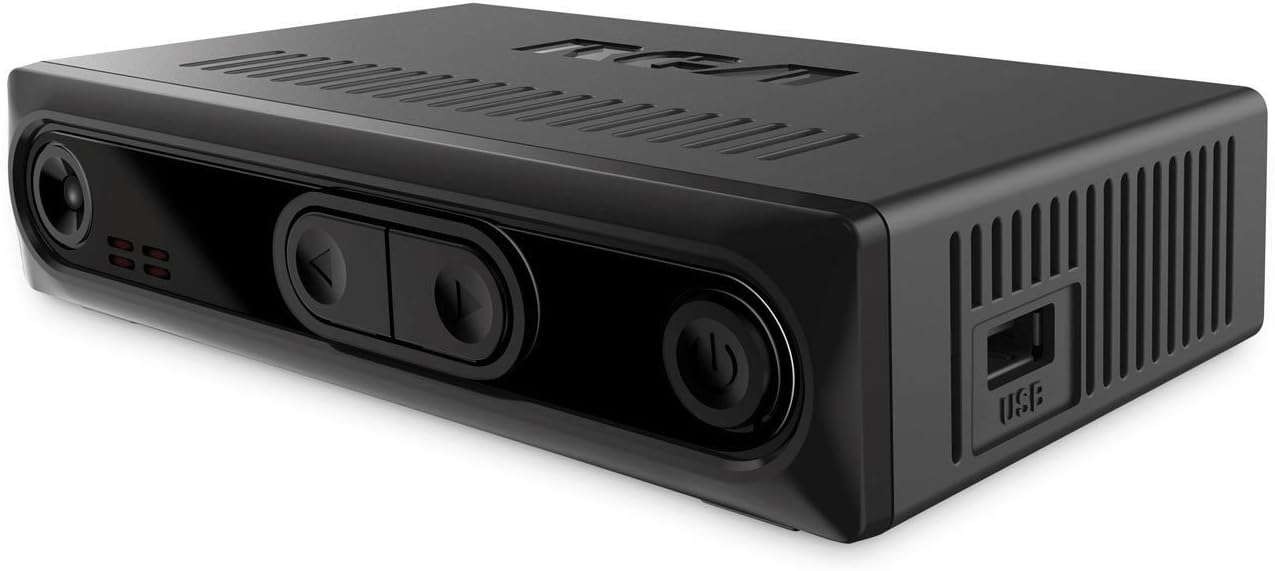
Image 2: Front and Side View. This image shows the front panel with control buttons and the side panel featuring the USB port for external storage.
Operating Instructions
Basic TV Viewing
- Use the CHANNEL +/- buttons on the remote to change channels.
- Adjust volume using the VOL +/- buttons on the remote.
- Press the INFO button to display current program information.
DVR Recording (with external USB drive)
To utilize the DVR functionality, an external USB storage device (e.g., USB flash drive or hard drive) must be connected to the USB port on the side of the converter box.
- Connect USB Drive: Insert a compatible USB drive into the USB port.
- Format USB Drive: Access the system settings menu to format the USB drive if prompted or if it's a new drive. Formatting will erase all data on the drive.
- Record Instantly: While watching a program, press the RECORD button on the remote to begin recording. Press STOP to end the recording.
- Schedule Recording: Use the EPG (Electronic Program Guide) button to view program listings. Select a program and follow the on-screen instructions to schedule a recording.
- Playback Recordings: Press the MEDIA or PLAYBACK button (refer to your remote for exact labeling) to access your recorded programs.
Note: The recording quality and performance may vary depending on the speed and capacity of the connected USB drive. A USB 3.0 drive is recommended for optimal performance.
Parental Control
The converter box includes a parental control function to restrict access to certain programs based on ratings. Access this feature through the main menu settings. A PIN will be required to set up and modify parental control settings.
Maintenance
- Cleaning: Use a soft, dry cloth to clean the exterior of the converter box. Do not use liquid cleaners or abrasive materials.
- Ventilation: Ensure the unit has adequate ventilation. Do not block the ventilation slots on the top and sides of the device.
- Storage: When not in use for extended periods, disconnect the power adapter and store the unit in a cool, dry place.
Troubleshooting
| Problem | Possible Cause | Solution |
|---|---|---|
| No picture or sound | Incorrect TV input selected; Loose cable connections; Power not connected. | Verify TV input matches converter box connection (e.g., HDMI 1, Video 1). Check all cable connections (antenna, A/V, HDMI, power). Ensure power adapter is securely plugged in. |
| No digital channels found | Antenna not connected or positioned correctly; Channel scan not performed. | Ensure antenna is properly connected and positioned for optimal reception. Perform a channel scan through the setup menu. |
| Remote control not working | Dead batteries; Obstruction between remote and unit; Remote sensor blocked. | Replace remote batteries. Ensure no objects are blocking the line of sight between the remote and the converter box's IR sensor. |
| Recording issues (stuttering, failure) | Slow or incompatible USB drive; USB drive not formatted. | Use a high-speed USB 3.0 drive. Ensure the USB drive is properly formatted via the converter box's menu. Check available storage space. |
| Volume resets to high after power cycle | Default setting. | This may be a default behavior. Adjust volume manually after powering on. Check settings for a persistent volume option if available. |
Specifications
| Feature | Detail |
|---|---|
| Brand | RCA |
| Model Number | DTA880 |
| Interface Type | HDMI, USB |
| Mounting Type | Surface Mount, Plug Mount |
| Number of Channels | 4 |
| Product Dimensions | 6 x 5 x 2 inches |
| Item Weight | 12.8 ounces |
| UPC | 062118488002 |
Warranty Information
This product is covered by a limited manufacturer's warranty. Please refer to the warranty card included in the product packaging or visit the official RCA website for detailed terms and conditions, including warranty period and claim procedures.
Support
For technical assistance, troubleshooting not covered in this manual, or general inquiries, please contact RCA customer support:
- Online Support: Visit the official RCA support website (refer to product packaging for URL).
- Telephone Support: Consult your product packaging or the RCA website for customer service phone numbers.
When contacting support, please have your product model number (DTA880) and purchase information ready.


