
NEXT-SHINE POC-P225-CA1
NEXT-SHINE Gram Scale Model POC-P225-CA1 User Manual
Precision Digital Mini Pocket Scale
1. Introduction
Thank you for choosing the NEXT-SHINE Gram Scale Model POC-P225-CA1. This digital mini pocket scale is designed for precise weighing of various items, from jewelry and gemstones to cooking ingredients and mail. With a maximum capacity of 500g and an accuracy of 0.01g, it offers reliable measurements for your daily needs. This manual provides detailed instructions for proper setup, operation, calibration, and maintenance to ensure optimal performance and longevity of your scale.
2. Important Safety Information
Please read and understand the following safety guidelines before using your scale:
- Stable Surface Required: Always use the scale on a flat, stable, and level surface. Avoid placing it near sources of vibration or drafts, which can affect measurement accuracy.
- Weight Limits: The precision range of this scale is 0.04g to 500g. Do not overload the scale beyond its maximum capacity of 500g, as this may cause permanent sensor damage.
- Battery Safety: Remove batteries during prolonged storage periods to prevent potential leakage and damage to the device.
- Cleaning: To clean the surface of the scale, wipe it with a slightly damp cloth only. Avoid using harsh chemicals, abrasive cleaners, or submerging the scale in water.
- Water Resistance: This scale is not waterproof. Never immerse it in water or expose it to excessive moisture.

3. Package Contents
Upon opening your NEXT-SHINE Gram Scale package, you should find the following items:
- NEXT-SHINE Gram Scale (Model POC-P225-CA1)
- Two transparent protective trays (can also be used as weighing containers)
- User Manual
Note: 2 AAA batteries are required for operation and are not included in the package.
4. Product Features
- High Precision: Equipped with a high-precision sensor, capable of measuring from 0.04g up to 500g with 0.01g accuracy.
- Multi-Unit Conversion: Easily switch between 9 different units: grams (g), pennyweights (dwt), ounces (oz), carats (ct), troy ounces (ozt), grains (gn), pounds (lb), taels (tl), and milliliters (ml).
- Compact & Portable: Mini pocket-sized design (4.92 x 4.13 x 0.59 inches) with a food-grade stainless steel panel.
- Backlit LCD Display: Ensures clear readability of measurements, even in low-light conditions.
- Protective Trays: Includes two transparent plastic trays that serve as both protective covers and convenient weighing containers.
- Smart Functions: Features Tare function for zeroing containers, PCS function for counting items, and a 60-second automatic shutdown to conserve battery life.
- Indicators: Low battery warning ("LO") and overweight prompt ("O-LD").


5. Setup
5.1. Battery Installation
- Open the battery compartment cover located on the underside of the scale.
- Insert two (2) AAA batteries, ensuring correct polarity (+/-).
- Close the battery compartment cover securely.

5.2. Initial Placement
Place the scale on a hard, flat, and stable surface. Ensure there are no vibrations or air currents that could interfere with accurate readings.
6. Operation

6.1. Power On/Off
- Press the Power button () to turn the scale on.
- Press and hold the Power button to turn the scale off.
- The scale will automatically shut off after 60 seconds of inactivity to save battery life.
6.2. Unit Conversion
To change the unit of measurement:
- With the scale on, press the M button () repeatedly to cycle through the available units (g, dwt, oz, ct, ozt, gn, lb, tl, ml).
- The selected unit will be displayed on the LCD screen.

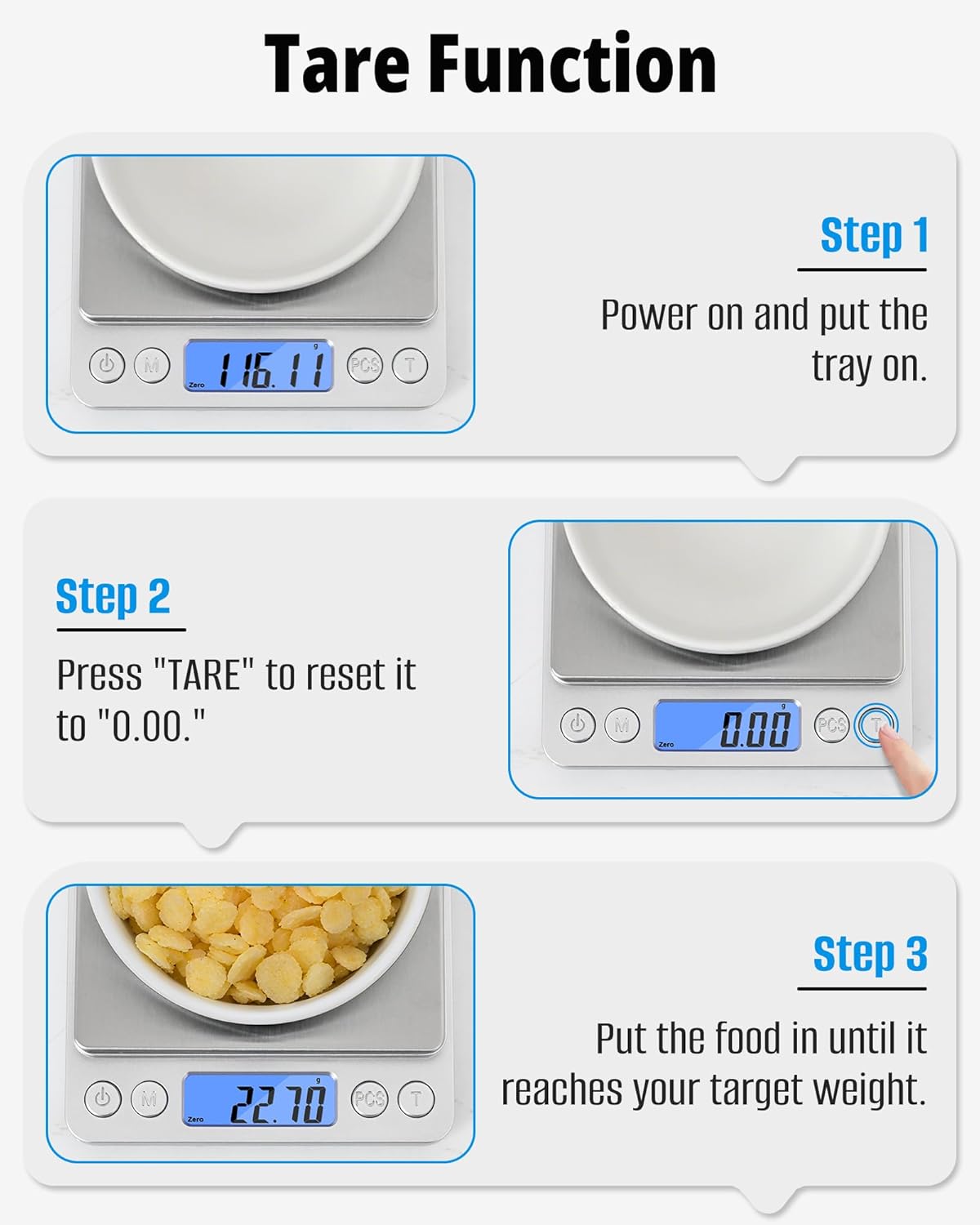
6.3. Tare Function
The Tare function allows you to subtract the weight of a container, so you only measure the contents.
- Place an empty container (e.g., a tray or bowl) on the scale platform.
- Press the T button (). The display will reset to "0.00".
- Add the items you wish to weigh into the container. The display will show only the net weight of the items.
6.4. Counting Function (PCS)
The PCS function allows you to count multiple small, identical items.
- Turn on the scale and ensure it reads "0.00".
- Place a sample quantity of identical items (e.g., 25 pieces) on the scale.
- Long-press the PCS button () until a number (e.g., "25") appears and the icon flashes.
- Press the PCS button again to confirm the sample quantity. The scale will now be in counting mode.
- Add more items to the scale, and the display will show the total count of items.

7. Calibration
Calibration ensures the accuracy of your scale. It is recommended to calibrate the scale periodically or if you suspect inaccurate readings. You will need a known calibration weight (e.g., 500g or 100g, depending on the model's specific calibration points).
- Turn on the scale. Ensure the display reads "0.00".
- Long-press the M button until "CAL" appears on the display, followed by a flashing weight value (e.g., "500.00" or "100.00").
- Press the T button to select the desired calibration weight value if multiple options are available.
- Place the corresponding calibration weight (e.g., 500g) onto the center of the scale platform.
- Press the M button to confirm. The display will show "PASS" or "CAL" briefly, then return to normal weighing mode.
- Remove the calibration weight. The scale is now calibrated.

8. Maintenance
8.1. Cleaning
- Wipe the scale surface with a soft, damp cloth.
- Do not use abrasive cleaners, solvents, or immerse the scale in water.
8.2. Storage
- Store the scale in a cool, dry place.
- Remove batteries if the scale will not be used for an extended period to prevent leakage.
- Keep the protective trays on the scale during storage to prevent dust and damage.
9. Troubleshooting
| Problem | Possible Cause | Solution |
|---|---|---|
| Display shows "LO" | Low battery power. | Replace the AAA batteries. |
| Display shows "O-LD" | Scale is overloaded. | Remove excess weight immediately. Do not exceed 500g. |
| Inaccurate readings | Unstable surface, air currents, scale not calibrated, or dirty sensor. | Place scale on a stable, flat surface. Avoid drafts. Recalibrate the scale. Ensure the platform is clean. |
| Scale does not turn on | Batteries incorrectly installed or dead. | Check battery polarity or replace with new batteries. |
10. Specifications
| Feature | Detail |
|---|---|
| Brand | NEXT-SHINE |
| Model Number | POC-P225-CA1 |
| Weight Limit | 500 Grams |
| Readout Accuracy | 0.01 Grams |
| Minimum Weight | 0.04 Grams |
| Units of Measurement | g, dwt, oz, ct, ozt, gn, lb, tl, ml (9 units) |
| Display Type | Backlit LCD |
| Material | Acrylonitrile Butadiene Styrene, Stainless Steel |
| Product Dimensions | 4.92 x 4.13 x 0.59 inches |
| Item Weight | 231 Grams (8.1 ounces) |
| Power Source | 2 x AAA Batteries (not included) |
| Auto Shut-off | 60 seconds |