
Acctim 12340
Acctim Auric 12340 LCD Alarm Clock User Manual
Model: 12340
Introduction
Thank you for choosing the Acctim Auric 12340 LCD Alarm Clock. This manual provides detailed instructions on how to set up, operate, and maintain your new alarm clock. Please read this manual thoroughly before use to ensure proper functionality and longevity of your device.
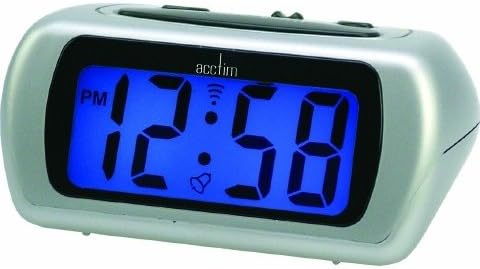
This image shows the Acctim Auric 12340 LCD Alarm Clock. It features a silver casing and a prominent blue digital display. The display currently shows '12:58 PM' with an AM/PM indicator, a bell icon for the alarm, and a signal icon. The clock has a sleek, rectangular design with rounded edges.
Setup
1. Battery Installation
- Locate the battery compartment cover on the back or bottom of the alarm clock.
- Slide or unclip the cover to open the compartment.
- Insert the required batteries (typically 2x AAA or AA, please check the compartment for markings) according to the polarity indicators (+ and -) inside the compartment.
- Replace the battery compartment cover securely.
2. Initial Time Setting
Upon inserting batteries, the display may flash or show a default time. You will need to set the current time.
- Identify the "TIME SET" or "SET" button, usually located on the back or side of the clock.
- Press and hold the "TIME SET" button until the hour digits begin to flash.
- Use the "HOUR" or "+" / "-" buttons to adjust the hour. Pay attention to the AM/PM indicator.
- Press the "TIME SET" button again to move to the minute digits.
- Use the "MINUTE" or "+" / "-" buttons to adjust the minutes.
- Press "TIME SET" one last time to confirm and exit time setting mode.
Operating Instructions
1. Setting the Alarm
- Locate the "ALARM SET" or "ALARM" button.
- Press and hold the "ALARM SET" button until the alarm hour digits begin to flash.
- Use the "HOUR" or "+" / "-" buttons to adjust the alarm hour, observing the AM/PM indicator.
- Press the "ALARM SET" button again to move to the alarm minute digits.
- Use the "MINUTE" or "+" / "-" buttons to adjust the alarm minutes.
- Press "ALARM SET" to confirm the alarm time.
- To activate or deactivate the alarm, locate the "ALARM ON/OFF" switch or button. When activated, an alarm icon (typically a bell) will appear on the display.
2. Snooze Function
When the alarm sounds, press the large "SNOOZE" button (usually located on top of the clock). The alarm will temporarily stop and sound again after a few minutes (typically 5-9 minutes, specific duration not provided). To turn off the alarm completely, press any other button or the "ALARM ON/OFF" switch.
3. Blue Backlight
The Acctim Auric 12340 features a super bright blue backlight for easy viewing in low light conditions. To activate the backlight, press the "LIGHT" or "SNOOZE/LIGHT" button. The backlight will illuminate for a few seconds and then turn off automatically to conserve battery life.
4. Crescendo Alarm
The crescendo alarm feature means the alarm sound starts softly and gradually increases in volume, providing a more gentle wake-up experience. This feature is automatic and does not require special settings.
5. AM/PM Indicator
The LCD display includes an AM/PM indicator to clearly distinguish between morning and afternoon hours when using the 12-hour format. Ensure you set the correct AM or PM when setting both the current time and the alarm time.
Maintenance
1. Cleaning
- Wipe the clock's surface with a soft, dry cloth.
- For stubborn marks, slightly dampen the cloth with water. Do not use abrasive cleaners or solvents, as they may damage the finish or display.
- Avoid getting moisture into any openings.
2. Battery Replacement
When the display becomes dim or the alarm function weakens, it is time to replace the batteries. Follow the battery installation steps outlined in the "Setup" section. Always replace all batteries at the same time with new ones of the same type.
Troubleshooting
| Problem | Possible Cause | Solution |
|---|---|---|
| Display is blank or dim. | Batteries are dead or inserted incorrectly. | Replace batteries with new ones, ensuring correct polarity. |
| Alarm does not sound. | Alarm is not activated or set incorrectly. | Ensure the alarm is turned ON (bell icon visible). Verify the alarm time is set correctly (AM/PM). |
| Time is incorrect. | Time was not set properly or batteries were removed. | Re-set the current time following the "Initial Time Setting" instructions. |
| Snooze function not working. | Alarm was turned off instead of snoozed. | Ensure you press the dedicated "SNOOZE" button when the alarm sounds. |
Specifications
| Feature | Detail |
|---|---|
| Brand | Acctim |
| Model Number | 12340 |
| Display Type | Digital LCD |
| Special Features | Alarm, Snooze, Crescendo Alarm, Blue Backlight, AM/PM Indicator |
| Power Source | Battery Powered |
| Shape | Rectangular |
| Dimensions (H x W x D) | 52 x 105 x 75 mm (approx.) |
| Batteries Included | Yes (Type not specified, typically AA or AAA) |
Related documents12340


Ask a question about this manual
Ask about setup, troubleshooting, compatibility, parts, safety, or missing instructions. Manuals+ will review the question and use this page’s manual context to help answer it.