
Introduction
This manual provides detailed instructions for the assembly, operation, and maintenance of your Seatcraft Sienna Home Theater Seating. Please read this manual thoroughly before use to ensure proper function and safety. The Sienna model features a space-saving design, power recline, ambient lighted cupholders, ambient base lighting, USB charging, and integrated tray tables.
Safety Information
WARNING: To prevent injury or damage, please observe the following safety guidelines:
- Maximum Weight Capacity: The seating has a maximum weight capacity of 350 pounds per seat. Do not exceed this limit.
- Recline Feature: Keep fingers, pets, and other body parts clear of the reclining mechanism when operating the recline function or returning the seat to an upright position.
- Ensure all power cords are properly connected and routed to avoid tripping hazards or damage.
- Do not allow children to play on or operate the reclining mechanism unsupervised.
Package Contents
Verify that all components are present before beginning assembly. The package should include:
- Seatcraft Sienna Seating Units (e.g., 2-row configuration)
- Backrests for each seating unit
- Power Adapter(s)
- Removable Tray Tables (quantity may vary by configuration)
- Instruction Manual (this document)
Note: For specific component counts based on your configuration (e.g., Row of 2, Row of 3, Row of 4), please refer to your packaging list.
Setup
Assembly of the Seatcraft Sienna Home Theater Seating is designed to be straightforward and typically takes 30 minutes or less. Follow these steps:
- Unpack Components: Carefully remove all parts from the packaging. Place them on a soft, clean surface to prevent scratches.
- Attach Backrests: Align the metal brackets on the backrest with the corresponding receivers on the seat base. Slide the backrest down firmly until it locks into place. Repeat for all seating units.
- Connect Power: Locate the power cord(s) and connect them to the power input on each seat unit. Plug the power adapter(s) into a standard electrical outlet.
- Position Seating: Place the assembled seating in your desired location. The wall-hugger design allows the chairs to be placed just inches from a wall, even in full recline.
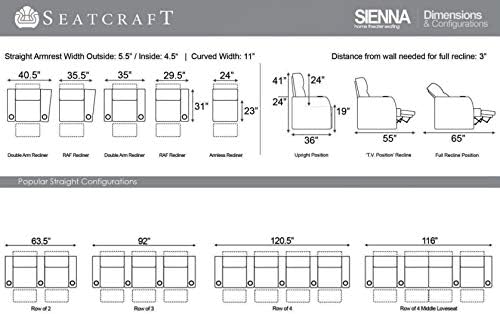
For visual guidance on setting up multi-seat configurations, refer to the official setup video:
Operating Instructions
Power Recline
Each seating unit is equipped with a power recline mechanism for personalized comfort. Locate the control buttons on the side of the armrest.
- To recline, press and hold the recline button. The footrest will extend, and the backrest will lean back.
- Release the button when you reach your desired position.
- To return to the upright position, press and hold the opposite button.
USB Charging Station
Conveniently charge your electronic devices using the integrated USB ports.
- Locate the USB charging station on the armrest.
- Plug your device's USB cable into one of the available ports.
- Ensure the seating unit is powered on for charging functionality.

Ambient Lighting (Cupholders & Base)
The Sienna seating features ambient blue LED lighting in the cupholders and along the base for enhanced ambiance and visibility in low-light conditions.
- Locate the lighting control button on the armrest, typically near the recline controls.
- Press the button to turn the ambient cupholder and base lighting on or off.


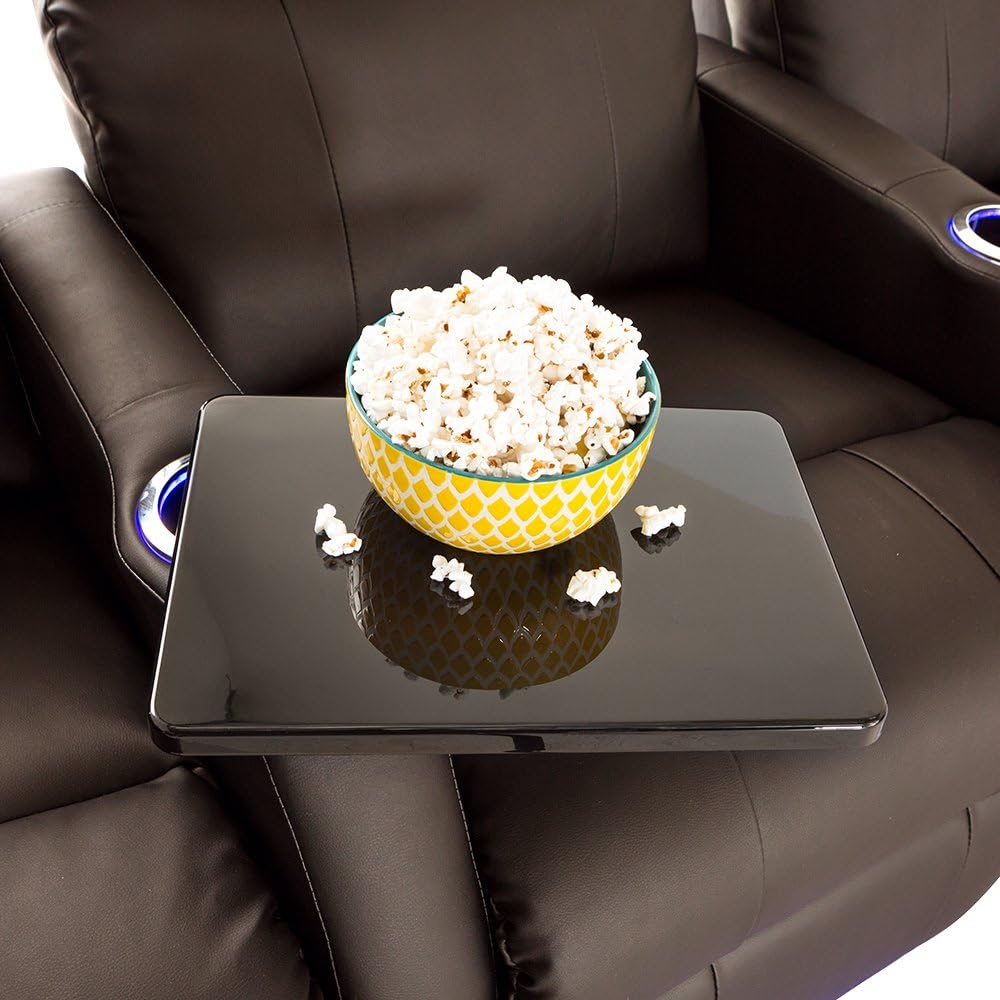
Removable Tray Tables
The included tray tables provide a convenient surface for snacks, drinks, or personal items.
- To install, insert the tray table's post into the designated receiver hole on the armrest.
- The tray table can be rotated to your preferred position.
- To remove, simply lift the tray table out of the receiver hole.
Maintenance
Proper care will extend the life and appearance of your Seatcraft Sienna Home Theater Seating.
- Cleaning: For general cleaning, wipe the leather surface with a soft, damp cloth. For spills or stains, use a mild leather cleaner and follow the product instructions. Avoid harsh chemicals or abrasive cleaners.
- Dusting: Regularly dust all surfaces, including the base and armrests, with a soft, dry cloth.
- Mechanism Care: Periodically check the reclining mechanism for any loose fasteners. Tighten if necessary. Avoid forcing the mechanism if it encounters resistance.
- Power Cords: Inspect power cords for any signs of damage. If damaged, discontinue use and contact customer support.
Troubleshooting
| Problem | Possible Cause | Solution |
|---|---|---|
| Recline mechanism not working. | Power cord disconnected or not fully plugged in. | Check all power connections, ensuring they are secure at both the seat and the wall outlet. |
| Ambient lights not illuminating. | Lights are turned off; power issue. | Press the light control button. Verify the main power connection. |
| USB charging not working. | Seating unit not powered; device cable faulty. | Ensure the seating unit is powered on. Try a different USB cable or device. |
| Unusual noise during recline. | Loose components in the mechanism. | Inspect the mechanism for loose screws or obstructions. If noise persists, contact customer support. |
Specifications
| Feature | Detail |
|---|---|
| Brand | Seatcraft |
| Model Name | Sienna |
| Model Number | 88-7060 |
| Product Dimensions | 39.5"D x 64"W x 42"H (for Row of 2) |
| Material | Leather (Leather 7000), Foam Fill |
| Color | Brown |
| Special Features | Power Recline, Ambient Lighted Cupholders, Ambient Base Lighting, USB Charging Station, Removable Tray Tables, Wall-Hugger Design |
| Maximum Weight Recommendation | 350 Pounds per seat |
| Assembly Time | 30 minutes or less |
| UPC | 819262015239 |
Warranty & Support
For specific warranty details, please refer to the documentation included with your purchase or visit the official Seatcraft website. If you encounter any issues or require assistance, please contact Seatcraft customer support.
Customer Support: Refer to your purchase invoice or the Seatcraft website for contact information.