
Introduction
This manual provides instructions for the setup, operation, maintenance, and troubleshooting of your Soundcandy Rave Ball Light Show Bluetooth Speaker. Please read this manual thoroughly before using the device to ensure proper function and longevity.
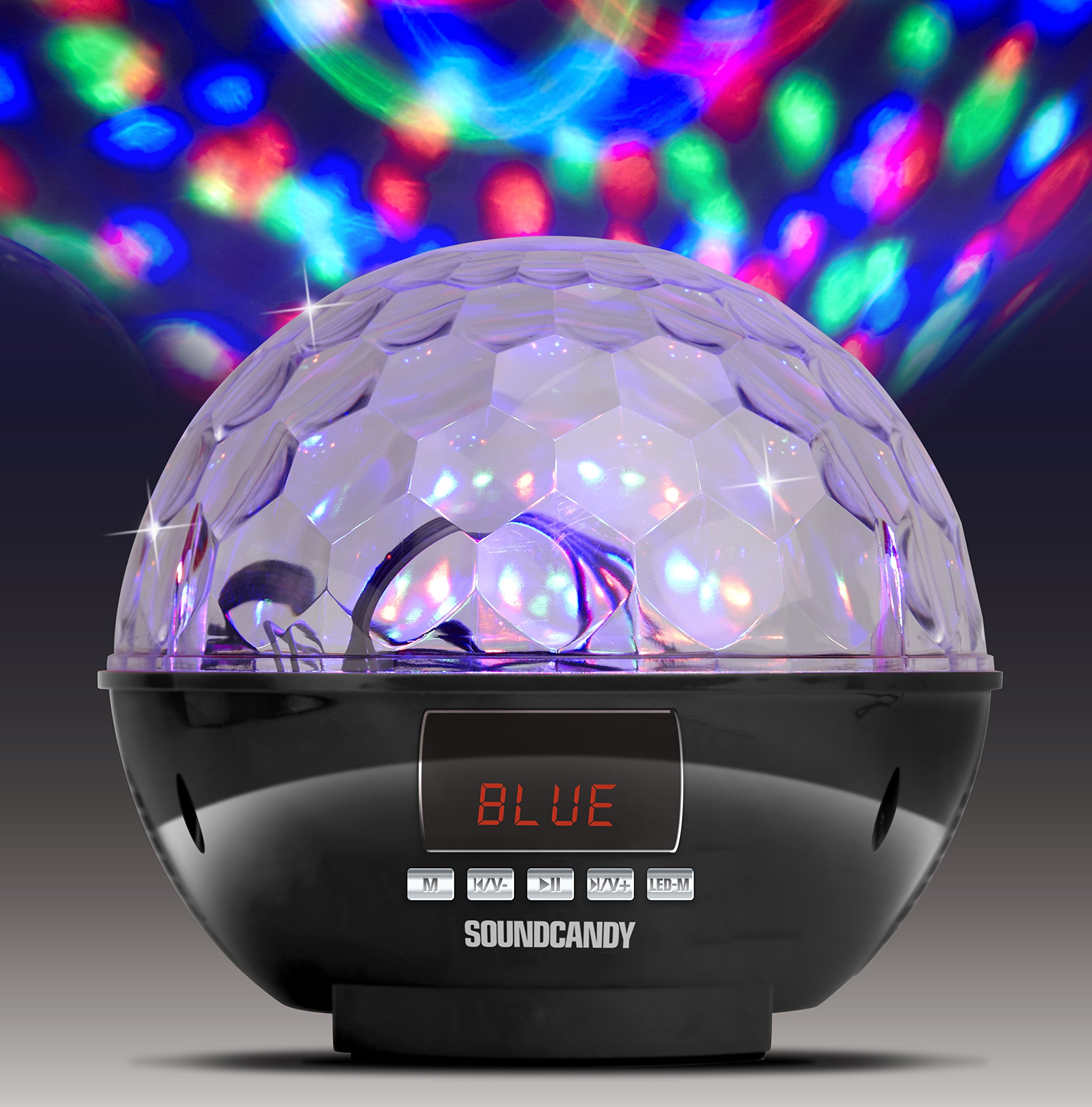
Image: The Soundcandy Rave Ball Light Show Bluetooth Speaker, a spherical device with a faceted top surface designed to project light patterns. The base contains control buttons and input ports.
What's in the Box
Upon unboxing, please ensure all components are present:
- Rave Ball Speaker
- USB Charging Cable (Note: Some packages may not include this cable.)
- 3.5mm Audio Cable (Note: Some packages may not include this cable.)
If any items are missing, please contact customer support.
Setup
1. Charging the Speaker
- Locate the charging port on the speaker.
- Connect the provided USB charging cable to the speaker and a compatible USB power adapter (not included) or computer USB port.
- The charging indicator light will illuminate. Allow approximately 2-3 hours for a full charge.
- A full charge provides up to 4 hours of playback time.
2. Powering On/Off
- To power on, press and hold the Power button until the device activates.
- To power off, press and hold the Power button again until the device shuts down.
Operating Instructions
1. Bluetooth Pairing
- Ensure the speaker is powered on and in Bluetooth mode (indicated by a specific light or display).
- On your mobile device, enable Bluetooth and search for available devices.
- Select "Soundcandy Rave Ball" from the list of devices.
- Once paired, the speaker will emit an audible confirmation, and you can begin playing audio from your device.
2. Playing Music from USB Drive or Micro SD Card
- Insert a USB drive or Micro SD card containing MP3 audio files into the corresponding port on the speaker.
- The speaker will automatically detect the storage device and begin playing music.
- Use the control buttons on the speaker to navigate tracks (next/previous) and adjust volume.
3. Using Aux-in Connection
- Connect one end of a 3.5mm audio cable (if included) to the Aux-in port on the speaker.
- Connect the other end of the cable to the headphone jack or audio output of your external device (smartphone, radio, etc.).
- The speaker will automatically switch to Aux-in mode. Play audio from your external device.
4. FM Radio Operation
- Switch the speaker to FM Radio mode.
- Use the control buttons to scan for available radio stations. The digital LCD display will show the station frequency.
- Adjust volume as needed.
5. Light Show Modes
- The speaker features a built-in rotation motor that creates a spinning light effect.
- There are four different light modes with various rotating lighting effects and colors.
- Press the "Light Mode" button (or similar, refer to device markings) to cycle through the available light patterns.
- The light effects are designed to fill a room with dynamic visuals.
Maintenance
Cleaning
To maintain the appearance and functionality of your speaker:
- Wipe the exterior surfaces with a soft, dry cloth.
- Do not use abrasive cleaners, solvents, or harsh chemicals.
- Avoid getting moisture into any openings.
Battery Care
- To prolong battery life, avoid fully discharging the battery frequently.
- If storing the speaker for an extended period, charge it to approximately 50% every few months.
Troubleshooting
| Problem | Possible Cause | Solution |
|---|---|---|
| No power | Battery is discharged. | Charge the speaker using the USB charging cable. |
| Cannot pair via Bluetooth | Speaker is not in pairing mode or too far from device. | Ensure speaker is in Bluetooth mode. Move device closer to speaker. Restart both devices. |
| No sound | Volume too low, incorrect input mode, or faulty connection. | Increase volume on both speaker and connected device. Verify correct input mode (Bluetooth, USB, Aux, FM). Check cable connections. |
| Light show not working | Light mode is off or device malfunction. | Press the "Light Mode" button to activate or change patterns. If issue persists, contact support. |
Specifications
| Feature | Detail |
|---|---|
| Model Number | SC3002BKB-BT |
| Brand | soundcandy |
| Color | Silver |
| Shape | Round |
| Material | Plastic |
| Finish Type | Metallic Silver |
| Light Source Type | Light Emitting Diode (LED) |
| Power Source | Battery Powered, Corded Electric |
| Battery Type | 1 Lithium Polymer battery (included) |
| Battery Life | Up to 4 hours of play |
| Mounting Type | Plug Mount |
| Special Features | Light Modes, FM Radio, Rechargeable Battery, Bluetooth Connectivity, USB/Micro SD Playback, Aux-in |
| Number of Light Sources | 4 |
| Item Weight | 1.2 Pounds |
| Manufacturer | Gluten Free Palace - HPC |
| UPC | 814092020231 |
| ASIN | B017DV02P6 |
Warranty and Support
Warranty Information
This product comes with a standard manufacturer's warranty. Please retain your proof of purchase for warranty claims. For specific warranty terms and conditions, refer to the documentation included with your purchase or contact the manufacturer directly.
Customer Support
If you encounter any issues not covered in the troubleshooting section or require further assistance, please contact Soundcandy customer support. Contact details can typically be found on the product packaging or the official Soundcandy website.