
1. Important Safety Instructions
Read all instructions carefully before using this appliance. Failure to follow these instructions may result in electric shock, fire, or serious injury. Keep this manual for future reference.
- Electrical Safety: Always ensure the power supply matches the voltage specified on the vacuum cleaner. Do not operate with a damaged cord or plug. Unplug the appliance before cleaning or performing maintenance.
- Hazardous Materials: Do not vacuum flammable, explosive, or hot materials such as ashes, burning cigarettes, or liquids. This vacuum cleaner is not designed for hazardous dust.
- Water and Moisture: Do not immerse the appliance in water or use it in wet conditions unless specifically designed for wet vacuuming. Ensure hands are dry when handling the plug or operating the appliance.
- Supervision: This appliance is not intended for use by persons with reduced physical, sensory, or mental capabilities, or lack of experience and knowledge, unless they have been given supervision or instruction concerning use of the appliance by a person responsible for their safety. Children should be supervised to ensure they do not play with the appliance.
- Attachments: Use only manufacturer-recommended attachments and accessories.
2. Product Overview
The Eureka Forbes Pro Shaker Industrial Vacuum Cleaner is a high-performance, heavy-duty single-phase vacuum cleaner designed for industrial and multi-utility applications requiring strong suction and airflow. Its robust design ensures efficient cleaning in demanding environments.
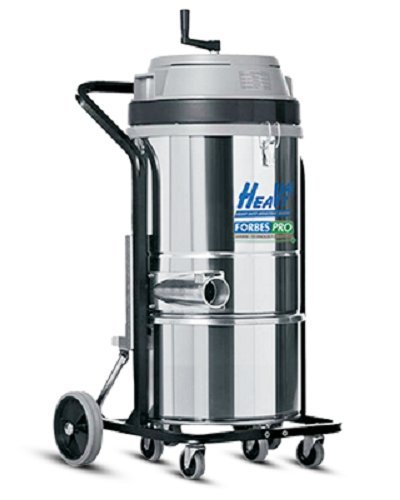
Figure 1: Eureka Forbes Pro Shaker Industrial Vacuum Cleaner. This image displays the complete vacuum cleaner unit, including the main body, collection tank, and hose attachment point.
Key Features:
- High suction power for effective debris removal.
- Large tank capacity for extended operation.
- Efficient filtering surface for dust retention.
- Powerful motor for consistent performance.
- Ergonomic and robust top portion for durability and ease of use.
3. Setup
Follow these steps to set up your industrial vacuum cleaner for first use:
- Unpacking: Carefully remove all components from the packaging. Check for any damage during transit.
- Assembly: Attach the wheels (if not pre-assembled) to the base of the unit. Ensure they are securely fastened.
- Filter Installation: Open the vacuum cleaner head and ensure the cartridge filter is correctly installed and seated. Refer to the 'Maintenance' section for filter details.
- Hose Connection: Connect the flexible hose to the suction inlet on the main unit. Ensure a tight fit to prevent air leaks.
- Accessory Attachment: Select the appropriate cleaning accessory (e.g., floor nozzle, crevice tool) and attach it to the end of the hose.
- Power Connection: Plug the power cord into a suitable grounded electrical outlet. Ensure the voltage matches the appliance's requirements.
4. Operating Instructions
This section details the proper operation of your Eureka Forbes Pro Shaker Industrial Vacuum Cleaner.
4.1 Starting and Stopping
- To Start: Press the 'ON' button, typically located on the top or front panel of the unit. The motor will start, and suction will begin.
- To Stop: Press the 'OFF' button. The motor will shut down. Always turn off the unit before unplugging or performing any adjustments.
4.2 Dry Vacuuming
For dry debris, ensure the cartridge filter is clean and properly installed. Use the appropriate nozzle for the surface being cleaned. Move the nozzle slowly over the surface to allow maximum suction and debris collection.
4.3 Using the Shaker Function (if applicable)
Some models feature a filter shaker mechanism to dislodge dust from the filter. If your model includes this, activate the shaker function periodically during operation or when suction power decreases. Refer to the specific controls on your unit for activation.
5. Maintenance
Regular maintenance ensures optimal performance and extends the lifespan of your vacuum cleaner.
5.1 Emptying the Collection Tank
- Turn off and unplug the vacuum cleaner.
- Release the latches securing the motor head to the collection tank.
- Carefully lift the motor head off the tank.
- Empty the collected debris into a suitable waste receptacle.
- Clean the inside of the tank with a damp cloth if necessary.
- Reassemble the unit, ensuring the motor head is securely latched.
5.2 Filter Cleaning and Replacement
The cartridge filter should be cleaned regularly to maintain suction power. Depending on usage, it may require replacement.
- Cleaning: Remove the filter from the unit. Gently tap it to dislodge dust. For thorough cleaning, use compressed air or rinse with water (if the filter type allows and is specified by the manufacturer). Ensure the filter is completely dry before reinstallation.
- Replacement: Replace the filter when it shows signs of wear, damage, or if cleaning no longer restores adequate suction. Use only genuine Eureka Forbes replacement filters.
5.3 General Cleaning
Wipe down the exterior of the vacuum cleaner with a damp cloth. Do not use harsh chemicals or abrasive cleaners. Check the hose and accessories for blockages and clear them as needed.
6. Troubleshooting
Refer to this section for common issues and their solutions.
| Problem | Possible Cause | Solution |
|---|---|---|
| Vacuum cleaner does not start | No power supply; Damaged power cord/plug; Faulty switch | Check power outlet and plug connection; Inspect cord for damage; Contact service center if switch is faulty. |
| Loss of suction power | Full collection tank; Clogged filter; Blocked hose/nozzle; Air leak | Empty collection tank; Clean or replace filter; Clear blockages from hose/nozzle; Check all connections for tightness. |
| Unusual noise from motor | Motor obstruction; Worn motor bearings | Turn off and unplug. Check for debris near the motor fan. If noise persists, contact service center. |
| Dust escaping from unit | Filter not installed correctly; Damaged filter; Tank not sealed properly | Ensure filter is correctly seated; Replace damaged filter; Check tank latches and seals. |
If the problem persists after attempting these solutions, please contact Eureka Forbes customer support.
7. Specifications
Technical specifications for the Eureka Forbes Pro Shaker Industrial Vacuum Cleaner.
- Brand: Eureka Forbes
- Model: Pro Shaker Industrial Vacuum Cleaner
- ASIN: B017CX3W2A
- Suction Power: 29 kPa
- Tank Capacity: 50 Litres
- Filtering Surface: 1.3 sqm
- Airflow: 102 L/sec
- Power: 3000W
- Voltage: 220-240/50 V/Hz (240 Volts)
- Filter Type: Cartridge
- Power Source: Corded Electric
- Item Weight: 37 Kilograms
- Noise Level: 82 Decibels
- Form Factor: Cannister
- Controller Type: Push Button
8. Warranty and Support
Eureka Forbes products are manufactured to high-quality standards. For warranty information, please refer to the warranty card included with your purchase or visit the official Eureka Forbes website. Keep your purchase receipt as proof of purchase.
For technical assistance, spare parts, or service requests, please contact Eureka Forbes customer support through their official channels. Contact details can typically be found on the product packaging, the official website, or the warranty documentation.