
Introduction
Welcome to the ZOTAC ZBOX CI323 Nano Mini PC user manual. This guide provides essential information for setting up, operating, and maintaining your fanless mini PC. The ZBOX CI323 Nano is designed for quiet and efficient computing, featuring an Intel N3150 quad-core processor, Intel HD Graphics with 4K support, dual Gigabit LAN, 802.11ac Wi-Fi, and Bluetooth connectivity. Please read this manual thoroughly before using your device.
Package Contents
Verify that all the following items are included in your ZBOX CI323 Nano package:
- ZBOX-CI323NANO-U Unit
- AC Adapter
- Power Cord
- Wi-Fi Antenna
- Driver DVD
- User Manual & Warranty Card (This document serves as the user manual)
- Quick Start Guide
- VESA Monitor Mount (with 4 screws)
- Mini-Optical S/PDIF Adapter
Product Overview and Features
The ZOTAC ZBOX CI323 Nano is a compact, fanless mini PC engineered for silent operation and versatile performance. Its design allows for various placement options, making it suitable for diverse computing environments.
Video: An overview of the ZOTAC ZBOX CI323 Nano Mini PC, highlighting its fanless design, triple display support, compact form factor, and various connectivity options.
Front Panel Features
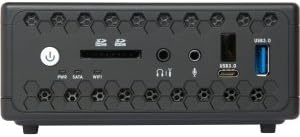
Image: Front panel of the ZBOX CI323 Nano, highlighting the power button, SD card reader, headphone and microphone jacks, a USB 3.0 port, and a USB Type-C port.
- Power Button: Press to power on or off the system.
- SD/SDHC/SDXC Card Reader: For convenient data transfer from memory cards.
- Headphone Output: 3.5mm jack for audio output.
- Microphone Input: 3.5mm jack for audio input.
- USB 3.0 Port (Type-A): High-speed data transfer for compatible devices.
- USB 3.0 Port (Type-C): Reversible connector for modern USB-C devices.
Rear Panel Features
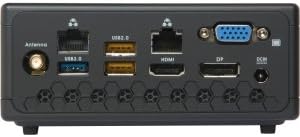
Image: Rear panel of the ZBOX CI323 Nano, featuring the Wi-Fi antenna connector, USB 3.0, USB 2.0, dual Gigabit Ethernet, HDMI, DisplayPort, VGA, and DC-in power input.
- Wi-Fi Antenna Connector: Attach the included Wi-Fi antenna for wireless connectivity.
- USB 3.0 Port (Type-A): Additional high-speed USB port.
- USB 2.0 Ports (x2): For connecting standard USB devices.
- Dual Gigabit Ethernet Ports: Provides robust wired network connectivity.
- HDMI 2.0 Port: Connect to a display for high-definition video and audio, supporting 4K resolution.
- DisplayPort: Another digital video output, also supporting 4K resolution.
- VGA Port: For connecting to older monitors or projectors.
- DC-in: Power input for the AC adapter.
Other Features
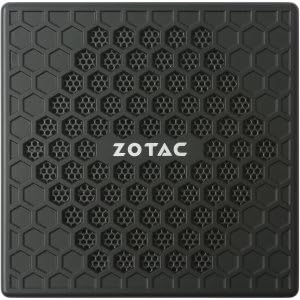
Image: Top view of the ZBOX CI323 Nano, showcasing its fanless honeycomb design for passive cooling.
- Fanless Design: Passive cooling ensures silent operation and reduces dust accumulation.
- Compact Form Factor: Small footprint allows for flexible placement, including VESA mounting.
- Intel N3150 Quad-Core Processor: Efficient performance for daily computing tasks.
- Intel HD Graphics: Integrated graphics with native 4K support.
- 802.11ac Wi-Fi & Bluetooth 4.0: Fast wireless networking and peripheral connectivity.
- 2.5-inch SATA Drive Support: Accommodates SSD or HDD for storage (barebones system requires user installation).
- Dual Channel DDR3L-1600 SODIMM Slots: Supports up to 8GB of RAM (barebones system requires user installation).
Setup Guide
1. Installing Memory (RAM) and Storage (HDD/SSD)
The ZBOX CI323 Nano is a barebones system, meaning memory and storage are not pre-installed. Follow these steps to install them:
- Power off the device and disconnect the AC adapter.
- Carefully remove the bottom cover of the ZBOX. Refer to the Quick Start Guide for detailed instructions on opening the chassis.
- Locate the two 204-pin DDR3L-1600 SODIMM slots. Insert the RAM modules firmly until they click into place.
- Locate the 2.5-inch SATA drive bay. Connect your SSD or HDD to the SATA data and power connectors, then secure it in the bay.
- Replace the bottom cover, ensuring it is securely fastened.
2. Connecting Peripherals
Connect your essential peripherals to the ZBOX:
- Display: Connect your monitor(s) using the HDMI, DisplayPort, or VGA outputs. The system supports up to three displays simultaneously.
- Keyboard & Mouse: Connect your USB keyboard and mouse to any available USB 2.0 or USB 3.0 ports.
- Network: For wired internet, connect an Ethernet cable to one of the Gigabit LAN ports. For wireless, screw the included Wi-Fi antenna onto its connector on the rear panel.
- Audio: Connect headphones or speakers to the 3.5mm headphone jack on the front panel. If using the Mini-Optical S/PDIF Adapter, connect it to the headphone jack for digital audio output.
3. Powering On
Once all peripherals are connected:
- Connect the AC adapter to the DC-in port on the rear panel, then plug the power cord into an electrical outlet.
- Press the power button on the front panel. The power indicator light will illuminate.
- The system will boot up. If no operating system is installed, you will need to proceed with OS installation.
4. Operating System Installation
As a barebones system, an operating system is not included. You will need to install your preferred OS (e.g., Windows 10, Linux). Refer to the operating system's installation guide for specific steps. Ensure you have the necessary drivers, which can be found on the included Driver DVD or downloaded from the ZOTAC website.
Operating Instructions
- Silent Operation: Due to its fanless design, the ZBOX CI323 Nano operates silently. It is normal for the chassis to feel warm to the touch during operation, as this is how heat is dissipated.
- 4K Video Playback: Utilize the HDMI 2.0 or DisplayPort outputs for native 4K resolution support. Ensure your display and cables are 4K compatible.
- VESA Mounting: Use the included VESA mount to attach the ZBOX to the back of a compatible monitor or to a wall, saving desk space.
- BIOS Update: Updating the BIOS from the ZOTAC website may be beneficial for optimal performance and compatibility. Follow ZOTAC's official instructions carefully when performing BIOS updates.
Troubleshooting
Common Issues and Solutions
- No Display Output:
- Ensure the monitor is powered on and correctly connected to the ZBOX.
- Verify the correct input source is selected on your monitor.
- Try connecting to a different display port or using a different cable.
- System Not Powering On:
- Check that the AC adapter is securely connected to both the ZBOX and a working power outlet.
- Ensure the power button is pressed firmly.
- Operating System Installation Issues (e.g., USB drivers):
- For Windows 7 installation, specific USB 3.0 drivers may be required during the setup process. ZOTAC provides tools or instructions for creating bootable media with integrated drivers. Refer to ZOTAC's support website for detailed guidance.
- Ensure your installation media is not corrupted.
- No Wi-Fi or Bluetooth Connectivity:
- Ensure the Wi-Fi antenna is securely attached.
- Check device manager in your operating system to confirm drivers are installed correctly.
- Verify Wi-Fi and Bluetooth are enabled in your OS settings.
- Overheating Concerns:
- While fanless, ensure the ZBOX is placed in a well-ventilated area, not enclosed, to allow for proper heat dissipation. Avoid blocking the ventilation grilles.
Technical Specifications
| Component | Specification |
|---|---|
| Processor | Intel N3150 Quad-Core (1.6GHz, up to 2.08GHz with TurboBoost) |
| Graphics | Intel HD Graphics (Native 4K Support) |
| Memory | 2x 204-pin DDR3L-1600 SODIMM Slots, Max 8GB (User-installed) |
| Storage | Supports 2.5-inch SATA3 HDD/SSD (User-installed) |
| Network | Dual Gigabit Ethernet, 802.11ac Wi-Fi, Bluetooth 4.0 |
| Front Ports | 1x USB 3.0 Type-A, 1x USB 3.0 Type-C, SD/SDHC/SDXC Card Reader, Headphone Output, Microphone Input, Power Button |
| Rear Ports | 1x USB 3.0 Type-A, 2x USB 2.0, 2x RJ45 (Gigabit LAN), 1x HDMI 2.0, 1x DisplayPort, 1x VGA, Wi-Fi Antenna Connector, DC-in |
| Cooling | Fanless Passive Cooling |
| Dimensions | Approximately 127mm x 127mm x 57mm (5.0 x 5.0 x 2.2 inches) |
| Operating System | Barebones (No OS included, supports Windows 7/8/10 64-bit) |
Safety Information
- Always disconnect the power adapter before cleaning or performing any maintenance.
- Do not expose the device to moisture, extreme temperatures, or direct sunlight.
- Ensure proper ventilation around the device, even with its fanless design, to prevent heat buildup.
- Use only the provided AC adapter and power cord.
- Do not attempt to open or repair the device yourself, as this may void the warranty and pose a safety risk.
Warranty and Support
Your ZOTAC ZBOX CI323 Nano Mini PC comes with a limited warranty. Please refer to the included Warranty Card for specific terms and conditions. For technical support, driver downloads, and further assistance, visit the official ZOTAC website at www.zotac.com.