
1. Product Overview
The Stack-On PDS-1505 safe is designed to secure personal items, ammunition, and handguns. It features an electronic lock with a keypad and a backup key for access. The safe is constructed with a solid steel, pry-resistant door and two steel live-action locking bolts for enhanced security. This model is a California-approved firearm safety device, meeting the requirements of Penal Code section 23655.
Package Contents:
- Stack-On PDS-1505 Safe Unit
- Backup Key (2 included)
- Mounting Hardware
- User Manual
- AA Batteries (initial set)
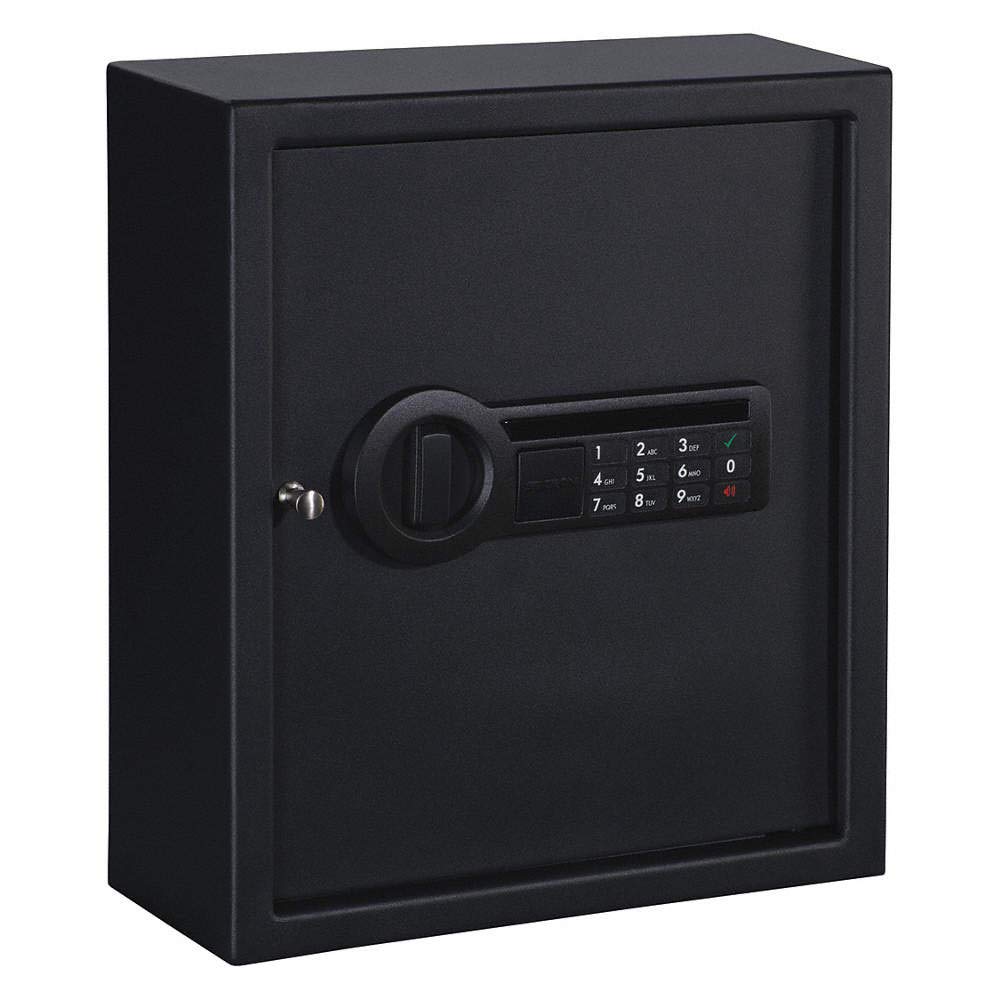
Figure 1: Front view of the Stack-On PDS-1505 safe, showing the electronic keypad and the overall compact design suitable for drawer or wall mounting.
2. Important Safety Information
- Do not store the backup key inside the safe. Keep it in a secure, separate location.
- Ensure the safe is securely mounted to prevent unauthorized removal.
- Keep the safe closed and locked at all times when not in use.
- Do not share your combination with unauthorized individuals.
- This safe is designed for security against unauthorized access. While listed as 'Fireproof' in specifications, it is also listed as 'Not Water Resistant'. Consult manufacturer documentation for specific fire resistance ratings.
3. Setup Instructions
3.1 Battery Installation
- Locate the battery compartment, typically on the inside of the safe door.
- Open the battery compartment cover.
- Insert the required AA batteries. Ensure correct polarity (+/-).
- Close the battery compartment cover. The safe's electronic lock should now be powered.
3.2 Setting Your Personal Combination
- With the safe door open, locate the reset button on the inside of the door, usually near the battery compartment.
- Press the reset button. The electronic lock will emit a beep, and an indicator light (often yellow or green) will illuminate.
- On the keypad, enter your desired new combination (typically 3-8 digits).
- Press the "ENTER" or "#" button to confirm. The safe will beep again, confirming the new combination is set.
- Test the new combination multiple times with the door open before closing it to ensure it works correctly.
3.3 Mounting the Safe
The PDS-1505 safe can be mounted to a drawer or a wall. Choose a secure location that is out of sight and provides a solid mounting surface.
- Identify the pre-drilled mounting holes on the back or bottom of the safe.
- Position the safe in the desired location and mark the drilling points through the mounting holes.
- Drill pilot holes into the mounting surface using an appropriate drill bit for the included mounting hardware.
- Align the safe with the drilled holes and secure it using the provided bolts or screws. Ensure all fasteners are tightened securely.
4. Operating Instructions
4.1 Opening the Safe with Electronic Lock
- Enter your personal combination on the keypad.
- Press the "ENTER" or "#" button.
- If the combination is correct, a green indicator light will illuminate, and you will hear a click.
- Within 5 seconds, turn the handle (if applicable) or pull the door open.
Note: After 3 incorrect combination attempts, the lock will enter a lockout period, typically 20 seconds, during which no entries will be accepted. This is a security feature.
4.2 Using the Backup Key
In case of battery failure or forgotten combination, the backup key can be used to open the safe.
- Locate the keyhole, usually concealed behind a removable cover on the keypad panel.
- Insert the backup key into the keyhole.
- Turn the key clockwise (or counter-clockwise, depending on the model) while simultaneously turning the handle or pulling the door open.
- Once open, remove the key.
Important: Always store the backup key in a secure location away from the safe.
4.3 Closing and Locking the Safe
- Close the safe door firmly.
- Turn the handle (if applicable) to engage the locking bolts. The safe will automatically lock.
- Verify the safe is securely locked by attempting to open the door without entering the combination.
5. Maintenance
5.1 Battery Replacement
The electronic lock features a low battery warning light. When this light illuminates, replace the batteries promptly to ensure continuous operation.
- Open the safe using your combination or the backup key.
- Locate and open the battery compartment.
- Remove the old AA batteries and dispose of them responsibly.
- Insert new AA batteries, ensuring correct polarity.
- Close the battery compartment. Test the lock operation.
5.2 Cleaning
Clean the exterior of the safe with a soft, damp cloth. Avoid using abrasive cleaners or solvents, as these can damage the finish or electronic components.
6. Troubleshooting
Safe Will Not Open with Combination:
- Incorrect Combination: Ensure you are entering the correct combination. Re-enter slowly and carefully.
- Low Batteries: Check if the low battery warning light is on. Replace batteries as described in Section 5.1.
- Lockout Mode: If multiple incorrect attempts were made, the safe may be in lockout mode. Wait for the lockout period to expire (approx. 20 seconds) before trying again.
- Electronic Malfunction: If the above steps do not resolve the issue, use the backup key to open the safe.
Key Does Not Work:
- Incorrect Key: Ensure you are using the correct backup key provided with your safe.
- Obstruction: Check the keyhole for any obstructions.
- Mechanism Jammed: If the key turns but the door does not open, ensure the handle is being turned or the door is being pulled simultaneously. Do not force the key.
7. Product Specifications
| Brand: | Stack-On |
| Model Number: | PDS-1505 |
| Exterior Dimensions (H x W x D): | 14.5" H x 12.5" W x 4.62" D |
| Chamber Width: | 4.62 Inches |
| Lock Type: | Electronic (Push Button Control), Key |
| Material: | Alloy Steel |
| Item Weight: | 9.07 kg |
| Mounting Type: | Floor Mount, Wall Mount |
| Special Features: | Pry resistant steel door, 2 steel live action locking bolts, Fireproof, California-approved firearm safety device |
| Water Resistance Level: | Not Water Resistant |
| Included Components: | Key, Safe, batteries |
| Power Source: | AA Batteries (Required) |
8. Warranty and Support
For specific warranty information and customer support, please refer to the documentation included with your purchase or visit the official Stack-On website. Keep your purchase receipt as proof of purchase for any warranty claims.
Manufacturer: STAAP
Model Number: PDS-1505
UPC: 085529150504
