
Cheerwing S107G
Cheerwing S107/S107G Phantom Mini RC Helicopter User Manual
Model: S107G
Introduction
Welcome to the world of remote-controlled flight with your new Cheerwing S107/S107G Phantom Mini RC Helicopter. This manual provides essential information for safe operation, setup, and maintenance. Please read it thoroughly before first use to ensure a proper and enjoyable experience.
Safety Information
- Always operate the helicopter in an open, clear area, away from people, pets, and obstacles.
- Do not fly near power lines, roads, or water.
- Adult supervision is recommended for users under the age of 14.
- Ensure the helicopter battery is fully charged before each flight.
- Do not touch the rotating blades during operation.
- Turn off the helicopter and remote control when not in use.
- Use only original replacement parts and accessories.
Package Contents
Verify that all items are present in your package:
- 1 x RC Helicopter
- 1 x Remote Controller
- 1 x USB Cable
- 1 x User Manual
- 1 x Spare Tail Blade
Setup
Remote Controller Battery Installation
The remote controller requires 4 'AA' batteries (not included).
- Open the battery compartment on the back of the remote controller.
- Insert 4 'AA' batteries, ensuring correct polarity (+/-).
- Close the battery compartment securely.
Helicopter Charging
The helicopter is powered by a 3.7V 150mAh Lithium-Ion Polymer battery.
- Connect the small end of the provided USB charging cable to the helicopter's charging port.
- Connect the larger USB end of the cable to a USB power source (e.g., computer, USB wall adapter, power bank).
- The charging indicator light on the USB cable will illuminate during charging.
- Charging typically takes 50-60 minutes for a full charge. The indicator light may change or turn off when charging is complete.
- Important: Use only the original charging cable provided.

Image: The Cheerwing S107G helicopter connected to a laptop via its USB charging cable, illustrating the charging process.
Operating Instructions
Pairing the Helicopter and Remote
- Ensure both the helicopter and remote controller are turned off.
- Place the helicopter on a flat, level surface.
- Turn on the helicopter's power switch. The helicopter's lights will flash.
- Turn on the remote controller's power switch. The remote's indicator light will flash.
- Push the left joystick (throttle) all the way up, then pull it all the way down.
- The lights on both the helicopter and remote will become solid, indicating successful pairing.
Basic Flight Controls
The Cheerwing S107/S107G features a 3-channel remote control system.
- Left Joystick (Throttle): Controls altitude. Push up to ascend, pull down to descend.
- Right Joystick: Controls forward/backward movement and left/right rotation.
- Push up for forward flight.
- Pull down for backward flight.
- Push left to rotate left.
- Push right to rotate right.
- Trimmer Buttons: Used to fine-tune the helicopter's stability if it drifts.
- If the helicopter spins left, press the right trimmer button.
- If the helicopter spins right, press the left trimmer button.
Video: Official video from Cheerwing USA demonstrating the basic flight and control of the S107 RC Helicopter.
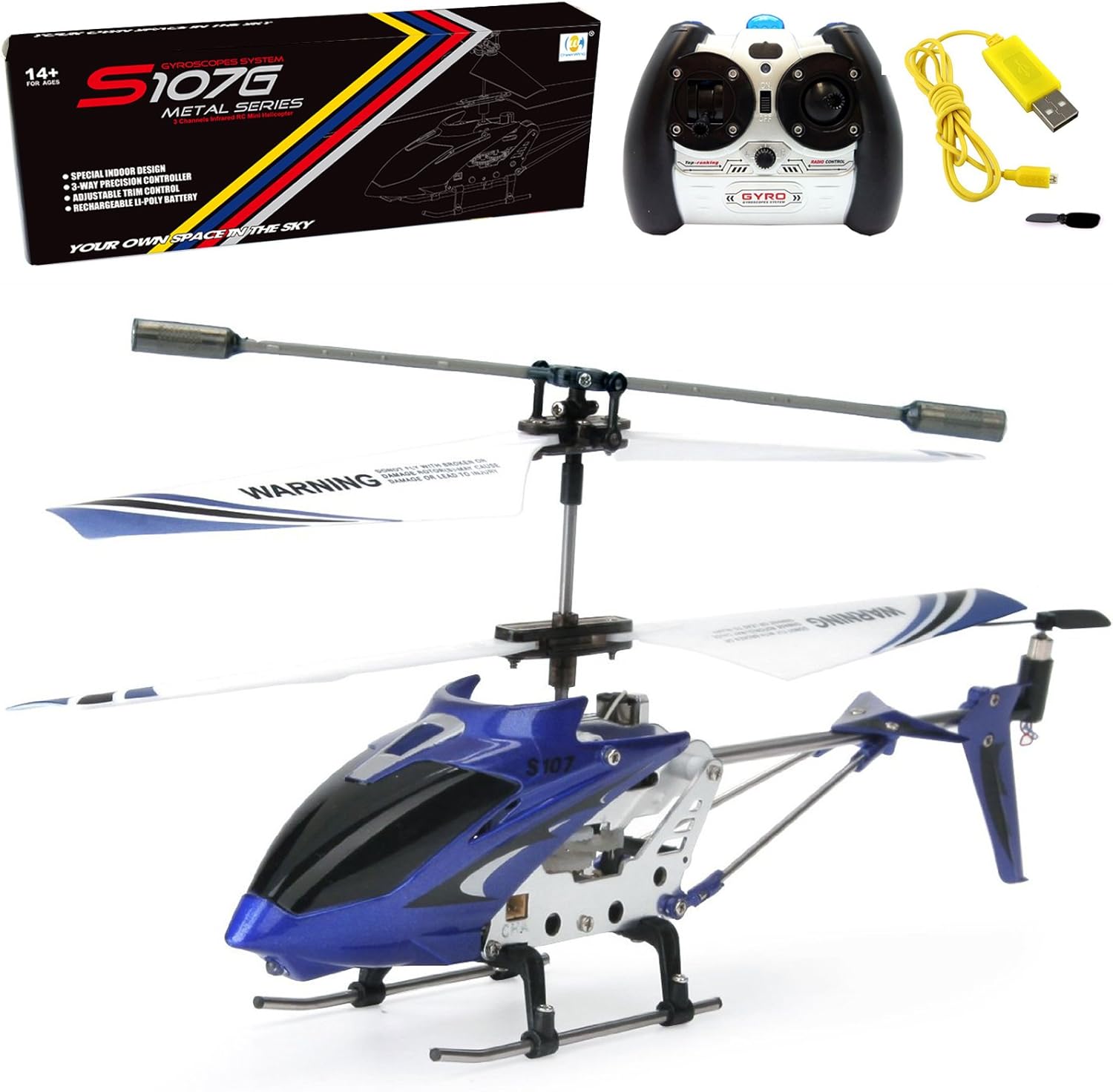
Image: The Cheerwing S107G Phantom Mini RC Helicopter in blue, showcasing its design and size.
Maintenance
- Cleaning: Use a soft, dry cloth to clean the helicopter. Avoid water or solvents.
- Blade Inspection: Regularly check the main and tail blades for any damage or cracks. Replace damaged blades immediately using the spare provided or official replacements.
- Storage: When not in use for extended periods, remove batteries from the remote control and store the helicopter in a cool, dry place.
- Battery Care: Do not overcharge or completely discharge the helicopter's battery.
Troubleshooting

Image: A detailed troubleshooting table for the Cheerwing S107G RC Helicopter, outlining common problems, their causes, and recommended solutions.
| Problem | Problem Cause | Solution |
|---|---|---|
| The controller indicator light is off. | Low battery. The batteries are incorrectly positioned. | Replace the controller battery. Install the batteries following the polarity indicators. Clean the dirt between the battery and the battery contacts. |
| Controller not working. | Indicator light is off. Mis-operation. There is an interfering signal nearby. The electronic component is damaged for fiercely collision. | Restart the helicopter and power on the controller. Operate the helicopter step by step in accordance with the user manual. To contact customer service for spare parts and replace damaged parts. |
| Helicopter not working or could not fly. | Low battery. The main shaft base is loose. The blade is seriously deformed. Incorrect installation of the blade. The motor gear is damage. The circuit board is damage. | Recharge the helicopter battery. Tighten the screws of the main shaft base. Replace the blade. Reinstall the blade in accordance with the user manual. Replace the helicopter by contacting seller. Replace the helicopter by contacting seller. |
| Helicopter could not hover. | Low battery. Motor is damaged. The blade is seriously deformed. | Recharge the helicopter battery. Replace the motor. Replace the blade. |
| Helicopter keeps flying right. | Improper operation. The Gyro is damaged and unbalanced. The PCB board of the controller is damaged. | Adjust the fly by using rotation adjustment knob. Replace the helicopter by contacting seller. Replace the controller by contacting seller. |
| Helicopter indicator light is off. | Low battery. Switch damage. Poor contact. The battery is expired or over discharge protection. | Recharge the helicopter battery. Replace the receiver board. Disconnect and re-connect the battery. Replace the battery or recharge the battery. |
| Helicopter doesn't stay charged. | The USB charging cable is damaged. The charging port is broken. The battery is damaged. The charging IC is broken. | Replace the charging cable. Replace the helicopter by contacting seller. Replace the battery. Replace the helicopter by contacting seller. |
| Helicopter does not fly straight. | The balance bar was damaged by impact. The Gyro is damaged and unbalanced. | Replace the helicopter by contacting seller. Replace the helicopter by contacting seller. |
| Hard to control. | Not experienced enough. | Practice and read the user manual carefully. |
Specifications
- Model Name: S107
- Model Number: Phantom (S107G)
- Brand: Cheerwing
- Channels: 3-channel
- Gyro System: Upgraded Gyro System
- Material: Metal
- Power Source: Battery Powered
- Battery Type: Lithium-Ion Polymer (3.7V 150mAh)
- Charging Time: 50-60 minutes
- Indoor/Outdoor Usage: Indoor (or no wind outdoors)
- Dimensions: 16.8 x 2.6 x 6.1 inches
- Weight: 13.28 ounces
- Age Range: Youth (Manufacturer Minimum Age: 14 years)
Warranty and Support
For warranty information or technical support, please contact Cheerwing USA directly through their official channels or the retailer where the product was purchased. Keep your purchase receipt as proof of purchase.
Related documentsS107G

Ask a question about this manual
Ask about setup, troubleshooting, compatibility, parts, safety, or missing instructions. Manuals+ will review the question and use this page’s manual context to help answer it.