
1. Introduction
The HP Power Pack Plus 18000 is a portable power solution designed to charge a variety of electronic devices, including smartphones, tablet PCs, and notebooks. This manual provides essential information for the safe and efficient use of your power pack.
2. Safety Information
Please read all safety instructions carefully before using the HP Power Pack Plus 18000. Failure to follow these instructions may result in electric shock, fire, or damage to the product or connected devices.
- Do not expose the power pack to extreme temperatures, direct sunlight, or high humidity.
- Do not disassemble, modify, or attempt to repair the device. Refer all servicing to qualified personnel.
- Keep the power pack away from water and other liquids.
- Do not use the power pack if it has been damaged or dropped.
- Ensure proper ventilation when charging or discharging.
- Use only approved charging cables and adapters.
- Keep out of reach of children.
3. Package Contents
Verify that all items are present in your package. If any items are missing or damaged, contact your retailer or HP support.
- HP Power Pack Plus 18000
- AC Adapter for charging the power pack
- USB charging cables (various types)
- Laptop charging tips/adapters
- Carrying pouch

Figure 3.1: HP Power Pack Plus 18000 and its accompanying accessories, including various charging cables and adapters.
4. Product Overview
Familiarize yourself with the ports and indicators on your HP Power Pack Plus 18000.

Figure 4.1: The HP Power Pack Plus 18000, illustrating the various input and output ports for charging the power bank and external devices.
4.1 Port Identification
- IN (19V): Input port for charging the power pack using the provided AC adapter.
- OUT (19V Barrel Output): Output port for charging compatible notebooks.
- USB Output (5V/1A): Standard USB port for charging smartphones and other small devices.
- USB Output (5V/2.1A): High-current USB port for faster charging of tablets and larger smartphones.
- USB Output (5V/3A Type C): USB Type-C port for charging compatible devices.
4.2 Battery Level Indicators
The power pack features LED indicators to show the current battery charge level.
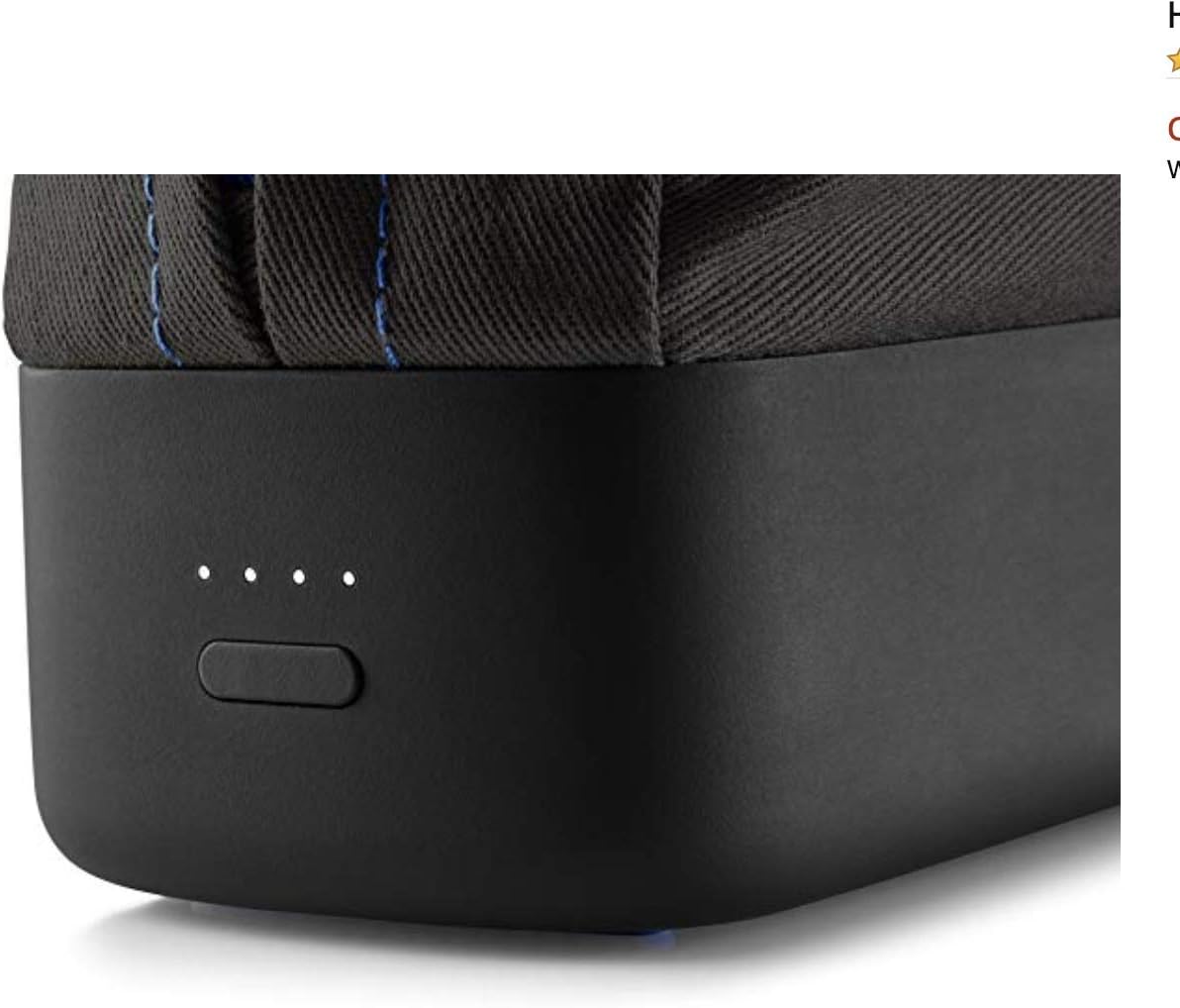
Figure 4.2: Close-up view of the LED indicators on the HP Power Pack Plus 18000, which display the remaining battery charge.
- Each illuminated LED typically represents approximately 25% of the battery capacity.
- Press the power button briefly to check the current charge level.
5. Setup
5.1 Initial Charging of the Power Pack
Before first use, fully charge your HP Power Pack Plus 18000.
- Connect the provided AC adapter to the IN (19V) port on the power pack.
- Plug the AC adapter into a wall outlet.
- The LED indicators will illuminate and flash to show the charging progress. All LEDs will be solid when fully charged.
- Disconnect the AC adapter once charging is complete.
6. Operating Instructions
6.1 Charging External Devices
The HP Power Pack Plus 18000 can charge multiple devices simultaneously.
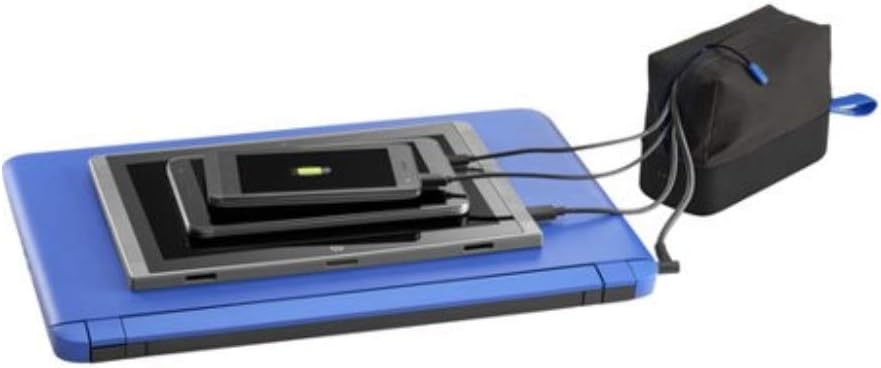
Figure 6.1: The HP Power Pack Plus 18000 connected to and simultaneously charging a laptop, tablet, and smartphone.
- Identify the correct charging cable and port for your device.
- Connect one end of the charging cable to the appropriate output port on the power pack (e.g., 5V/1A USB, 5V/2.1A USB, 5V/3A Type C, or 19V Barrel Output).
- Connect the other end of the cable to your device.
- The power pack will automatically begin charging your device. The LED indicators will show the power pack's remaining charge.
- Disconnect your device once it is fully charged or when you no longer need to charge it.
Note: For optimal charging, use the port that matches your device's power requirements. Using the 19V Barrel Output requires selecting the correct tip for your notebook.
7. Maintenance
7.1 Cleaning
- Wipe the power pack with a soft, dry cloth.
- Do not use abrasive cleaners, solvents, or harsh chemicals.
7.2 Storage
- Store the power pack in a cool, dry place, away from direct sunlight and extreme temperatures.
- If storing for extended periods, charge the power pack to approximately 50-75% every three months to maintain battery health.
8. Troubleshooting
If you encounter issues with your HP Power Pack Plus 18000, refer to the following common solutions:
| Problem | Possible Cause | Solution |
|---|---|---|
| Power pack not charging | AC adapter not connected properly; faulty adapter or cable; power outlet issue. | Ensure AC adapter is securely connected. Try a different power outlet. Check if the adapter or cable is damaged. |
| Device not charging from power pack | Power pack battery is depleted; incorrect cable or port used; device not compatible; cable is faulty. | Charge the power pack. Ensure you are using the correct cable and output port for your device. Verify device compatibility. Try a different cable. |
| Slow charging | Using a low-current USB port for a high-demand device; cable resistance. | Use the 5V/2.1A or 5V/3A Type C USB port for faster charging. Ensure the cable is of good quality and appropriate length. |
| LED indicators not working | Power pack is completely discharged; internal fault. | Attempt to charge the power pack. If indicators still do not respond, contact HP support. |
9. Specifications
Detailed technical specifications for the HP Power Pack Plus 18000 (Model M6H77AA#ABC).
- Model Number: M6H77AA#ABC
- Product Dimensions: 6.02 x 2.6 x 4.59 inches
- Item Weight: 9.9 ounces
- Batteries: 1 Lithium Ion battery required
- Input Voltage: 240 Volts (via AC adapter)
- Output Voltage: 5 Volts (USB), 19 Volts (Barrel Output)
- Output Current: 13 Amps (total combined output)
- Total USB Ports: 3 (2x USB Type A, 1x USB Type C)
- Wattage: 65 watts
- Compatible Devices: Cellular Phones, Notebooks, Tablets
- Special Feature: Fast Charging, Travel-friendly design
- Manufacturer: HEWLETT PACKARD
- Date First Available: October 27, 2015
10. Warranty Information
HP products are covered by a limited warranty. For specific warranty terms and conditions applicable to your HP Power Pack Plus 18000, please refer to the warranty card included with your product or visit the official HP support website. Keep your proof of purchase for warranty claims.
11. Support
For further assistance, technical support, or service inquiries regarding your HP Power Pack Plus 18000, please contact HP customer support through the following channels:
- HP Support Website: Visit www.hp.com/support for drivers, manuals, and troubleshooting guides.
- Contact by Phone: Refer to the HP support website for regional contact numbers.
- Online Chat: Available through the HP support website.


