
1. Product Overview
The MJX C4005 FPV Aerial Camera Components are designed to provide First Person View (FPV) capabilities for compatible MJX RC helicopters and quadcopters. This module allows users to capture aerial footage and experience real-time video transmission to a connected mobile device.
Compatible Models:
- MJX T64, T10, T55, T57 RC Helicopters
- MJX X400, X500, X600, X800 RC Quadcopters
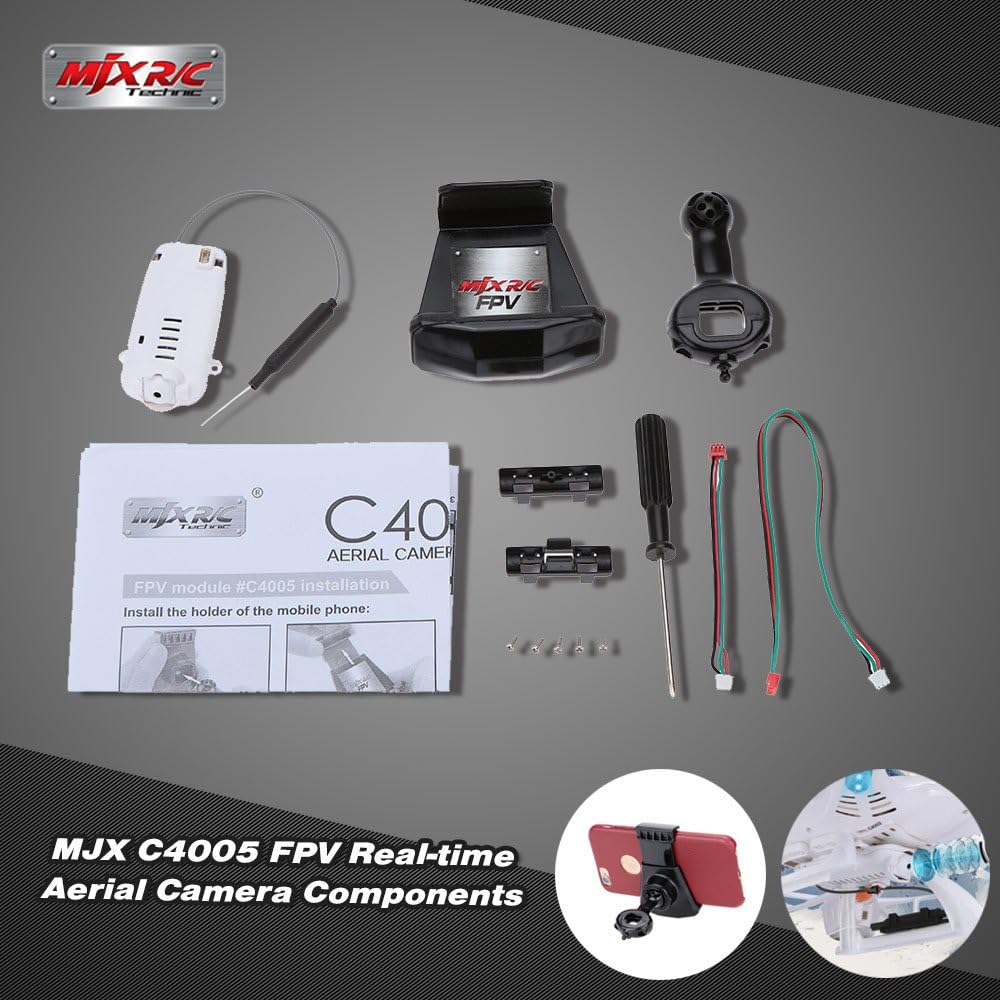
Figure 1: MJX C4005 FPV Aerial Camera Components. This image displays the complete set of components included with the MJX C4005 FPV camera, featuring the camera module, mobile phone holder, and various installation tools.

Figure 2: MJX C4005 FPV Camera Module. This image shows the camera module itself, alongside an illustrative diagram demonstrating how it integrates with a compatible drone for aerial photography.
2. Setup and Installation
Follow these steps to properly install the MJX C4005 FPV camera module and mobile phone holder onto your compatible RC aircraft.
2.1 Camera Module Installation
- Identify the designated mounting location on your RC helicopter or quadcopter. Refer to your aircraft's specific manual for precise instructions.
- Securely attach the C4005 FPV camera module to the aircraft using the provided screws and tools. Ensure the camera is facing forward and is firmly mounted to prevent vibration during flight.
- Connect the camera's power and data cable to the corresponding port on your RC aircraft.

Figure 3: Detailed view of the MJX C4005 FPV camera module, highlighting its lens and antenna connection point.

Figure 4: Rear view of the MJX C4005 FPV camera module, displaying the internal circuit board and ventilation slots.

Figure 5: Side view of the MJX C4005 FPV camera module, showing the power/data connection port and antenna.
2.2 Mobile Phone Holder Installation
- Attach the mobile phone holder to your RC transmitter (remote control). The holder is designed to securely grip your smartphone.
- Adjust the holder to accommodate the size of your mobile phone.
- Ensure the phone is securely seated in the holder before operation.

Figure 6: MJX Mobile Phone Holder. This image illustrates the phone holder with a smartphone securely mounted, ready for FPV operation.
3. Operating Instructions
To operate the MJX C4005 FPV camera, you will need to download the official MJX FPV application on your smartphone. This application facilitates real-time video viewing and recording.
3.1 Connecting to the FPV System
- Power on your RC aircraft and the C4005 FPV camera module.
- On your smartphone, enable Wi-Fi and search for the Wi-Fi network broadcast by the C4005 camera (usually named "MJX FPV" or similar).
- Connect your smartphone to the camera's Wi-Fi network.
- Open the MJX FPV application on your smartphone. The live video feed from the camera should now be displayed.
3.2 Recording Video and Taking Photos
Within the MJX FPV application, you will find controls for recording video and capturing still images. Refer to the in-app instructions for specific button layouts and functions.
- Video Recording: Tap the record button to start and stop video capture. Videos are typically saved to your smartphone's gallery.
- Photo Capture: Tap the camera icon to take a still photograph. Photos are also saved to your smartphone's gallery.
Note: Ensure your smartphone has sufficient storage space for recorded media.
4. Maintenance
Proper maintenance ensures the longevity and optimal performance of your MJX C4005 FPV camera components.
- Cleaning: Gently wipe the camera lens with a soft, dry, lint-free cloth to remove dust or smudges. Avoid using harsh chemicals.
- Storage: Store the camera module and components in a cool, dry place away from direct sunlight and extreme temperatures when not in use.
- Cable Inspection: Periodically check all cables and connectors for signs of wear or damage. Replace any damaged components immediately.
- Software Updates: Check the MJX official website or app store for any available software or firmware updates for the FPV application to ensure compatibility and improved performance.
5. Troubleshooting
This section addresses common issues you might encounter with your MJX C4005 FPV camera.
5.1 No Video Feed on Smartphone
- Check Wi-Fi Connection: Ensure your smartphone is correctly connected to the camera's Wi-Fi network.
- App Compatibility: Verify that you are using the official MJX FPV application. Older versions or third-party apps may not be compatible.
- Smartphone Compatibility: Some newer smartphone models, particularly those with very high screen resolutions (e.g., Samsung Galaxy S7 and newer), may experience compatibility issues with the FPV application, potentially preventing video recording or real-time viewing. Check for updated software from MJX or consult their support.
- Power Supply: Confirm that the camera module is receiving power from the RC aircraft.
5.2 Unable to Record Video
- App Version: Ensure your MJX FPV application is up to date. Some older app versions might have limitations.
- Smartphone Storage: Check if your smartphone has sufficient free storage space for video files.
- Compatibility: As noted above, certain smartphone models might have limitations with video recording functionality even if live view works.
5.3 Poor Video Quality or Lag
- Interference: Operate in an open area away from other Wi-Fi networks or electronic devices that may cause interference.
- Distance: Ensure your RC aircraft is within the effective range of the FPV camera's Wi-Fi signal.
- Battery Level: Low battery on either the aircraft or the camera module can affect performance.
6. Specifications
| Feature | Detail |
|---|---|
| Model Name | C4005 FPV |
| Brand | MJX |
| Material Type | Plastic |
| Power Source | Battery Powered (via RC aircraft) |
| Additional Features | Portable |
| Operation Mode | Remote Control (via FPV app) |
| Item Weight | 0.01 Ounces |
| Manufacturer Part Number | PDX3132331787909AG |
| Included Components | FPV Camera Module, Mobile Phone Holder, Screwdriver, Connecting Wires |
Note: Components such as Remote Control, Charger, Battery, and Play Mat are typically part of the complete RC aircraft package and are not included with the C4005 FPV Aerial Camera Components.
7. Warranty and Support
Information regarding specific warranty terms for the MJX C4005 FPV Aerial Camera Components is not available in this document. For warranty claims, technical support, or further inquiries, please contact MJX customer service directly or visit their official website.
Manufacturer: MJX
Official Website: MJX Official Store on Amazon (This link directs to the MJX store page on Amazon, which may contain links to their official support resources.)