

1. Product Overview
The EdgeStar KC2000TWIN is a full-size dual tap kegerator designed for dispensing draft beer. This unit is capable of reaching temperatures in the low 30s, providing optimal cooling for various beverages. It is suitable for both seasoned beer enthusiasts and new users seeking a reliable home draft system.
Key Features:
- Dual Tap Configuration: Allows for dispensing two different beverages simultaneously.
- Temperature Range: Maintains temperatures from the low 30s to mid 40s degrees Fahrenheit.
- Ample Capacity: Accommodates one full-size standard keg or two sixth-size kegs. Note: This unit does not support Coors, Miller rubberized, or other oversized kegs.
- Mobility: Equipped with rolling casters for easy relocation.
- External CO2 Tank Mount: The CO2 tank installs externally, maximizing internal storage space.
- Commercial-Grade Components: Includes NSF-approved beer and air lines, a Domestic "D" coupler, CO2 regulator, stainless steel draft tower with faucet, and an aluminum CO2 tank (supplied empty).


2. Included Components
Your EdgeStar KC2000TWIN Kegerator package includes the following items:

- Draft Beer Tower (1)
- Faucet Handles (2)
- Keg Couplers (2)
- CO2 Regulator (1)
- Beer Lines (2)
- Gas Lines (2)
- 5 lb. CO2 Tank (empty) (1)
- Drip Tray (1)
- Faucet Wrench (1)
- Guard Rail (1)
- Gas Line Splitter (T-connector) (1)
- Washers and Clamps
- Casters (4)
3. Setup Instructions
3.1 Unpacking and Placement
Carefully unpack all components and remove any packaging materials. Place the kegerator on a flat, stable surface. This unit is designed for freestanding use only. Ensure adequate clearance around the unit for proper ventilation. A minimum of 2-3 inches of space should be maintained on the sides and back.
3.2 Caster Installation
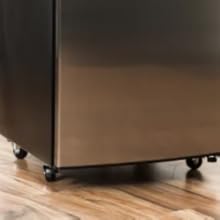
Attach the included casters to the bottom of the kegerator for easy mobility. Secure them firmly using the provided hardware.
3.3 CO2 Tank and Regulator Connection
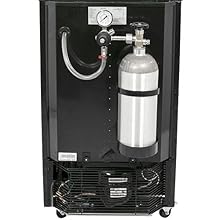
The 5 lb. CO2 tank is supplied empty and must be filled by a local gas supplier before use. Once filled, attach the CO2 regulator to the tank. Connect the gas lines from the regulator to the keg couplers using the provided splitter and clamps. The CO2 tank can be mounted externally on the back of the unit to conserve internal space.
3.4 Draft Tower Assembly
Mount the draft beer tower onto the top of the kegerator. Connect the beer lines from the keg couplers to the faucets within the tower. Secure the faucet handles to the faucets. Place the drip tray and guard rail on top of the unit.

3.5 Keg Installation
Open the kegerator door and carefully place the keg(s) inside. Connect the beer lines to the keg couplers and then attach the couplers to the kegs. Ensure all connections are secure to prevent leaks.


4. Operating Instructions
4.1 Temperature Control
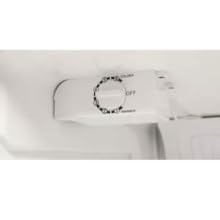
The kegerator is designed to maintain temperatures from the low 30s to mid 40s degrees Fahrenheit. The thermostat dial is located inside the unit. To adjust the temperature, rotate the dial towards 'Colder' for lower temperatures or 'Warmer' for higher temperatures. Allow 24 hours for the unit to stabilize after any temperature adjustment.
4.2 Keg Compatibility and Capacity
The KC2000TWIN can store one full-size standard keg (1/2 barrel) or two sixth-size kegs (1/6 barrel). It also supports pony kegs (1/4 barrel) and slim pony kegs. Please note that oversized kegs, including some Coors or Miller rubberized kegs, are not compatible with this unit.

4.3 Dispensing Beer
Once the kegerator has reached the desired temperature and the CO2 pressure is set appropriately (refer to your beer's specific requirements, typically 10-12 PSI), you can dispense beer. Pull the faucet handle forward to pour and push it back to stop. For optimal results, ensure the beer lines are properly chilled.
5. Maintenance
5.1 Cleaning Beer Lines
Regular cleaning of the beer lines is crucial for maintaining beer quality and preventing bacterial growth. It is recommended to clean the lines every 2-4 weeks, or after every keg change. Use a dedicated beer line cleaning solution and follow the manufacturer's instructions for the cleaning kit.
5.2 General Cleaning
Wipe down the interior and exterior of the kegerator regularly with a mild detergent and a soft cloth. Ensure the drip tray is emptied and cleaned frequently to prevent spills and odors. Keep the condenser coils at the back of the unit free of dust and debris for efficient operation.
6. Troubleshooting
This section addresses common issues you might encounter with your kegerator.
6.1 Foamy Beer
- Cause: Inconsistent temperature in the draft tower, incorrect CO2 pressure, or warm beer lines.
- Solution: Ensure the kegerator is set to the correct temperature and has had sufficient time to cool. Verify CO2 pressure is appropriate for your beer type. Consider installing a tower cooler to maintain consistent cold temperatures in the draft tower, which can significantly reduce initial foam.
6.2 Kegerator Not Cooling Sufficiently
- Cause: Thermostat setting too high, poor ventilation, or a faulty thermostat.
- Solution: Adjust the internal thermostat to a colder setting. Ensure the unit has proper clearance for ventilation (at least 2-3 inches on sides and back). If the issue persists, contact customer support for thermostat adjustment instructions, which may involve a minor internal adjustment as described by some users.
6.3 Unusual Noises
- Cause: Compressor operation, expansion/contraction of materials, or loose components.
- Solution: It is normal for the compressor to make some noise during operation. Popping or cracking sounds can occur as the unit cools and materials expand or contract. If noises are excessive or unusual, check for any loose parts or contact customer support.
6.4 Keg Does Not Fit
- Cause: Attempting to use an incompatible keg size or type.
- Solution: Refer to the 'Keg Compatibility and Capacity' section (4.2) to ensure your keg is a standard full-size, pony, slim pony, or sixth-size keg. This unit is not designed for oversized or rubberized kegs.
7. Specifications
| Specification | Detail |
|---|---|
| Brand Name | EdgeStar |
| Model Info | KC2000TWIN |
| Item Weight | 90 pounds |
| Product Dimensions | 25.69 x 20.19 x 34.13 inches |
| Installation Type | Free Standing |
| Color | Black |
| Voltage | 115 Volts |
| Wattage | 105 watts |
| Certification | NSF, UL |
| Included Components | Kegerator (complete assembly) |
| Door Reversibility | Yes |
| Leveling Legs | Yes |
| With Casters | Yes |
8. Warranty and Support
8.1 Product Warranty
The EdgeStar KC2000TWIN Kegerator comes with a warranty of 90 days for labor and 1 year for parts from the date of purchase. Please retain your proof of purchase for warranty claims.
8.2 Customer Support
For technical assistance, troubleshooting not covered in this manual, or warranty inquiries, please contact EdgeStar customer support. You can often find contact information on the manufacturer's website or through your retailer.
Visit the official EdgeStar store for more products and support information: EdgeStar Store


