
Fujitsu FP-LR03-4B
Fujitsu Alkaline Premium Batteries LR03 / AAA User Manual
Model: FP-LR03-4B
Product Overview
Fujitsu Premium alkaline batteries are engineered in Japan with cutting-edge technology to ensure anti-leakage capability. They feature a rare metal coat that maintains lower impedance for extended storage, providing extra life and stronger power duration. These batteries are designed for optimal performance and reliability, especially in devices with high energy consumption. The suppressed gas generation inside the battery further enhances leakage prevention.
This pack contains 4 AAA (LR03) alkaline batteries, providing 1.5 Volts each. They are suitable for a wide range of everyday devices.
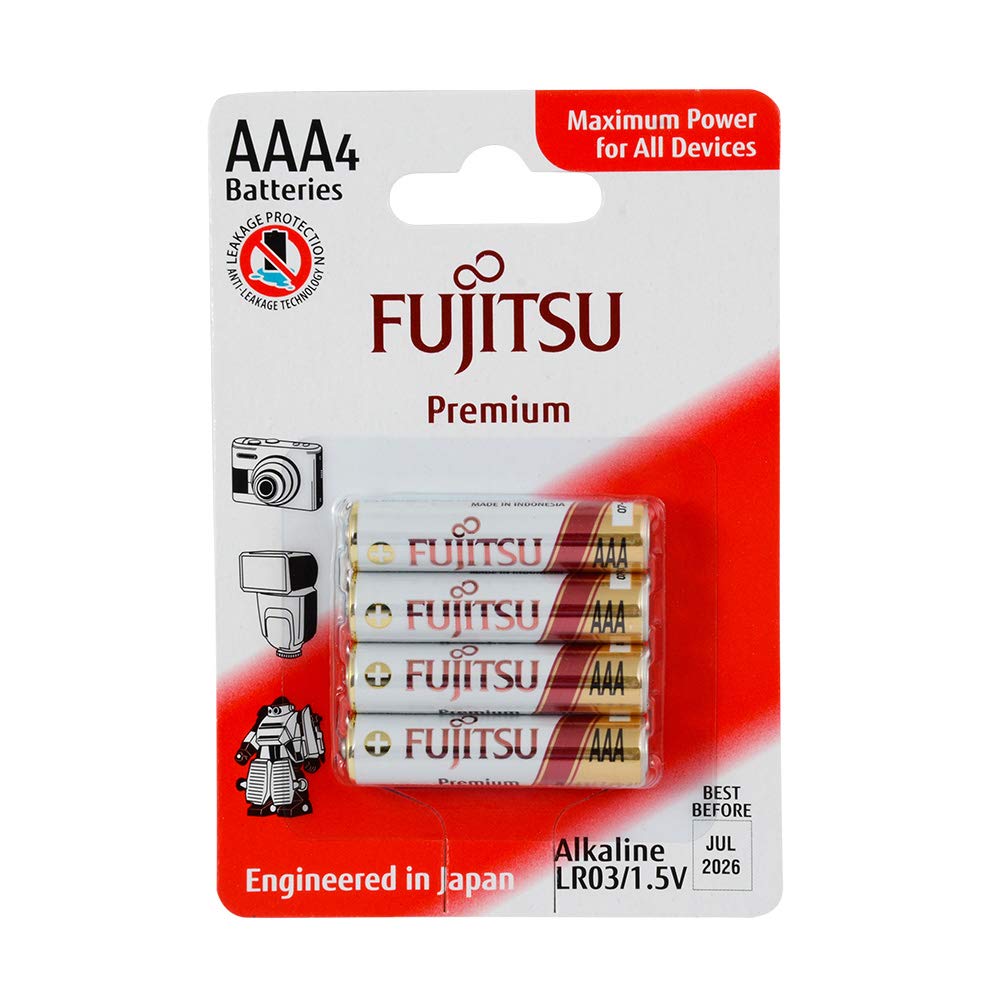
Image: A blister pack containing four Fujitsu Premium AAA alkaline batteries. The packaging highlights "AAA4 Batteries", "Maximum Power for All Devices", "Anti-Leakage Technology", and "Engineered in Japan". The batteries themselves are white with red and gold accents, showing the Fujitsu logo and "AAA" designation.
Setup and Installation
To ensure proper function and safety, follow these steps when installing Fujitsu AAA alkaline batteries:
- Identify Battery Compartment: Locate the battery compartment on your electronic device. This is typically found on the back, bottom, or side of the device.
- Open Compartment: Open the battery compartment cover. This may involve sliding a latch, pressing a button, or unscrewing a small screw.
- Observe Polarity: Carefully observe the polarity markings (+ and -) inside the battery compartment. These indicate the correct orientation for the batteries.
- Insert Batteries: Insert the Fujitsu AAA batteries according to the polarity markings. The positive (+) end of the battery should align with the positive terminal in the compartment, and the negative (-) end with the negative terminal.
- Close Compartment: Securely close the battery compartment cover. Ensure it clicks into place or is screwed tightly to prevent accidental opening.
- Test Device: Turn on your device to confirm that the batteries are correctly installed and providing power.
Note: Always replace all batteries in a device at the same time with new batteries of the same type and brand for optimal performance.
Operating Guidelines
Fujitsu Premium alkaline batteries are designed for general use in a wide array of electronic devices. For best performance and longevity, consider the following:
- Device Compatibility: These batteries are suitable for devices requiring AAA (LR03) size batteries, including remote controls, clocks, flashlights, toys, and portable audio devices.
- High Drain Devices: While suitable for all devices, Fujitsu Premium batteries offer enhanced performance in high-drain devices due to their advanced technology.
- Storage: Store unused batteries in their original packaging in a cool, dry place at room temperature. Avoid extreme temperatures and direct sunlight.
- Mixing Batteries: Do not mix new and used batteries, or different types/brands of batteries, as this can lead to leakage or reduced performance.
Maintenance and Storage
Proper maintenance and storage can extend the life and safety of your Fujitsu batteries:
- Clean Contacts: Periodically clean the battery contacts in your device and on the batteries themselves with a clean, dry cloth to ensure good electrical connection.
- Remove from Device: If a device will not be used for an extended period (e.g., several months), remove the batteries to prevent potential leakage and damage to the device.
- Disposal: Dispose of used batteries responsibly according to local regulations. Many communities offer battery recycling programs. Do not dispose of batteries in household waste or by incineration.
- Avoid Short Circuits: Do not short-circuit batteries by connecting the positive and negative terminals with metal objects. This can cause heat generation, leakage, or rupture.
Troubleshooting
If your device is not functioning correctly with new Fujitsu batteries, consider the following common issues and solutions:
- Device Not Turning On:
- Check battery polarity: Ensure batteries are inserted with the correct positive (+) and negative (-) orientation.
- Check battery contacts: Make sure contacts in the device and on the batteries are clean and free of corrosion. Gently rub with a pencil eraser if needed.
- Verify battery charge: Although new, ensure batteries are not depleted. Try a different set of new batteries if available.
- Check device: Test the device with known working batteries or another power source if possible to rule out a device malfunction.
- Short Battery Life:
- Device power consumption: Some devices inherently consume more power than others.
- Storage conditions: Batteries stored in extreme temperatures may have reduced life.
- Mixing batteries: Ensure only new, identical Fujitsu AAA batteries are used together.
- Battery Leakage:
- Fujitsu Premium batteries are designed with anti-leakage technology. However, leakage can occur under extreme conditions (e.g., short circuit, extreme heat, prolonged over-discharge in a device).
- If leakage occurs, carefully remove the batteries using gloves and dispose of them properly. Clean the device compartment with a cotton swab dipped in vinegar (for alkaline residue) and then dry thoroughly.
Specifications
| Battery Type | Alkaline |
| Size | AAA (LR03) |
| Voltage | 1.5V |
| Quantity | 4 Batteries per pack |
| Model Number | FP-LR03-4B |
| Product Dimensions | 0.43 x 0.43 x 1.77 inches (per battery) |
| Item Weight | 0.387 ounces (per battery) |
| Shelf Life | Up to 10 Years Storage Capacity Guarantees |
| Manufacturer | Fujitsu (FDK) |
Warranty Information
Fujitsu batteries are manufactured to high-quality standards. While specific warranty details for consumer batteries may vary by region and retailer, Fujitsu generally guarantees the performance and anti-leakage properties of its Premium Alkaline batteries under normal use conditions. For detailed warranty claims or inquiries, please retain your proof of purchase and contact Fujitsu customer support.
Cutting-Edge Technology ensures Fujitsu Batteries DO NOT LEAK. Engineered with up to 10 Years Storage Capacity Guarantees.
Customer Support
For further assistance, technical support, or inquiries regarding Fujitsu Alkaline Premium Batteries, please visit the official Fujitsu Batteries website or contact their customer service department. Contact information can typically be found on the product packaging or the manufacturer's official website.
Online Resources: Fujitsu Batteries Official Website
Related documentsFP-LR03-4B


Ask a question about this manual
Ask about setup, troubleshooting, compatibility, parts, safety, or missing instructions. Manuals+ will review the question and use this page’s manual context to help answer it.