
Introduction
The Dial 6686 Spider Bearing is a critical component designed for use in evaporative coolers. This bearing features a 1-inch diameter and is equipped with 9 arms, facilitating smooth and efficient operation within the cooler system. Manufactured in the United States, this product is engineered to meet specific operational requirements for evaporative cooling units.
This manual provides essential information regarding the setup, operation, maintenance, and troubleshooting of your Dial 6686 Spider Bearing to ensure its optimal performance and longevity.
Setup and Installation
Proper installation is crucial for the correct function and lifespan of the spider bearing. Always ensure the evaporative cooler is disconnected from power before beginning any installation or maintenance.
Safety Precautions:
- Disconnect all power to the evaporative cooler before installation.
- Wear appropriate personal protective equipment, such as gloves and eye protection.
- Ensure the work area is clean and well-lit.
Tools Required:
- Wrenches or sockets (appropriate sizes for cooler fasteners)
- Screwdrivers
- Pliers
- Appropriate lubricant (e.g., light machine oil or grease, consult cooler manual)
Installation Steps:
- Access the Bearing Assembly: Carefully open the evaporative cooler housing to gain access to the existing bearing assembly. Refer to your evaporative cooler's specific manual for detailed access instructions.
- Remove Old Bearing: Loosen and remove any fasteners securing the old spider bearing. Carefully detach the old bearing from its position. Note the orientation for correct installation of the new bearing.
- Clean Mounting Area: Clean any debris, rust, or old lubricant from the bearing mounting area. Ensure the surface is smooth and free of obstructions.
- Install New Bearing: Position the Dial 6686 Spider Bearing in the designated location. Ensure the 1-inch bearing and 9 arms align correctly with the cooler's shaft and support structure.
- Secure the Bearing: Fasten the new bearing securely using the appropriate hardware. Do not overtighten, but ensure it is firm and stable.
- Lubricate: Apply a small amount of appropriate lubricant to the bearing surfaces as recommended by your evaporative cooler's manufacturer.
- Test Rotation: Manually rotate the shaft to ensure the new bearing allows for smooth, unrestricted movement.
- Reassemble Cooler: Carefully reassemble the evaporative cooler housing.
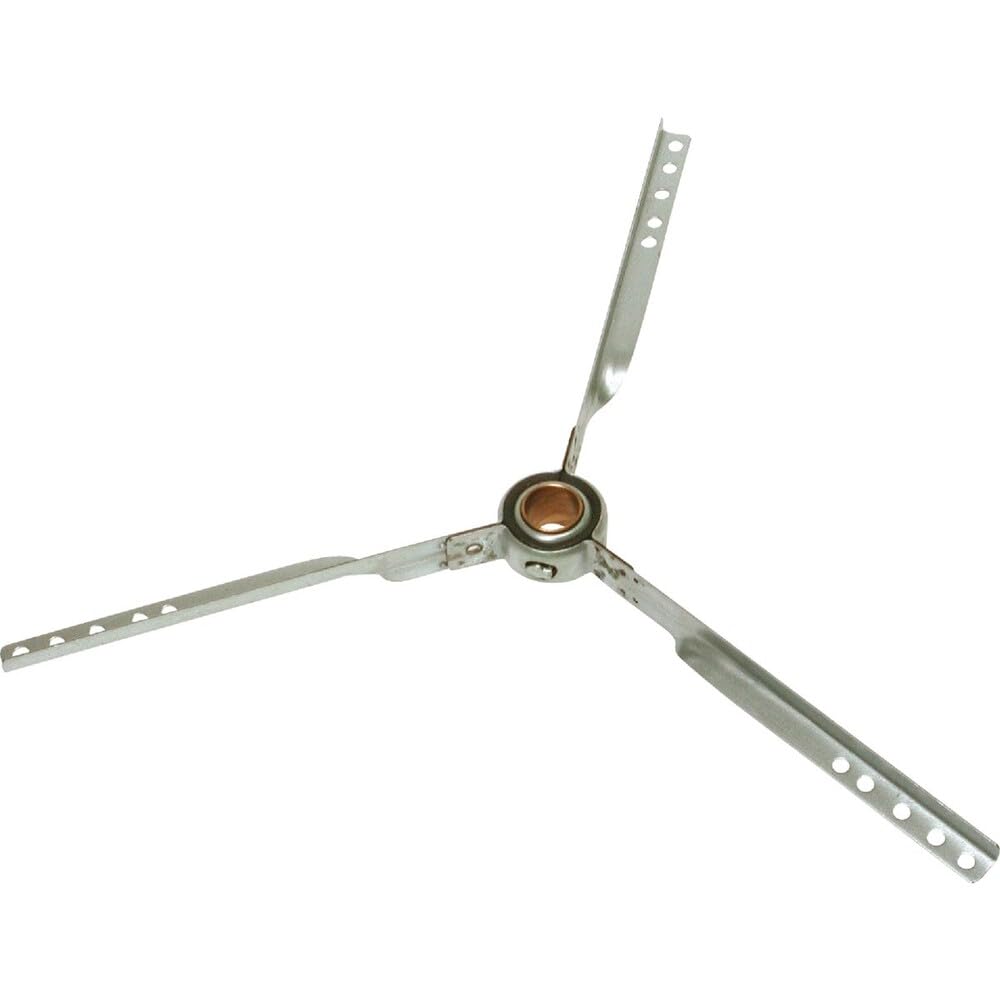
Image: The Dial 6686 Spider Bearing, a component designed for evaporative coolers. It features a 1-inch bearing and nine arms, constructed from alloy steel.
Operating Principles
The Dial 6686 Spider Bearing functions as a support mechanism for rotating shafts within an evaporative cooler. Once properly installed, it facilitates the smooth and efficient rotation of the cooler's fan or other moving parts, reducing friction and ensuring quiet operation.
The bearing itself does not require direct user operation beyond its initial installation and subsequent maintenance. Its primary role is to enable the mechanical movement of the evaporative cooler's components.
Maintenance
Regular maintenance extends the life of the Dial 6686 Spider Bearing and ensures the efficient operation of your evaporative cooler.
Inspection:
- Periodically inspect the bearing for signs of wear, corrosion, or damage.
- Check for any unusual noises or vibrations coming from the bearing area during cooler operation.
- Ensure the bearing remains securely fastened and there is no excessive play.
Lubrication:
- Apply a small amount of appropriate lubricant (e.g., light machine oil or grease) to the bearing surfaces at regular intervals, as recommended by your evaporative cooler's manufacturer.
- Avoid over-lubrication, which can attract dust and debris.
Cleaning:
- Keep the area around the bearing clean and free from dust, dirt, and other contaminants.
- If necessary, gently clean the exterior of the bearing with a soft cloth.
Troubleshooting
If you encounter issues with your evaporative cooler that you suspect are related to the spider bearing, refer to the following common problems and solutions:
Issue: Unusual Noise (e.g., squeaking, grinding)
- Possible Cause: Lack of lubrication.
- Solution: Apply appropriate lubricant to the bearing.
- Possible Cause: Worn or damaged bearing.
- Solution: Inspect the bearing for physical damage. If worn, replacement may be necessary.
Issue: Excessive Vibration
- Possible Cause: Loose bearing or mounting hardware.
- Solution: Ensure all fasteners are securely tightened.
- Possible Cause: Damaged or unbalanced bearing.
- Solution: Inspect the bearing for damage. If the bearing is compromised, it should be replaced.
Issue: Shaft Sticking or Restricted Movement
- Possible Cause: Contamination or debris in the bearing.
- Solution: Clean the bearing area thoroughly.
- Possible Cause: Bearing failure.
- Solution: If the bearing is seized or severely damaged, it requires replacement.
If troubleshooting steps do not resolve the issue, or if you are unsure about performing repairs, it is recommended to consult a qualified technician or contact Dial customer support.
Specifications
| Brand | Dial |
| Model Number | 6686 |
| Bearing Size | 1 inch |
| Arm Count | 9 arms |
| Material | Alloy Steel |
| Item Weight | 12 ounces |
| Item Dimensions (L x W x H) | 1.2 x 18 x 15.8 inches |
| UPC | 026529668606 |
| Manufactured In | United States |
Warranty Information
Specific warranty details for the Dial 6686 Spider Bearing are provided by the manufacturer, Dial. For information regarding warranty coverage, terms, and conditions, please refer to the documentation included with your purchase or contact Dial directly.
It is recommended to retain your proof of purchase for any warranty claims.
Customer Support
For technical assistance, replacement parts, or any other inquiries regarding your Dial 6686 Spider Bearing, please contact Dial customer support. You may find contact information on the product packaging, the manufacturer's official website, or through your retailer.
When contacting support, please have your product model number (6686) and any relevant purchase information readily available.