
1. Introduction
This manual provides instructions for the proper use and care of your Digital Nc +10 Close-Up Lens. This accessory is designed to enhance the close-focusing capabilities of your Olympus M.ZUIKO Digital ED 75-300mm f/4.8-6.7 II lens, allowing for detailed macro photography without requiring a dedicated macro lens.
The close-up lens functions similarly to a magnifying glass, attaching to the front of your existing camera lens. It enables your lens to focus at much closer distances, revealing intricate details of small subjects. This particular model features two achromatic elements to minimize chromatic aberrations and maintain high optical performance.
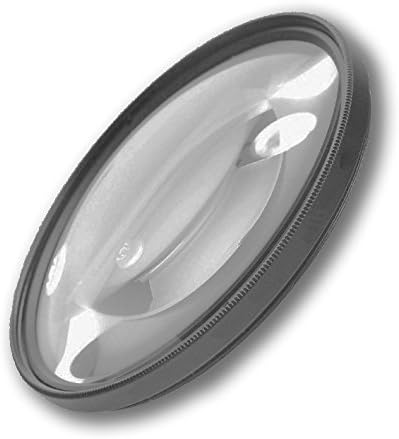
Image 1.1: The Digital Nc +10 Close-Up Lens. This lens accessory is designed to screw onto the front of your camera lens, enabling enhanced close-up photography.
2. Product Features
The Digital Nc +10 Close-Up Lens incorporates several design elements to optimize its performance:
- High Definition (Beveled Design) +10 Close-Up Lens: Provides significant magnification for close-up subjects.
- High-Index / Low-Dispersion 2 Element Optical Glass: Utilizes two achromatic elements to correct chromatic aberrations, ensuring sharp and color-accurate images.
- Fully Multi-Coated & Threaded: Multiple layers of coating reduce reflections and improve light transmission. The threaded design allows for secure attachment to your lens.
- Anti-Reflection Coating: Further minimizes glare and ghosting for clearer images.
- High Speed Auto-Focus / Infrared Compatible: Designed to work seamlessly with your camera's autofocus system and is compatible with infrared photography.
3. Setup
Attaching the Digital Nc +10 Close-Up Lens to your Olympus M.ZUIKO Digital ED 75-300mm f/4.8-6.7 II lens is a straightforward process:
- Identify Filter Thread Size: Ensure your Olympus M.ZUIKO Digital ED 75-300mm f/4.8-6.7 II lens has a 58mm filter thread. The close-up lens is designed to match this size.
- Remove Lens Cap: Carefully remove the front lens cap from your camera lens.
- Align and Attach: Align the threads of the close-up lens with the filter threads on the front of your camera lens. Gently rotate the close-up lens clockwise until it is securely fastened. Do not overtighten.
- Verify Secure Attachment: Ensure the close-up lens is firmly attached and does not wobble.

Image 3.1: Illustration of the close-up lens being attached to the front of a camera lens. The lens screws directly into the filter threads.
To remove the close-up lens, simply rotate it counter-clockwise until it detaches from your camera lens.
4. Operating Instructions
Once the Digital Nc +10 Close-Up Lens is attached, your camera lens will be able to focus at much closer distances. Here are some tips for optimal operation:
- Focusing: Your camera's autofocus system should still function. However, for very precise macro shots, manual focus may offer greater control. Experiment with both.
- Working Distance: The close-up lens significantly reduces the minimum focusing distance. You will need to get much closer to your subject than usual.
- Depth of Field: Macro photography inherently has a very shallow depth of field. To maximize the in-focus area, consider using a smaller aperture (higher f-number). This may require increasing ISO or using slower shutter speeds, potentially necessitating a tripod.
- Lighting: Due to the close working distance, lighting can become challenging. External light sources, such as ring lights or small LED panels, can be beneficial to illuminate your subject evenly and avoid shadows.
- Stability: For sharp macro images, camera stability is crucial. Using a tripod is highly recommended to minimize camera shake, especially with slower shutter speeds.

Image 4.1: A collage demonstrating the close-up capabilities of the lens, showing detailed shots of a flower petal with water drops, a water drop reflecting scenery, a butterfly, and a cactus texture.
Examples of subjects suitable for close-up photography include insects, flowers, textures, small objects, and intricate details.

Image 4.2: A detailed macro photograph of a human eye, showcasing the intricate patterns of the iris.

Image 4.3: A macro photograph of a butterfly resting on an orange flower, highlighting its delicate wing patterns.

Image 4.4: A detailed shot of water droplets on a green leaf, demonstrating the lens's ability to capture fine textures.

Image 4.5: A macro photograph of a dog's nose, revealing its unique texture and moisture.
5. Maintenance
Proper care will ensure the longevity and optimal performance of your close-up lens:
- Cleaning the Lens: Use a soft, lint-free microfiber cloth specifically designed for optical surfaces. For stubborn smudges, a small amount of lens cleaning fluid applied to the cloth (not directly to the lens) can be used. Avoid abrasive materials or harsh chemicals.
- Dust Removal: Use a blower brush or compressed air (designed for electronics) to remove dust particles before wiping.
- Storage: When not in use, store the close-up lens in its protective pouch (e.g., the blue or grey pouch provided) to prevent dust accumulation and scratches. Keep it in a cool, dry place away from direct sunlight and extreme temperatures.
- Handling: Always handle the lens by its metal rim, avoiding touching the glass surfaces.

Image 5.1: A blue protective pouch, ideal for storing the close-up lens when not in use.

Image 5.2: The close-up lens shown alongside a grey protective pouch, illustrating storage options.
6. Troubleshooting
If you encounter issues while using your Digital Nc +10 Close-Up Lens, consider the following:
- Difficulty Focusing:
- Ensure you are within the very close working distance required by the close-up lens.
- Try switching to manual focus for more precise control.
- Check if your camera's autofocus mode is set appropriately for close-up subjects.
- Soft or Blurry Images:
- Verify the lens is securely attached and clean.
- Increase your depth of field by using a smaller aperture (higher f-number).
- Use a tripod to eliminate camera shake, especially at close distances and slower shutter speeds.
- Ensure adequate lighting to allow for faster shutter speeds or lower ISO.
- Vignetting (Dark Corners):
- Vignetting is generally not expected with this type of close-up lens, especially when used with the specified Olympus lens. If observed, ensure the close-up lens is fully and correctly threaded onto your main lens.
7. Specifications
| Feature | Detail |
|---|---|
| Model Number | CL10XOLY753004.8-58 |
| Diopter Strength | +10 |
| Lens Construction | 2 Element Achromatic Optical Glass |
| Coatings | Fully Multi-Coated, Anti-Reflection |
| Compatibility | Lenses with 58mm filter thread (e.g., Olympus M.ZUIKO Digital ED 75-300mm f/4.8-6.7 II) |
| Special Features | High Definition (Beveled Design), High Speed Auto-Focus, Infrared Compatible |
| Manufacturer | Digital Nc |
| ASIN | B016T2CUUK |
8. Warranty and Support
For specific warranty information regarding your Digital Nc +10 Close-Up Lens, please refer to the documentation included with your purchase or contact Digital Nc directly. Warranty terms typically cover manufacturing defects.
If you require technical support or have questions not addressed in this manual, please contact the manufacturer or your retailer. When contacting support, please have your product model number (CL10XOLY753004.8-58) and purchase details readily available.
You can often find contact information on the manufacturer's official website or through the retailer where the product was purchased.