
Beats ML4M2LL/A
Beats Pill+ Portable Wireless Speaker User Manual
Model: ML4M2LL/A | Brand: Beats
Introduction
The Beats Pill+ is a portable wireless speaker designed to deliver defined, pure sound quality. It features Bluetooth connectivity, a long-lasting battery, and a built-in microphone for phone calls. This manual provides essential information on setting up, operating, and maintaining your Beats Pill+ speaker.
Setup
Charging Your Speaker
The Beats Pill+ features a 12-hour rechargeable battery. To charge your speaker, connect the included 1.5m Lightning to USB-A charging cable to the charging port on the back of the speaker and plug the USB-A end into the 12.5W PSU (Power Supply Unit) or a compatible USB power source. A quick charge can be achieved in approximately 3 hours. The LED fuel gauge on the top of the speaker indicates the remaining battery life.

Image: The Beats Pill+ speaker with an overlay indicating 'Up to 12 Hours' battery life, highlighting its long-lasting power.
Pairing with a Bluetooth Device
To pair your Beats Pill+ with a Bluetooth device, ensure the speaker is powered on. The speaker is compatible with both iOS and Android devices. Once powered on, the Beats logo in the center will illuminate and blink when ready for pairing. Select 'Beats Pill+' from your device's Bluetooth settings to connect.

Image: A visual representation of the Beats Pill+ speaker's compatibility with both iOS and Android devices for seamless pairing and playback.
Operating
Controls Overview
The Beats Pill+ features intuitive controls located on its top surface:
- Power Button: Located on the left, used to turn the speaker on/off and check battery status.
- Beats 'b' Logo Button: Located in the center, serves as your play/pause button. It will blink when disconnected from Bluetooth.
- Volume Controls: Located on the right, '+' for increasing volume and '-' for decreasing volume.
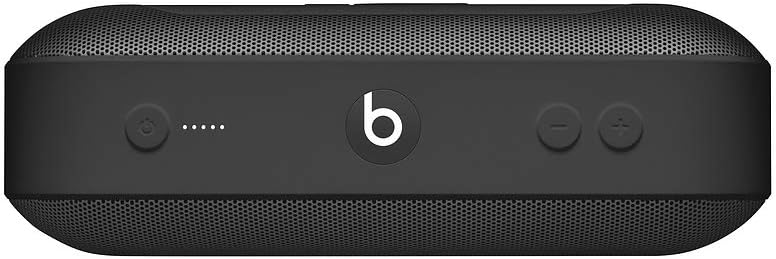
Image: Top view of the Beats Pill+ speaker, illustrating the layout of its power, battery indicator, Beats logo (play/pause), and volume controls.
Sound Features
The speaker utilizes a stereo active 2-way crossover system, which creates an optimized sound field for dynamic range and clarity across all music genres. The tweeter and woofer separation employs acoustic mechanics similar to those found in professional recording studios, ensuring high-fidelity audio.

Image: The Beats Pill+ speaker, emphasizing its ability to produce a sound larger than its physical size, with optimized dynamic range and clarity.
Beats Pill+ App Features
Download the Beats Pill+ app (available on compatible iOS and select Android devices) to unlock additional features:
- Amplify: Add a second Beats Pill+ into the mix and simultaneously play from both speakers for a sound that's twice as full.
- Stereo: Use two Beats Pill+ speakers as left and right output for an even more dynamic sound experience.
- DJ: Grab a friend with a Bluetooth source and take turns running the music.

Image: Two Beats Pill+ speakers demonstrating the 'Amplify Your Sound' feature, allowing for a fuller audio experience by connecting multiple units.
Maintenance
General Care
The Beats Pill+ is constructed with a soft rubber material. To maintain its appearance and longevity, regularly wipe the surface with a soft, damp cloth. Avoid using harsh chemicals or abrasive cleaners. For the white model, be aware that it may attract dirt and smudges more visibly over time, requiring more frequent cleaning.
Battery Care
To maximize battery lifespan, avoid fully discharging the speaker frequently. Charge the device regularly, even if not in constant use. Store the speaker in a cool, dry place when not in use for extended periods.
Troubleshooting
Common Issues and Solutions
- Speaker not turning on: Ensure the battery is charged. Connect the speaker to a power source and allow it to charge for a few minutes before attempting to power on again.
- Cannot pair via Bluetooth: Make sure the speaker is in pairing mode (Beats logo blinking). Turn off and on your device's Bluetooth, then try re-pairing. Ensure the speaker is not already connected to another device.
- No sound or low volume: Check the volume levels on both the speaker and your connected device. Ensure the speaker is properly paired and within Bluetooth range.
Specifications
| Feature | Detail |
|---|---|
| Model Name | Beats Pill+ |
| Speaker Type | Multi Room |
| Special Feature | Portable |
| Compatible Devices | Smartphone, Tablet |
| Color | Black |
| Battery Life | 12 Hours |
| Product Dimensions | 4.88"D x 8.66"W x 3.23"H |
| Item Weight | 1.28 Pounds |
| Is Waterproof | FALSE |
| Charging Time | 12 Hours |
| Wireless Communication Technology | Bluetooth, Airplay, NFC |
| Speaker Size | 2.8 Inches |
| Power Source | 110V |
| UPC | 888462537179 |
| Manufacturer | Apple |
What's in the Box
Your Beats Pill+ package includes the following items:
- Beats Pill+ speaker
- 1.5m Lightning to USB-A charging cable
- 12.5W PSU (Power Supply Unit)
- Quick Start Guide
- Warranty Card

Image: Contents of the Beats Pill+ box, including the speaker, charging cable, power supply unit, quick start guide, and warranty card.
Warranty and Support
Limited Warranty
The Beats Pill+ comes with a Limited Warranty. Please refer to the included Warranty Card for detailed terms and conditions regarding coverage and duration.
Additional Support
For further assistance or detailed instructions, you can refer to the official user manual available in PDF format:
Related documentsML4M2LL/A


Ask a question about this manual
Ask about setup, troubleshooting, compatibility, parts, safety, or missing instructions. Manuals+ will review the question and use this page’s manual context to help answer it.