
PowerStar YT4B-5 / GT4B-5-BS
PowerStar YT4B-5 / GT4B-5-BS 12V AGM Sealed Maintenance-Free Battery User Manual
Model: YT4B-5 / GT4B-5-BS
1. Introduction
This manual provides essential information for the safe and effective use of your PowerStar 12V AGM Sealed Maintenance-Free Battery. This battery is designed for various powersport applications, including motorcycles, ATVs, personal watercraft, and snowmobiles. Please read this manual thoroughly before installation and operation to ensure proper handling and to maximize battery life.
2. Safety Information
WARNING: Batteries contain sulfuric acid and produce explosive gases. Improper handling can cause severe injury or death. Always wear appropriate personal protective equipment (PPE) including eye protection and gloves.
- Keep batteries out of reach of children.
- Do not short-circuit battery terminals.
- Do not expose batteries to open flames, sparks, or excessive heat.
- Ensure adequate ventilation when charging or using batteries.
- In case of contact with acid, flush immediately with water and seek medical attention.
- Dispose of batteries according to local regulations. Do not incinerate.
3. Product Overview
The PowerStar YT4B-5 / GT4B-5-BS is a 12V 4AH (Ampere-Hour) Absorbed Glass Mat (AGM) sealed battery. It features a leak-free, sealed design that prevents corrosion and eliminates the need for acid addition, making it maintenance-free. Its robust construction provides resistance to shock, vibration, and heat.

Figure 1: Front view of the PowerStar 12V AGM Sealed Maintenance-Free Battery. This image shows the black rectangular battery with the 'PowerStar' logo and 'PM4B-BS MOTORCYCLE BATTERY' printed on its side, along with the positive and negative terminals on the top.
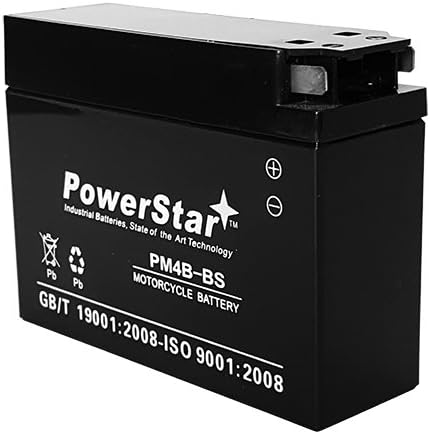
Figure 2: Side view of the PowerStar 12V AGM Sealed Maintenance-Free Battery. This image provides a different angle of the battery, highlighting its compact form factor and terminal configuration.
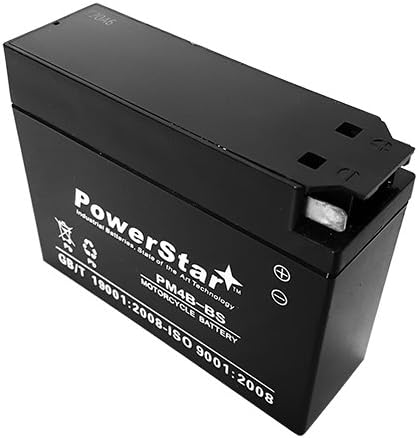
Figure 3: Top-down view of the PowerStar 12V AGM Sealed Maintenance-Free Battery. This perspective clearly shows the battery's top surface, including the terminal posts and their arrangement.
4. Setup and Installation
This battery is shipped fully charged and ready for installation. No initial acid filling or charging is typically required. Always refer to your vehicle's service manual for specific battery installation procedures.
- Safety First: Ensure the vehicle's ignition is off and remove the key. Wear appropriate safety gear, including eye protection and gloves.
- Locate Battery Compartment: Identify the battery location in your motorcycle, ATV, or other powersport vehicle.
- Disconnect Old Battery (if applicable): First, disconnect the negative (-) terminal cable, then the positive (+) terminal cable. Carefully remove the old battery.
- Inspect Battery Tray and Cables: Clean the battery tray and inspect battery cables for corrosion or damage. Replace damaged cables if necessary.
- Position New Battery: Place the PowerStar battery securely in the battery compartment. Ensure it is stable and does not shift during vehicle operation.
- Connect New Battery: First, connect the positive (+) terminal cable to the positive (+) battery post. Then, connect the negative (-) terminal cable to the negative (-) battery post. Ensure all connections are tight and secure.
- Secure Battery: Use any straps or clamps provided by your vehicle manufacturer to secure the battery in place.
- Verify Operation: Attempt to start the vehicle to confirm proper installation and battery function.
5. Operating Instructions
Once properly installed, the PowerStar AGM battery operates automatically as part of your vehicle's electrical system. It provides starting power and supports the vehicle's electrical components. No specific user interaction is required during normal operation.
6. Maintenance
The PowerStar AGM battery is designed to be maintenance-free. However, periodic checks can help ensure optimal performance and longevity.
- Terminal Inspection: Periodically check battery terminals for cleanliness and tightness. Clean any corrosion with a wire brush and a baking soda/water solution. Ensure connections are secure.
- Battery Case Inspection: Inspect the battery case for any signs of damage, cracks, or bulging. A damaged battery should be replaced immediately.
- Charging: If the vehicle is stored for extended periods (e.g., off-season), use a compatible powersport battery charger or a trickle charger designed for AGM batteries to maintain a full charge. Avoid overcharging.
- Storage: Store the battery in a cool, dry place when not in use. Ensure it is fully charged before storage and periodically check its voltage during storage, recharging if necessary.
7. Troubleshooting
If you experience issues with your battery, consult the following table for common problems and solutions.
| Problem | Possible Cause | Solution |
|---|---|---|
| Vehicle does not start or cranks slowly | Low battery charge | Charge the battery using a compatible AGM charger. Check vehicle charging system. |
| Corrosion on terminals | Loose or dirty connections | Clean terminals with a wire brush and baking soda solution. Tighten connections. |
| Battery case is bulging or cracked | Overcharging or internal damage | Immediately replace the battery. Do not attempt to use a damaged battery. |
| Battery loses charge quickly | Parasitic drain, faulty charging system, or end of battery life | Test vehicle's charging system and check for electrical drains. If battery is old, consider replacement. |
8. Specifications
| Feature | Specification |
|---|---|
| Brand | PowerStar |
| Model Number | YT4B-BS |
| Type | AGM Sealed Maintenance-Free |
| Voltage | 12V |
| Amperage (AH) | 4 AH |
| Cold Cranking Amps (CCA) | 30 CCA |
| Dimensions (L x W x H) | 4.45" x 1.5" x 3.35" (1.5"D x 4.45"W x 3.35"H) |
| Weight | 1.76 pounds |
| Number of Cells | 6 |
| Terminal Type | T1 |
| Replacement for | PTX4B-BS, GT4B-5, CYT4B-BS, M62T4B, YT4B-BS, WP4B-BS, CTR4A-BS, 62T4B, UT4B-BS, MBT4BB |
9. Warranty and Support
For warranty information and customer support, please refer to the documentation included with your purchase or visit the official PowerStar website. Keep your proof of purchase for warranty claims.
Ask a question about this manual
Ask about setup, troubleshooting, compatibility, parts, safety, or missing instructions. Manuals+ will review the question and use this page’s manual context to help answer it.