
esinkin W29
esinkin Bluetooth Audio Adapter User Manual
Model: W29
Brand: esinkin
Introduction
The esinkin Bluetooth Audio Adapter is designed to bring wireless music streaming capabilities to your existing sound systems. Connect it to computer speakers, home stereo systems, or other speaker systems via 3.5mm or RCA cables, and then pair it with your Bluetooth-enabled devices like smartphones or tablets to stream audio wirelessly. This adapter acts as a Bluetooth receiver, enabling your non-Bluetooth audio equipment to receive wireless signals.
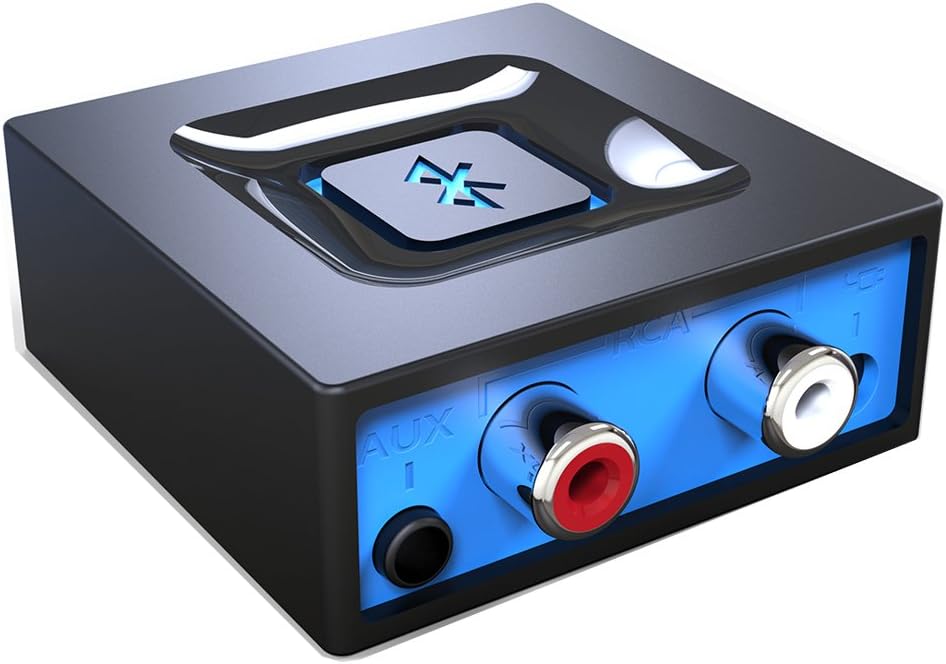
Image: Front view of the esinkin Bluetooth Audio Adapter, showing the AUX and RCA input ports.
What's in the Box
Upon opening the package, please ensure all the following items are present:
- 1 x Bluetooth receiver
- 1 x AC to DC Power adapter
- 1 x 3.5mm to RCA Audio cable
- 1 x USB Power cable
- 1 x User manual
 Image: All included accessories for the esinkin Bluetooth Audio Adapter.
Setup
Follow these steps to set up your esinkin Bluetooth Audio Adapter:
- Connect to Power: Connect the Bluetooth adapter to a power source using either the provided AC to DC power adapter or the USB cable. Note that this adapter does not have a built-in battery and requires continuous power.
- Connect to Audio System: Connect the adapter to your computer speakers, home stereo system, or other speaker system using either the 3.5mm audio cable or the RCA cable. Ensure the connection is secure.
- Power On: The device will power on when connected to power.
- Pairing Mode: Press and hold the large Bluetooth symbol button in the middle of the adapter for approximately 3 seconds until the blue light starts blinking. This indicates the adapter is in pairing mode.
- Pair with Your Device: On your Bluetooth-enabled device (smartphone, tablet, computer), go to the Bluetooth settings and search for available devices. Select the esinkin Bluetooth Audio Adapter from the list to pair. Once paired, the blue light on the adapter will become solid.

Image: Connection diagram for the esinkin Bluetooth Audio Adapter.

Image: Illustrates the function of the main Bluetooth button for power and playback control.
Operating Instructions
Once successfully set up and paired, operating the esinkin Bluetooth Audio Adapter is straightforward:
- Music Streaming: After pairing, music played on your Bluetooth-enabled device will stream wirelessly to the connected audio system.
- Playback Control:
- Click the Bluetooth symbol button once to Start/Pause music playback.
- Hold the Bluetooth symbol button for 3 seconds to turn the device ON/OFF.
- Automatic Reconnect: The adapter is designed to automatically reconnect with the last paired device when both are within range and Bluetooth is enabled.
- Wireless Range: The effective wireless range indoors (without significant obstacles) is approximately 30-40 feet (10-12 meters).

Image: Demonstrates wireless music streaming from mobile devices to a home stereo via the adapter.
Maintenance
To ensure the longevity and optimal performance of your esinkin Bluetooth Audio Adapter, please observe the following maintenance guidelines:
- Cleaning: Use a soft, dry cloth to clean the surface of the adapter. Avoid using liquid cleaners or abrasive materials.
- Power Protection: To protect the adapter from potential damage due to power surges or brown-outs, especially during electrical supply issues or storms, it is recommended to unplug the unit from the wall outlet.
- Storage: When not in use for extended periods, store the adapter in a cool, dry place away from direct sunlight and extreme temperatures.
- Continuous Operation: The adapter is designed to remain powered when connected to a power source. To completely turn it off, disconnect it from the power outlet.
Troubleshooting
If you encounter issues with your esinkin Bluetooth Audio Adapter, please refer to the following common solutions:
| Problem | Possible Cause / Solution |
|---|---|
| No sound or low volume: |
|
| Cannot pair with device: |
|
| Intermittent connection or poor range: |
|
| Adapter is always on: |
|
Specifications
| Feature | Detail |
|---|---|
| Brand | esinkin |
| Model Number | W29 |
| Wireless Type | Bluetooth |
| Item Weight | 3.52 ounces |
| Product Dimensions (LxWxH) | 1.97 x 1.97 x 0.94 inches |
| Color | Black |
| Compatible Devices | Smartphone, Tablet, Home Stereo System |
| Connector Type | RCA, Auxiliary (3.5mm) |
| Power Input | 5V === 150mA |
Warranty and Support
For warranty information or technical support, please refer to the documentation included with your purchase or visit the official esinkin website. Contact details for customer service are typically available on the product packaging or the brand's online support page.
For additional resources and product information, you may visit the esinkin Store on Amazon.
Related documentsW29


Ask a question about this manual
Ask about setup, troubleshooting, compatibility, parts, safety, or missing instructions. Manuals+ will review the question and use this page’s manual context to help answer it.