
1. Introduction
Thank you for choosing the Anker Soundcore Portable Bluetooth Speaker. This manual provides essential information for the safe and optimal use of your device. Please read it thoroughly before using the product and retain it for future reference.
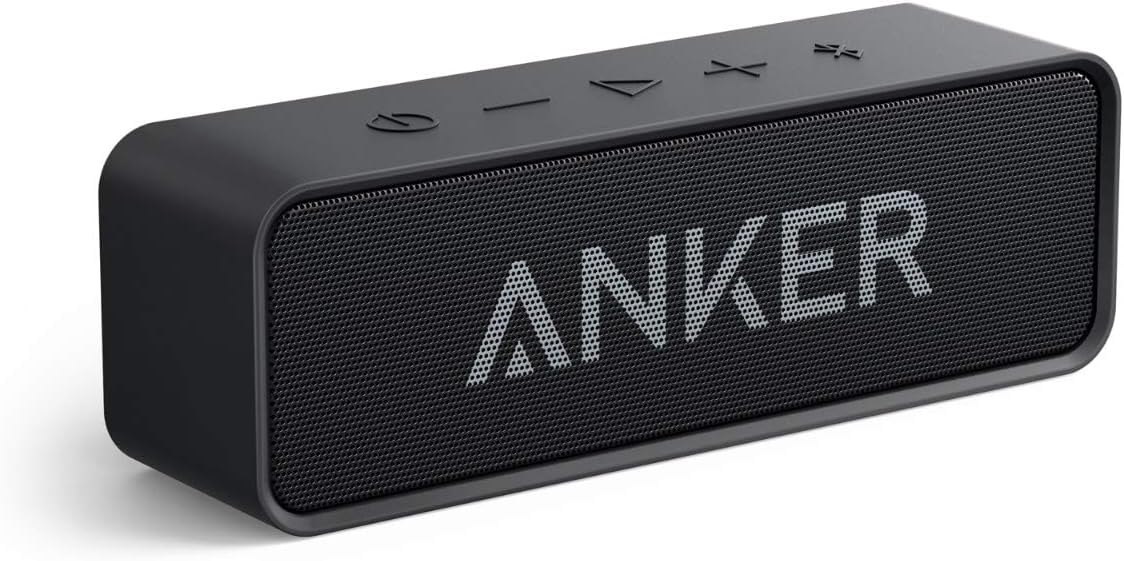
Image 1.1: Front view of the Anker Soundcore Portable Bluetooth Speaker. This compact, black speaker features a minimalist design with the Anker logo prominently displayed on the grille.
2. What's in the Box
Ensure all items are present upon unboxing:
- Anker Soundcore Bluetooth Speaker
- Micro USB Charging Cable
- User Guide
3. Product Overview
3.1 Controls and Indicators

Image 3.1: Top panel of the Anker Soundcore speaker showing control buttons. From left to right, these include Power, Volume Down, Play/Pause, Volume Up, and Bluetooth Pairing buttons.
- Power Button: Press and hold to turn the speaker on or off.
- Volume Down (-): Press to decrease volume.
- Play/Pause Button: Press to play or pause audio. Press twice to skip to the next track.
- Volume Up (+): Press to increase volume.
- Bluetooth Button: Press to enter Bluetooth pairing mode.
3.2 Ports

Image 3.2: Side view of the Anker Soundcore speaker, illustrating its compact size and the location of the charging port.
- Micro USB Port: For charging the speaker.
- AUX Input Port: For connecting to devices via a 3.5mm audio cable (cable not included).
4. Setup
4.1 Charging Your Speaker
- Connect the Micro USB charging cable to the speaker's Micro USB port and the other end to a USB wall adapter (not included) or a computer's USB port.
- The LED indicator will show charging status. A full charge typically takes approximately 2.5 hours.
- When fully charged, the LED indicator will change (e.g., turn solid or turn off, refer to specific LED behavior in your user guide).
4.2 Bluetooth Pairing

Image 4.1: A user holding the Anker Soundcore speaker while interacting with a smartphone, demonstrating seamless Bluetooth connection.
- Power on the speaker by pressing and holding the Power button. The Bluetooth indicator will flash blue, indicating it's in pairing mode.
- On your Bluetooth-enabled device (smartphone, tablet, etc.), enable Bluetooth and search for available devices.
- Select "Soundcore" from the list of devices.
- Once connected, the Bluetooth indicator will turn solid blue, and you will hear an audible confirmation.
- The speaker will automatically reconnect to the last paired device when powered on, if the device is within range.
4.3 AUX Connection
To use the speaker with a non-Bluetooth device:
- Connect one end of a 3.5mm audio cable (not included) to the AUX input port on the speaker.
- Connect the other end of the audio cable to the audio output jack of your device.
- The speaker will automatically switch to AUX mode.
5. Operating Your Speaker
5.1 Power On/Off
- To Power On: Press and hold the Power button for 2 seconds.
- To Power Off: Press and hold the Power button for 2 seconds.
5.2 Volume Control
- Press the + button to increase volume.
- Press the - button to decrease volume.
5.3 Music Playback
- Press the Play/Pause button once to play or pause music.
- Press the Play/Pause button twice to skip to the next track.
5.4 Hands-Free Calling
When connected via Bluetooth, the speaker's built-in microphone allows for hands-free calls.
- Answer/End Call: Press the Play/Pause button once.
- Reject Call: Press and hold the Play/Pause button for 2 seconds.
6. Maintenance
6.1 Cleaning
- Always power off the speaker before cleaning.
- Use a soft, dry, lint-free cloth to wipe the surface of the speaker.
- Do not use any abrasive cleaners, alcohol, benzene, or other chemicals, as these may damage the surface or internal components.
6.2 Storage
- Store the speaker in a cool, dry place away from direct sunlight and extreme temperatures.
- If storing for an extended period, charge the battery at least once every 3 months to maintain battery health.
7. Troubleshooting
| Problem | Solution |
|---|---|
| Speaker does not turn on. | Ensure the speaker is charged. Connect it to a power source and try again. |
| Cannot pair with Bluetooth device. |
|
| No sound or low volume. |
|
| Sound distortion. |
|
8. Specifications
| Brand | Anker |
| Model Name | A3102 |
| Connectivity Technology | Bluetooth 5.0 |
| Max Output Power | 6 Watts |
| Frequency Response | 20 Hz - 20 kHz |
| Battery Life | Up to 24 hours |
| Battery Capacity | 4400 mAh |
| Input Voltage | 5 Volts |
| Bluetooth Range | Up to 20 meters (66 feet) |
| Material | Rubber and Plastic |
| Dimensions (L x W x H) | 165 x 45 x 54 mm |
| Weight | 380 Grams |
| Microphone | Built-in (1) |
| Water Resistance | Waterproof |
9. Safety Information
- Do not expose the speaker to extreme temperatures (above 40°C or below 0°C).
- Avoid dropping or subjecting the speaker to strong impacts.
- Do not disassemble, repair, or modify the speaker yourself. Contact authorized service personnel.
- Keep the speaker away from water and liquids, even though it is waterproof, to prevent damage to ports when open.
- Do not use the speaker at excessively high volumes for prolonged periods to prevent hearing damage.
- Keep out of reach of children.
10. Warranty and Customer Support
10.1 Limited Warranty
Anker provides an 18-month worry-free warranty for this product, covering defects in materials and workmanship. This warranty does not cover damage caused by accident, misuse, abuse, improper installation, unauthorized repair, or modification.
10.2 Lifetime Support
Anker offers lifetime technical support for its products. If you encounter any issues or have questions regarding your Anker Soundcore speaker, please contact our customer service team.
10.3 Contact Us
For support, please refer to the contact information provided in your product packaging or visit the official Anker website. When contacting support, please have your product model (A3102) and purchase details ready.
You can also visit the Anker Store on Amazon for more information and support resources.


