
Introduction
This manual provides detailed instructions for the setup, operation, and maintenance of your Singing Machine SDL366 The VIBE Digital Karaoke System. This system allows you to create lasting memories with its Hi-Def digital karaoke capabilities, dual microphones, Bluetooth connectivity, and LED disco lights. Please read this manual thoroughly to ensure proper use and enjoyment of your device.
Package Contents
- Singing Machine SDL366 The VIBE Digital Karaoke System Unit
- Two (2) Wired Microphones
- One (1) 8GB USB Flash Drive (pre-loaded with 10 song downloads)
- Power Adapter (AC/DC)
The 8GB USB flash drive is included to playback downloaded HD karaoke videos and save your vocal recordings.
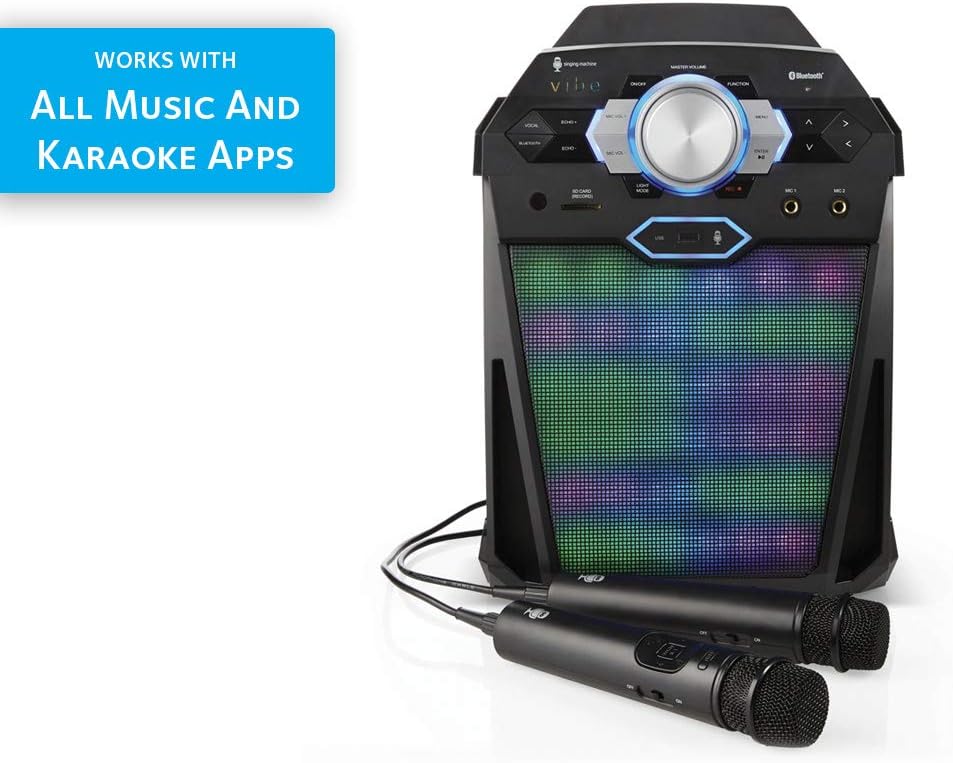
Image: The Singing Machine VIBE Party Pack showing the main unit, two microphones, and the included 8GB USB drive.
Setup
1. Power Connection
Connect the provided AC/DC power adapter to the DC 9V input jack on the back of the unit and plug the other end into a standard wall outlet.
2. Microphone Connection
Plug the wired microphones into the MIC 1 and MIC 2 input jacks located on the front panel of the karaoke system.

Image: The Singing Machine VIBE unit with two microphones plugged into the front jacks.
3. HDMI Output Connection
For displaying HD karaoke videos and scrolling lyrics on a larger screen, connect an HDMI cable (not included) from the HDMI output port on the back of the unit to an HDMI input on your television.
4. Bluetooth Pairing
To stream audio wirelessly from your compatible devices:
- Ensure the karaoke system is powered on.
- Activate Bluetooth on your mobile device.
- Search for and select "Singing Machine" from the list of available devices.
- Once paired, you can stream audio directly to the VIBE system.

Image: A graphic illustrating wireless digital audio streaming via Bluetooth from a compatible device to the karaoke system.
5. USB Flash Drive Usage
Insert the included 8GB USB flash drive into the USB port on the front of the unit. This allows you to play pre-loaded HD karaoke videos and record your vocal performances.
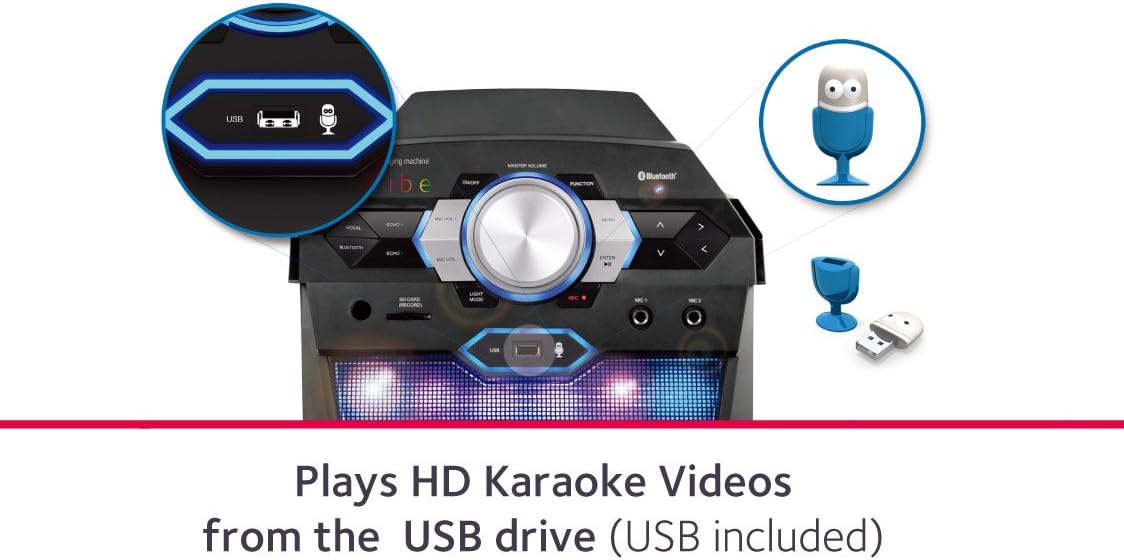
Image: A close-up view of the USB port on the karaoke machine, indicating its function for playing HD karaoke videos from a USB drive.
6. Mobile Device Cradle
Place your tablet or smartphone in the integrated cradle at the top of the unit for convenient viewing of lyrics or video content while performing.

Image: The Singing Machine VIBE with a tablet securely positioned in its top cradle, showing karaoke lyrics on the screen.
Operating Instructions
1. Power On/Off
Press the 'ON/OFF' button located on the control panel to power the unit on or off.
2. Master Volume Control
Adjust the large 'MASTER VOLUME' knob to control the overall sound output level of the system.
3. Microphone Volume Control
Use the 'MIC VOL +' and 'MIC VOL -' buttons to adjust the volume of the connected microphones independently.
4. Echo Control
Enhance your vocal performance by using the 'ECHO +' and 'ECHO -' buttons to add or reduce an echo effect to your voice.
5. LED Light Modes
Press the 'LIGHT MODE' button to cycle through various LED disco light patterns on the front speaker grille, synchronizing with the music.

Image: The Singing Machine VIBE karaoke system displaying its vibrant, multi-colored LED disco lights on the speaker grille.
6. Playing Music and Videos
- Bluetooth: Pair your device as described in the Setup section and play music or karaoke tracks from your preferred apps.
- USB: Insert the USB flash drive. Use the 'MENU' and arrow buttons on the control panel to navigate and select HD karaoke videos or recorded tracks.
- HDMI: When connected to a TV via HDMI, the system will output video and lyrics from USB or compatible mobile apps.
7. Recording Vocals
To record your vocal performances to the USB flash drive, press the 'REC' button on the control panel. Press it again to stop recording. Recorded files will be saved on the USB drive.
Video: An overview of the Singing Machine VIBE, demonstrating its features such as LED lights, dual microphone inputs, Bluetooth connectivity, HDMI output for lyrics, and USB recording capabilities.
Maintenance
To ensure the longevity and optimal performance of your Singing Machine VIBE, follow these maintenance guidelines:
- Cleaning: Use a soft, dry cloth to clean the exterior of the unit. Do not use liquid cleaners or abrasive materials.
- Storage: Store the unit in a cool, dry place away from direct sunlight and extreme temperatures.
- Microphones: Handle microphones with care. Avoid dropping them or exposing them to moisture.
Troubleshooting
If you encounter any issues with your Singing Machine VIBE, please refer to the following common solutions:
- No Power: Ensure the power adapter is securely connected to both the unit and a working wall outlet.
- No Sound: Check the Master Volume and individual Microphone Volume levels. Ensure your audio source (Bluetooth device, USB) is playing and its volume is up.
- Microphone Not Working: Verify microphones are securely plugged into the correct jacks. Check microphone power switches if applicable.
- Bluetooth Pairing Issues: Ensure Bluetooth is enabled on your device and the karaoke system is in pairing mode. Try unpairing and re-pairing the device.
- No Video/Lyrics on TV: Confirm the HDMI cable is correctly connected to both the karaoke system and the TV. Ensure the TV input is set to the correct HDMI source.
If problems persist, contact Singing Machine customer support for further assistance.
Specifications
| Feature | Detail |
|---|---|
| Model Number | SDL366 |
| Item Weight | 9.98 pounds |
| Product Dimensions | 7.7 x 11.4 x 16.1 inches |
| Color | Black |
| Compatible Devices | Tablet |
| Connector Type | HDMI, USB |
| Speaker Count | 1 |
| Power Source | Battery Powered (Note: Primary power is AC, battery for portability) |
| Special Feature | Wireless (Bluetooth) |
Warranty and Support
Specific warranty information and detailed support contacts are typically provided with your product packaging or on the manufacturer's official website. Please refer to these resources for the most accurate and up-to-date information regarding your Singing Machine SDL366 The VIBE Digital Karaoke System.


