
1. Introduction
Thank you for purchasing the Media-Tech Boombox BT MT 3145. This portable stereo speaker system combines Bluetooth connectivity, an integrated subwoofer, an MP3 player, and an FM radio into a compact, wooden cabinet design. It is designed for versatile audio playback, suitable for home, office, or outdoor use. This manual provides essential information for the safe and efficient operation of your device.
2. Safety Information
Please read these safety instructions carefully before using the device and keep them for future reference. Incorrect use may result in electric shock, fire, or damage to the device.
- Do not expose the device to rain, moisture, or extreme temperatures.
- Avoid placing the device near heat sources such as radiators, stoves, or other heat-producing appliances.
- Do not block any ventilation openings.
- Use only attachments/accessories specified by the manufacturer.
- Disconnect the device from the power source during lightning storms or when unused for long periods.
- Do not attempt to repair the device yourself. Refer all servicing to qualified service personnel.
3. Product Overview
The Media-Tech Boombox BT MT 3145 features a compact design with a handle for portability. It includes a main control panel, various input ports, and a built-in subwoofer for enhanced bass.

Image: Front and side view of the Media-Tech Boombox BT MT 3145, showing the main speaker, control panel, and side subwoofer.
Controls and Ports:
- MODE/⑁ Button: Power On/Off and mode selection (Bluetooth, FM, USB, MicroSD, AUX).
- Volume Knob: Adjusts the master volume.
- ◀◀ / ▶▶ Buttons: Skip tracks (MP3), tune radio stations (FM).
- ▶II Button: Play/Pause (MP3), Auto-scan (FM).
- TF Slot: For MicroSD memory cards.
- USB Port: For USB flash drives.
- AUX Input: 3.5mm jack for external audio devices.
- DC 5V Port: Power input for charging and operation.
- Telescopic Antenna: For FM radio reception.
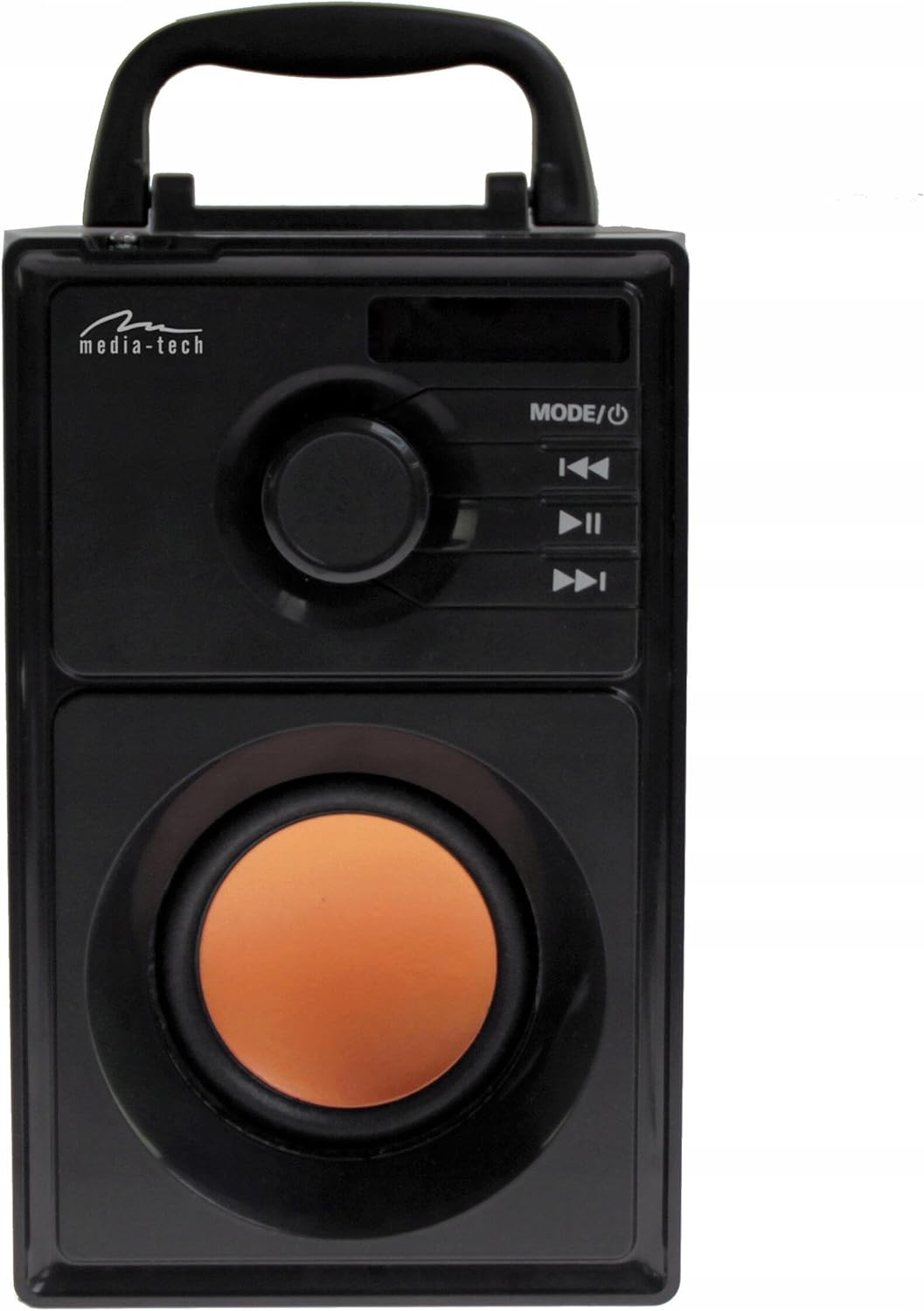
Image: Front view of the Boombox, highlighting the control panel with the mode/power button, volume knob, and playback controls.
Remote Control:
The device comes with a remote control for convenient operation from a distance.
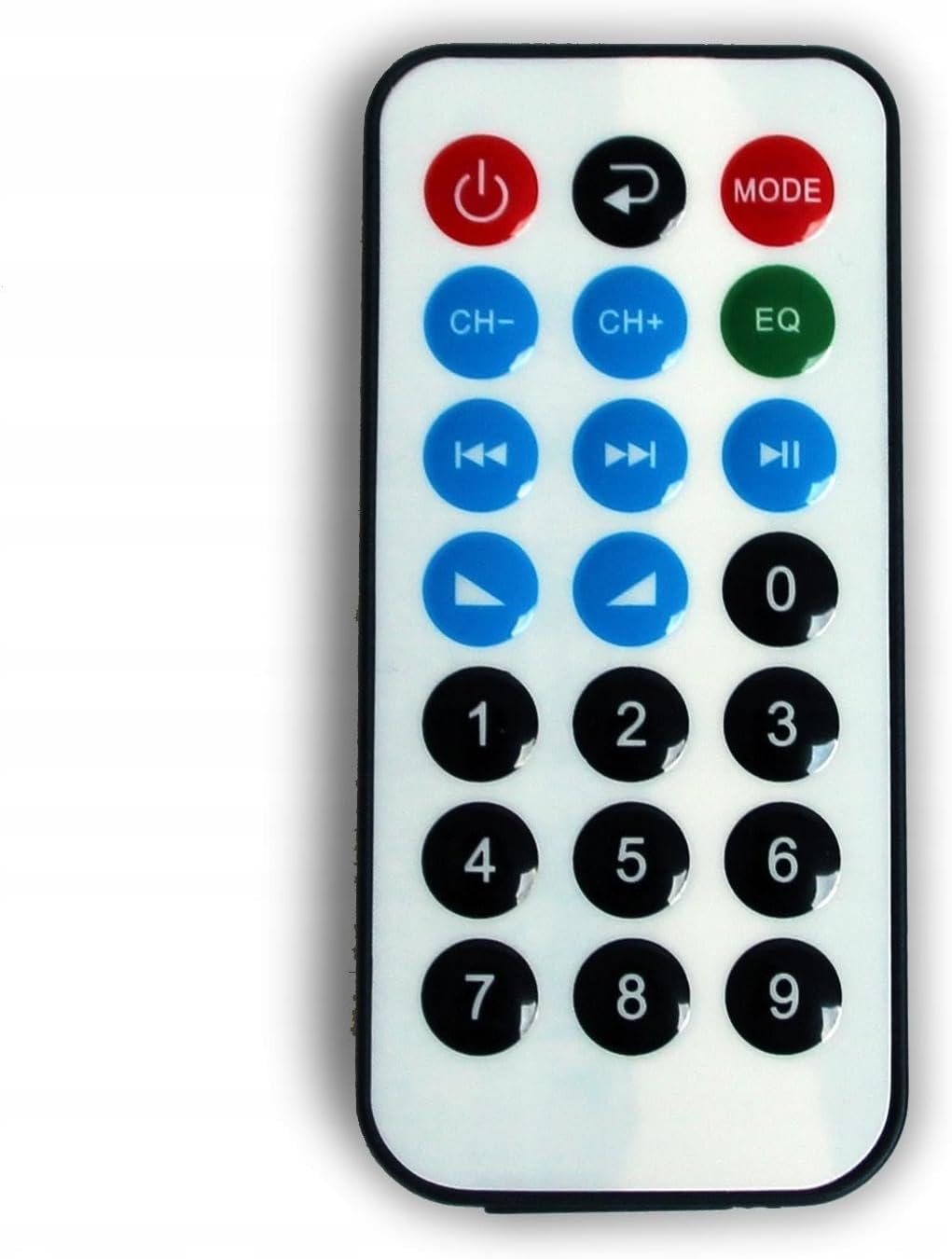
Image: The remote control for the Media-Tech Boombox, showing buttons for power, mode, channel/track selection, equalizer, and numeric input.
4. Setup
4.1 Unpacking
Carefully remove the Boombox from its packaging. Ensure all components are present: the Boombox unit, remote control, and charging cable.
4.2 Charging the Battery
The Boombox has a built-in Li-ion battery. Before first use, fully charge the device.
- Connect the provided USB charging cable to the DC 5V port on the Boombox.
- Connect the other end of the USB cable to a standard 5V USB power adapter (not included) or a computer USB port.
- The LED display will indicate charging status. Once fully charged, the indicator will change or turn off.
A full charge provides approximately 6 hours of operation, depending on volume level and usage mode.
5. Operating Instructions
5.1 Power On/Off
Press and hold the MODE/⑁ button on the control panel or the power button on the remote control to turn the device on or off.
5.2 Mode Selection
Press the MODE/⑁ button repeatedly to cycle through the available modes: Bluetooth, FM Radio, USB, MicroSD, and AUX.
5.3 Bluetooth Mode
- Switch the Boombox to Bluetooth mode. The LED display will show 'BT' and a pairing indicator will flash.
- Enable Bluetooth on your smartphone, tablet, or other Bluetooth-enabled device.
- Search for available devices and select 'MT3145' from the list.
- Once paired, the Boombox will emit a confirmation sound, and the Bluetooth indicator will stop flashing.
- You can now play audio wirelessly from your connected device. Use the playback controls on the Boombox or remote to manage your music.
5.4 FM Radio Mode
- Switch the Boombox to FM Radio mode.
- Extend the telescopic antenna fully for optimal reception.
- Press and hold the ▶II button to initiate an automatic station search. The radio will scan and save available stations (87.6-108MHz).
- Use the ◀◀ and ▶▶ buttons to navigate through the saved stations.

Image: The Boombox with its telescopic antenna extended, ready for FM radio reception.
5.5 MP3 Player Mode (USB/MicroSD)
- Insert a USB flash drive into the USB port or a MicroSD card into the TF slot.
- Switch the Boombox to USB or MicroSD mode. The device will automatically detect and begin playing MP3 files.
- Use the ◀◀, ▶▶, and ▶II buttons to control playback (previous/next track, play/pause).
5.6 AUX Mode
- Connect an external audio device (e.g., smartphone, MP3 player) to the AUX input using a 3.5mm audio cable (not included).
- Switch the Boombox to AUX mode.
- Audio will now be played through the Boombox. Control playback from your external device.
5.7 Volume Control
Rotate the volume knob on the control panel to adjust the master volume. Volume can also be adjusted using the remote control.
6. Maintenance
6.1 Cleaning
Wipe the exterior of the Boombox with a soft, dry cloth. Do not use abrasive cleaners, waxes, or solvents as they may damage the finish.
6.2 Battery Care
To prolong battery life, avoid fully discharging the battery frequently. Recharge the device when the battery level is low. If storing the device for an extended period, charge it to approximately 50% every few months.
6.3 Storage
Store the Boombox in a cool, dry place away from direct sunlight and extreme temperatures when not in use.
7. Troubleshooting
If you encounter issues with your Boombox, refer to the following common problems and solutions:
| Problem | Possible Cause | Solution |
|---|---|---|
| Device does not power on. | Battery is discharged. | Connect the device to a power source and charge the battery. |
| No sound. | Volume is too low or muted. Incorrect mode selected. | Increase the volume. Ensure the correct input mode (Bluetooth, FM, USB, MicroSD, AUX) is selected. |
| Bluetooth pairing fails. | Device is not in pairing mode. Boombox is already connected to another device. | Ensure the Boombox is in Bluetooth pairing mode. Disconnect from any previously paired devices. Move devices closer together. |
| Poor FM radio reception. | Antenna not extended. Weak signal. | Fully extend the telescopic antenna. Try repositioning the device for better signal. |
| USB/MicroSD not playing. | Unsupported file format. Corrupted media. | Ensure files are in MP3 format. Try a different USB drive or MicroSD card. |
8. Specifications
- Model: MT3145
- Bluetooth Version: 2.1 + EDR
- Bluetooth Protocols: A2DP, AVRCP
- FM Radio Frequency: 87.6-108MHz
- Audio Playback: MP3 Player, MicroSD, USB, AUX
- Power Output: RMS 15W
- Speakers: 3" Subwoofer, 2 x 2" High-Tone Speakers
- Frequency Response: 80 ~ 20,000 Hz
- Power Input: DC 5V (via USB port)
- Battery: Built-in Li-ion, up to 6 hours operation
- Display: LED Information Display
- Antenna: Telescopic
- Cabinet Material: Wood
- Dimensions: 120 x 195 x 165 mm
- Weight: 1.24 kg
9. Warranty and Support
9.1 Warranty
This Media-Tech Boombox BT MT 3145 comes with a 2-year warranty from the date of purchase. This warranty covers manufacturing defects under normal use. It does not cover damage caused by misuse, accidents, unauthorized modifications, or normal wear and tear.
9.2 Customer Support
For technical assistance, warranty claims, or further inquiries, please contact your retailer or the Media-Tech customer support service. Refer to the product packaging or the Media-Tech official website for contact information.


