
Introduction
Thank you for choosing the U-Turn Audio Orbit Plus Turntable. This manual provides detailed instructions for setting up, operating, and maintaining your turntable to ensure optimal performance and longevity. The Orbit Plus is designed for superior audio fidelity, featuring an acrylic platter for improved speed consistency and clearer playback, an Ortofon OM5E cartridge for detailed sound, and a precision OA2 gimbal tonearm for accurate tracking.

Figure 1: U-Turn Audio Orbit Plus Turntable (Blue) with dust cover.
What's in the Box
Before you begin, please ensure all components are present and accounted for:
- U-Turn Audio Orbit Plus Turntable Unit
- Acrylic Platter
- Ortofon OM5E Cartridge (pre-installed on tonearm)
- Drive Belt
- Dust Cover
- Power Adapter
- RCA Cables
- User Manual (this document)
Setup Guide
Follow these steps to set up your Orbit Plus Turntable:
1. Unpacking and Placement
Carefully remove all components from the packaging. Place the turntable on a stable, level surface away from direct sunlight, heat sources, and areas with high vibration.
2. Platter and Belt Installation
Place the acrylic platter onto the spindle. Locate the drive belt and carefully stretch it around the motor pulley and the inner rim of the platter. Ensure the belt is not twisted.

Figure 2: Top view illustrating the external belt drive system.
3. Tonearm and Cartridge Setup
The Ortofon OM5E cartridge is pre-installed. Ensure the tonearm is unlocked from its rest. Adjust the counterweight by rotating it until the tonearm floats parallel to the platter. Then, set the tracking force to 1.75 grams by rotating the counterweight indicator ring. Set the anti-skate dial to 1.75 as well.

Figure 3: Detailed view of the precision OA2 gimbal tonearm.
4. Dust Cover Installation
Carefully attach the dust cover hinges to the corresponding slots on the turntable base. The dust cover protects your turntable from dust and debris when not in use.

Figure 4: Turntable with the clear dust cover in an open position.
5. Connecting to Audio System
Connect the RCA cables from the turntable's output to your amplifier or powered speakers. If your amplifier has a dedicated phono input, use that. Otherwise, you may need an external phono preamplifier.
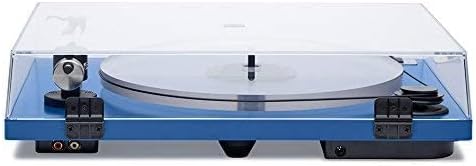
Figure 5: Rear panel with RCA output jacks for connecting to an audio system.
Operating Instructions
1. Power On
Connect the power adapter to the turntable and a wall outlet. Flip the power switch to the 'On' position. The platter will begin to spin.
2. Playing a Record
Place a record on the platter. Gently lift the tonearm using the tonearm lift lever. Position the tonearm over the desired track on the record. Slowly lower the tonearm lift lever to gently place the stylus onto the record groove. The music will begin to play.
3. Stopping Playback
At the end of the record, or when you wish to stop playback, lift the tonearm using the tonearm lift lever. Return the tonearm to its rest and secure it with the tonearm lock. Flip the power switch to 'Off'.
Maintenance
1. Cleaning the Turntable
Regularly wipe the dust cover and plinth with a soft, dry cloth. For the acrylic platter, use a microfiber cloth and a mild acrylic cleaner if necessary. Avoid abrasive cleaners.
2. Stylus Care
Gently clean the stylus regularly using a soft stylus brush, brushing from back to front. Replace the stylus when you notice a degradation in sound quality or after approximately 1,000 hours of playback.
3. Belt Replacement
The drive belt may stretch or degrade over time. If you notice inconsistent platter speed, it may be time to replace the belt. Contact U-Turn Audio support for replacement belts.
Troubleshooting
No Sound
- Ensure all audio cables are securely connected.
- Verify your amplifier/receiver is set to the correct input (Phono if applicable).
- Check that the stylus guard is removed and the stylus is properly seated.
Distorted Sound
- Re-check tonearm tracking force and anti-skate settings.
- Clean the stylus.
- Ensure records are clean and free of dust.
Inconsistent Platter Speed
- Check that the drive belt is properly installed and not twisted.
- The drive belt may need replacement.
Specifications
- Brand: U-Turn Audio
- Model Name: Orbit Plus
- Model Number: R100BUAOR5
- Color: Blue
- Material: Acrylic, Plastic/Painted Metal
- Item Weight: 0.4 Pounds
- Maximum Rotational Speed: 45 RPM
- Special Feature: Acrylic Platter
- Power Source: Corded Electric
- Connectivity Technology: RCA
- Included Cartridge: Ortofon OM5E
Warranty and Support
For warranty information, technical support, or to purchase replacement parts, please visit the official U-Turn Audio website or contact their customer service directly. Keep your proof of purchase for warranty claims.
