
Minidiva SB0001-Black-UK
Minidiva E02 Smart Bracelet User Manual
Model: SB0001-Black-UK
Brand: Minidiva
1. Introduction
Thank you for choosing the Minidiva E02 Smart Bracelet. This manual provides essential information for setting up, operating, and maintaining your device. Please read it thoroughly before use to ensure proper functionality and to maximize your experience.
2. Safety Information
- Do not expose the device to extreme temperatures or direct sunlight for prolonged periods.
- The device is life waterproof only. Do not use it for diving, swimming, or in hot water.
- Keep the device away from strong magnetic fields.
- Do not attempt to disassemble or repair the device yourself. Contact customer support if issues arise.
- Use only the specified charging method (Standard PC USB interface 5V).
3. Package Contents
Upon opening your Minidiva E02 Smart Bracelet package, you should find the following items:
- 1 x Minidiva E02 Smart Bracelet
- 1 x User Manual (this document)
4. Setup Guide
4.1. Charging the Bracelet
Before first use, fully charge your Minidiva E02 Smart Bracelet. The bracelet features a standard PC USB interface for charging.

Image: The Minidiva E02 Smart Bracelet showing its integrated USB charging port, which can be directly plugged into a standard USB port for charging.
- Locate the USB charging interface on the bracelet.
- Plug the bracelet directly into a standard 5V USB port (e.g., computer USB port, USB wall adapter).
- The display will indicate charging status. A full charge typically provides up to 180 days of standby time.
4.2. App Installation and Pairing
To unlock the full features of your smart bracelet, you need to install the companion application on your smartphone and pair the devices via Bluetooth.
- Download the Application: Scan the QR code provided in the physical instruction manual included with your bracelet, or search for the official Minidiva E02 app in your smartphone's app store. The application supports English and Chinese languages.
- Compatibility: Ensure your smartphone meets the minimum requirements: Android 4.3 or above, or iOS 7.0 or above, with Bluetooth 4.0 enabled.
- Enable Bluetooth: On your smartphone, go to your settings and ensure Bluetooth is turned on.
- Open the App: Launch the Minidiva E02 application on your smartphone.
- Pairing: Follow the in-app instructions to search for and connect to your Minidiva E02 Smart Bracelet. The app will guide you through the pairing process.
5. Operating Instructions
The Minidiva E02 Smart Bracelet offers various functions to help you monitor your health and stay connected.
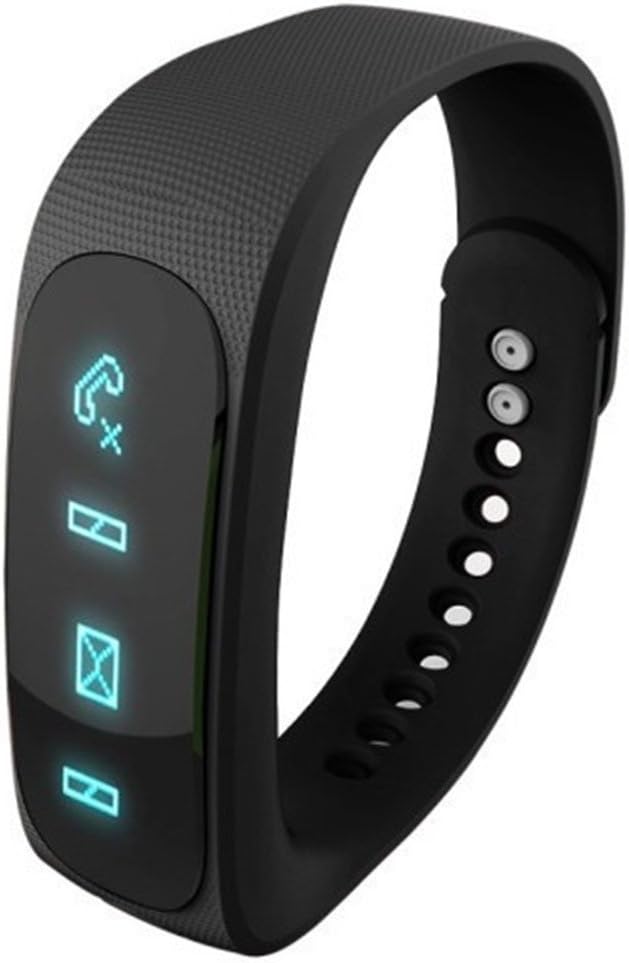
Image: The Minidiva E02 Smart Bracelet showing its OLED display with various notification icons, including incoming calls and messages.
5.1. Basic Display Functions
- Time/Date/Week/Battery State: The bracelet's 0.84-inch OLED display shows the current time, date, day of the week, and battery level.

Image: The Minidiva E02 Smart Bracelet displaying the time '15:58' on its OLED screen, indicating its primary function as a timepiece.
5.2. Notification Features
- Caller ID: When connected to an Android phone, the bracelet will display the caller's ID. For iOS phones, it will display "INCOMING CALL". Note: The bracelet cannot dial or answer calls.
- SMS Notice: Receive notifications for incoming SMS messages directly on your bracelet.
- Vibration Reminder: The built-in motor provides vibration alerts for incoming calls, SMS messages, long periods of sitting (sedentary reminder), and alarm clock notifications.
5.3. Health and Activity Tracking
- Pedometer: The bracelet records your steps, calculates calories burned, and tracks mileage throughout the day. This data provides a comprehensive overview of your daily physical activity.
- Sleeping Monitor: Set the bracelet to sleeping monitoring mode before going to bed. It accurately detects your actual sleep time, deep sleep and shallow sleep periods, short awakenings, and the number of activities during sleep. You can sync this data to your phone to review your sleep quality and adjust your schedule accordingly.

Image: A visual representation of the Minidiva E02 Smart Bracelet's sleep monitoring capabilities, showing a person sleeping with the bracelet and icons indicating various sleep metrics.
5.4. Smart Features
- Alarm Clock: Set alarms within the companion application. The bracelet will vibrate to remind you at the set time.
- Remote Camera: Use the bracelet as a remote shutter for your phone's camera. Double-click or hold the key on the bracelet to take pictures when the camera interface is open on your phone.

Image: A family posing for a photo, illustrating the remote camera function of the Minidiva E02 Smart Bracelet, which allows users to trigger their smartphone's camera remotely.
6. Maintenance
To ensure the longevity and optimal performance of your Minidiva E02 Smart Bracelet, follow these maintenance guidelines:
- Cleaning: Wipe the bracelet regularly with a soft, dry cloth. If necessary, use a slightly damp cloth, but ensure it is completely dry before wearing or charging.
- Water Resistance: The bracelet is designed with normal life waterproof capabilities. This means it can withstand splashes, rain, and hand washing. However, it is NOT suitable for showering, swimming, diving, or any prolonged submersion in water. Avoid exposing it to hot water or steam.
- Storage: Store the bracelet in a cool, dry place when not in use. Avoid direct sunlight and extreme temperatures.
7. Troubleshooting
If you encounter issues with your Minidiva E02 Smart Bracelet, please refer to the following common problems and solutions:
| Problem | Possible Cause / Solution |
|---|---|
| Bracelet does not turn on or respond. | Battery may be depleted. Charge the bracelet for at least 30 minutes. Ensure the USB connection is secure. |
| Cannot pair with smartphone. | 1. Ensure Bluetooth is enabled on your phone. 2. Make sure the bracelet is charged and within range. 3. Restart both the bracelet and your phone. 4. Check app permissions and ensure it has access to Bluetooth. 5. Verify phone compatibility (Android 4.3+ / iOS 7.0+ with Bluetooth 4.0). |
| Notifications are not received. | 1. Ensure the bracelet is successfully paired with the app. 2. Check notification settings within the app and on your phone (e.g., app notifications enabled, DND mode off). 3. Ensure the app is running in the background. |
| Activity data is inaccurate. | Ensure the bracelet is worn correctly and securely on your wrist. Calibrate the pedometer if the app provides such an option. |
| App crashes or freezes. | Try clearing the app's cache and data, or reinstalling the app. Ensure your phone's operating system is up to date. |
If the problem persists after trying these solutions, please contact Minidiva customer support for further assistance.
8. Specifications
| Feature | Specification |
|---|---|
| Model Number | SB0001-Black-UK |
| Display | 0.84 inches OLED (96x16 resolution) |
| Screen Size | 1.57 Inches (diagonal) |
| Connectivity | Bluetooth 4.0 BLE, USB |
| Battery Capacity | 60mA |
| Standby Time | Up to 180 days |
| Charging Interface | Standard PC USB interface 5V |
| Operating System Compatibility | Android 4.3 or above, iOS 7.0 or above |
| Sensor | Gravity sensor |
| Motor | Built-in, for vibration reminders |
| Water Resistance | Normal life waterproof (not for diving or swimming) |
| Item Weight | 90 g |
| Colour | Black |
9. Warranty and Support
Your Minidiva E02 Smart Bracelet comes with a standard manufacturer's warranty. Please refer to the warranty card included in your package for specific terms and conditions. For technical support, troubleshooting assistance, or warranty claims, please contact your retailer or the Minidiva customer service department.
Keep your purchase receipt as proof of purchase for warranty purposes.
Ask a question about this manual
Ask about setup, troubleshooting, compatibility, parts, safety, or missing instructions. Manuals+ will review the question and use this page’s manual context to help answer it.