
1. Introduction
This manual provides essential instructions for the safe and efficient use of your ZTE Axon A1G123 unlocked smartphone. Please read this guide thoroughly before operating your device to ensure optimal performance and longevity. Keep this manual for future reference.
2. Package Contents
Verify that your package contains the following items:
- ZTE Axon A1G123 Smartphone
- Headphones
- USB Cable (for charging and data transfer)
- Power Adapter
- Quick Start Guide
3. Device Overview
Familiarize yourself with the physical components of your ZTE Axon A1G123.

Figure 3.1: Front View of ZTE Axon A1G123
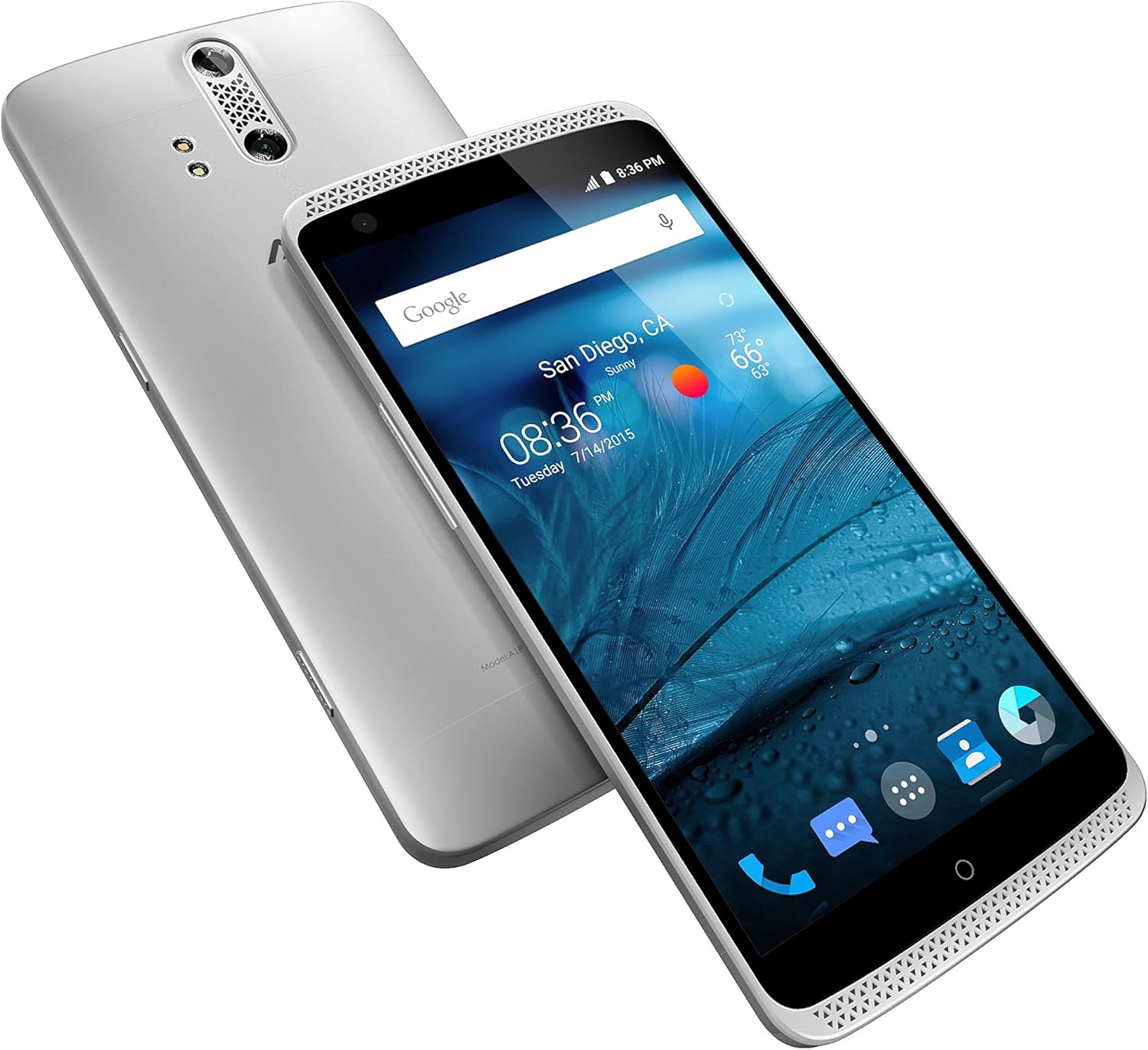
Figure 3.2: Angled View of ZTE Axon A1G123 (Front and Back)
Key Components:
- Front Camera: For selfies and video calls.
- Earpiece: For listening during calls.
- Display: 5.5-inch TFT-LCD touchscreen.
- Volume Buttons: Adjust media and call volume.
- Power Button: Turn the device on/off, lock/unlock the screen.
- Dual Rear Camera: For high-quality photos and videos.
- Fingerprint Sensor: For secure unlocking and authentication (if applicable).
- USB Port: For charging and connecting to a computer.
- Headphone Jack: For connecting the included headphones or other audio devices.
- Speaker Grilles: For audio output.
4. Setup
4.1. Inserting the SIM Card
- Ensure the phone is powered off.
- Locate the SIM card tray on the side of the device.
- Use the provided SIM ejector tool (or a small paperclip) to open the tray.
- Place your nano-SIM card into the tray with the gold contacts facing down.
- Carefully push the tray back into the slot until it is flush with the device.
4.2. Charging the Battery
Before first use, fully charge the device battery. Connect the USB cable to the phone's USB port and the power adapter, then plug the adapter into a wall outlet. The charging indicator will appear on the screen.
4.3. Powering On/Off
- To Power On: Press and hold the Power button until the ZTE logo appears.
- To Power Off: Press and hold the Power button until the power options menu appears, then select "Power off."
4.4. Initial Setup Wizard
Upon first power-on, follow the on-screen instructions to configure basic settings such as language, Wi-Fi network, Google account, and security options.
5. Operating Instructions
5.1. Basic Navigation
- Touchscreen Gestures: Tap, double-tap, swipe, pinch-to-zoom.
- Home Screen: Access apps, widgets, and notifications.
- Notification Panel: Swipe down from the top of the screen to view notifications and quick settings.
5.2. Making and Receiving Calls
- To Make a Call: Open the Phone app, enter the number, and tap the call icon.
- To Answer a Call: Swipe the answer icon when the phone rings.
- To End a Call: Tap the end call icon.
5.3. Messaging
Use the Messaging app to send and receive text (SMS) and multimedia (MMS) messages. Tap the "+" icon to compose a new message.
5.4. Camera Usage
The ZTE Axon A1G123 features a dual-lens rear camera for enhanced photography. Open the Camera app to access various modes and settings.
- Taking Photos: Tap the shutter button.
- Recording Videos: Switch to video mode and tap the record button.
- Front Camera: Tap the camera switch icon for selfies.
5.5. Audio Features
The device supports high-fidelity audio output. Connect the included headphones for an optimized listening experience. Adjust audio settings in the Settings menu under "Sound & notification."
5.6. Connectivity
- Wi-Fi: Go to Settings > Wi-Fi to connect to available wireless networks.
- Bluetooth: Go to Settings > Bluetooth to pair with other Bluetooth devices like headsets or speakers.
- NFC: Near Field Communication allows for quick data exchange with compatible devices. Enable it in Settings > More.
6. Maintenance
6.1. Battery Care
- Avoid extreme temperatures.
- Do not leave the device charging for extended periods after it is fully charged.
- For optimal battery life, avoid completely draining the battery frequently.
6.2. Software Updates
Periodically check for software updates to ensure your device has the latest features and security enhancements. Go to Settings > About phone > System updates. Updates may improve device performance and address known issues.
6.3. Cleaning Your Device
Use a soft, lint-free cloth to clean the screen and body of the phone. Avoid using harsh chemicals or abrasive materials, which can damage the device's finish.
7. Troubleshooting
If you encounter issues with your ZTE Axon A1G123, refer to the following common solutions:
- Device Not Responding: Press and hold the Power button for approximately 10-15 seconds to force a restart.
- Screen Unresponsive: Ensure the screen is clean and dry. If the issue persists, try restarting the device.
- Overheating: If the device feels excessively warm, close background applications, reduce screen brightness, and avoid using it while charging. Prolonged heavy usage, especially with demanding applications, can cause temporary heating.
- Poor Call Quality/Dropped Calls: Check your network signal strength. Move to an area with better reception. Ensure your SIM card is properly inserted.
- Battery Draining Quickly: Reduce screen brightness, disable unused connectivity features (Wi-Fi, Bluetooth, GPS), and close unnecessary background apps.
- Lagging Performance: Clear cache data from apps, uninstall unused applications, and ensure sufficient free storage space. A factory reset (see below) can also resolve persistent performance issues.
- Camera Issues: Ensure the camera lens is clean. Restart the camera app or the device.
7.1. Factory Reset
A factory reset will erase all data from your phone and restore it to its original factory settings. Back up important data before proceeding.
- Go to Settings > Backup & reset.
- Select "Factory data reset."
- Confirm your decision. The device will restart and begin the reset process.
8. Specifications
| Feature | Specification |
|---|---|
| Model Name | Axon |
| Item Model Number | A1G123 |
| Brand | ZTE |
| Color | Chromium Silver |
| Operating System | Google Android (initial release) |
| CPU Speed | 2.4 GHz Quad-core |
| Screen Size | 5.5 Inches |
| Display Technology | TFT-LCD |
| Memory Storage Capacity | 32 GB |
| Camera Features | Dual Rear, Front |
| Connectivity Technologies | Wi-Fi, Bluetooth, NFC |
| Wireless Network Technology | CDMA, GSM, LTE |
| Batteries | 1 Lithium Ion battery (included) |
| Product Dimensions | 6.09 x 0.38 x 2.96 inches |
| Item Weight | 1.1 pounds |
| Manufacturer | ZTE(USA) Wireless |
9. Warranty and Support
For warranty information and technical support, please refer to the warranty card included with your product or visit the official ZTE website. Keep your proof of purchase for warranty claims.


