1. Introduction
This manual provides essential instructions for the proper setup, operation, and maintenance of your JMK 007 Mini Pinhole Wireless Colour Camera Surveillance Kit. Please read this manual thoroughly before using the product to ensure optimal performance and safety.
2. Package Contents
Verify that all items listed below are present in your package:
- 1 x Mini Pinhole Wireless Camera
- 1 x Radio AV Receiver
- 2 x AC/DC Power Adapters
- 1 x Audio/Video (AV) Cable Set
3. Safety Information
Observe the following safety precautions to prevent damage to the device or injury to yourself:
- Do not expose the camera or receiver to water or excessive moisture.
- Use only the provided power adapters. Using unauthorized adapters may damage the device and void the warranty.
- Keep the device away from extreme temperatures and direct sunlight.
- Do not attempt to open or repair the device yourself. Refer all servicing to qualified personnel.
- Ensure proper ventilation for the receiver during operation.
4. Setup Instructions
Follow these steps to set up your wireless surveillance system:
- Connect the Camera:
Connect the mini pinhole camera to one of the provided AC/DC power adapters. An optional 9V battery (not included) can be used with the battery clip for portable power. - Position the Camera:
Place the camera in the desired surveillance location. Its compact size allows for discreet placement. Ensure the camera lens has a clear view of the area you wish to monitor. - Connect the Receiver:
Connect the Radio AV Receiver to its dedicated AC/DC power adapter. - Connect Receiver to Display:
Using the Audio/Video (AV) cable set, connect the 'VIDEO OUT' and 'AUDIO OUT' ports on the receiver to the corresponding 'VIDEO IN' and 'AUDIO IN' ports on your television or monitor. Match the yellow connector for video and the white/red connectors for audio. - Power On:
Plug both power adapters into electrical outlets. The power indicator on the receiver should illuminate. - Select Input:
On your television or monitor, select the correct AV input channel (e.g., AV1, Video In, Line In) to view the camera feed.
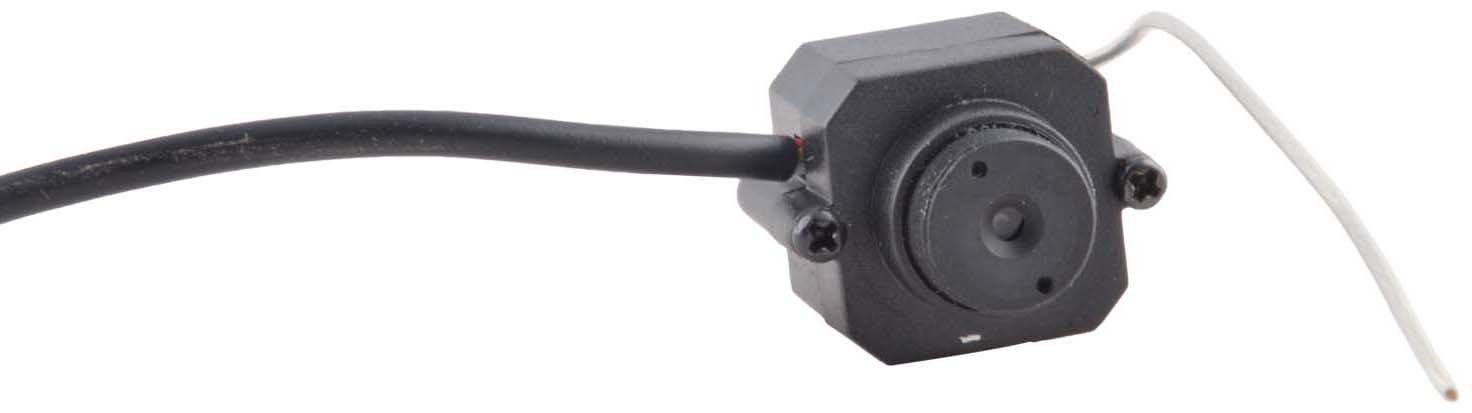
Image 1: The compact JMK mini pinhole camera unit.

Image 2: The mini pinhole camera connected to its AV output cable.

Image 3: The JMK Radio AV Receiver with antenna and AV output ports.
5. Operating Instructions
Once the system is set up and powered on, the camera will automatically transmit video and audio to the receiver. The effective wireless range is approximately 30-60 feet (9-18 meters) indoors, and up to 50 meters (164 feet) in open, unblocked spaces.
- Viewing the Feed: Ensure your display device is set to the correct AV input channel. The camera's live feed will be displayed.
- Audio Monitoring: The camera features a built-in microphone for audio monitoring. Ensure your display device's volume is adjusted appropriately.
- Adjusting Receiver: The 'TUNE' knob on the receiver can be used to fine-tune the signal for the clearest picture, especially if experiencing interference.
6. Maintenance
To ensure the longevity and optimal performance of your surveillance kit, follow these maintenance guidelines:
- Cleaning: Use a soft, dry cloth to clean the camera lens and receiver surfaces. Do not use liquid cleaners or abrasive materials.
- Storage: When not in use for extended periods, disconnect the power adapters and store the kit in a cool, dry place, away from direct sunlight.
- Battery (Optional): If using a 9V battery, ensure it is replaced when depleted to maintain continuous operation. Remove the battery if the camera will not be used for a long time to prevent leakage.
7. Troubleshooting
If you encounter issues with your surveillance kit, refer to the following common problems and solutions:
- No Picture/Signal:
- Check if both the camera and receiver are properly powered on.
- Ensure the AV cable connections between the receiver and display are secure and correctly matched (video to video, audio to audio).
- Verify that your television/monitor is set to the correct AV input channel.
- Adjust the 'TUNE' knob on the receiver.
- Reduce the distance between the camera and receiver, or remove any obstructions that might be blocking the signal.
- Poor Picture Quality/Interference:
- Adjust the 'TUNE' knob on the receiver for better signal reception.
- Ensure the camera and receiver are not too close to other wireless devices (e.g., Wi-Fi routers, cordless phones) that might cause interference.
- Check for strong electromagnetic fields nearby.
- No Audio:
- Check the audio cable connection between the receiver and display.
- Ensure your display device's volume is turned up and not muted.
8. Specifications
| Feature | Specification |
|---|---|
| Model Number | KRN121 |
| Product Dimensions (LxWxH) | 18.4 x 15 x 6.3 cm |
| CMOS Total Pixels | 510 x 492 (NTSC) |
| Horizontal Resolution | 380 TV Lines |
| Effective Wireless Range | 15m (Blocked) / 50m (Unblocked) |
| Power Input | DC +9~12V |
| Operating Temperature | -10°C ~ +40°C |
| Connectivity Technology | Wireless |
| Special Features | Built-in Microphone for Audio Monitoring |
| Recommended Uses | Baby Monitoring, Surveillance |
9. Warranty Information
Specific warranty details for the JMK 007 Mini Pinhole Wireless Colour Camera Surveillance Kit are typically provided at the point of purchase or by the manufacturer. Please retain your proof of purchase for any warranty claims. For detailed warranty terms and conditions, contact your retailer or the manufacturer directly.
10. Support
If you require further assistance or have questions not covered in this manual, please contact the retailer from whom you purchased the product or refer to the manufacturer's official support channels. Ensure you have your product model number (KRN121) and proof of purchase available when seeking support.


