
Introduction
This manual provides essential information for the safe and efficient operation of your KRUPS GX5000 Professional Electric Coffee Burr Grinder. Please read these instructions carefully before using the appliance and keep them for future reference. The KRUPS GX5000 is designed to deliver optimal coffee grinding results, preserving aroma and preventing overheating through its burr mill system.
Important Safety Instructions
- Always ensure the appliance is plugged into a 120V power outlet as per US standards.
- Do not operate the grinder if the bean container lid or the ground coffee container is not correctly in place. Safety micro-switches prevent operation under these conditions.
- Avoid exceeding the maximum capacity of beans in the hopper or ground coffee in the holder to prevent overheating.
- If the appliance stops during operation due to overheating, unplug it, detach the upper burr for cleaning, and remove any obstructions. Allow it to cool for at least 30 minutes before resuming use. If the issue persists, contact an authorized service center.
- Keep hands and utensils out of the bean hopper and ground coffee container during operation.
- Unplug the grinder from the outlet when not in use, before cleaning, or before assembling/disassembling parts.
- Do not immerse the motor unit in water or other liquids.
- This appliance is for household use only.
Product Overview
The KRUPS GX5000 coffee grinder features a metallic flat burr system for consistent grinding. Key components include:
- Bean Hopper: Transparent container for whole coffee beans.
- Grind Fineness Selector: Adjustable dial for 45 grind settings (9 main steps from fine to coarse).
- Cup Selector: Dial to choose the quantity of coffee to grind (2 to 12 cups).
- Power Button: Initiates the grinding process.
- Ground Coffee Container: Removable container with a lid to collect ground coffee.
- Removable Upper Burr: For easy cleaning.
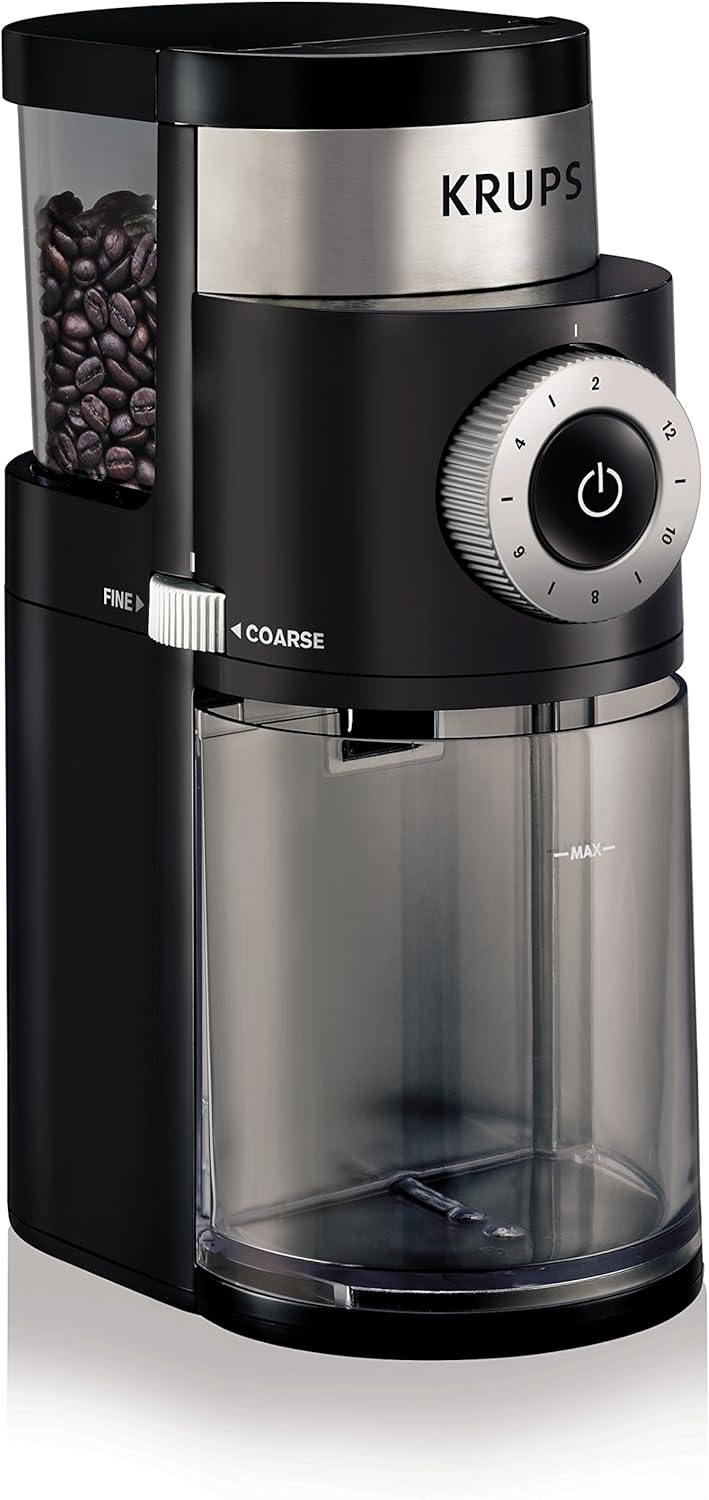
Figure 1: Front view of the KRUPS GX5000 Coffee Grinder, showing the bean hopper, grind selector, cup selector, and ground coffee container.

Figure 2: Top view of the KRUPS GX5000 Coffee Grinder, illustrating the bean hopper filled with whole coffee beans.
Setup
- Unpack the appliance and remove all packaging materials.
- Wipe the exterior of the grinder with a damp cloth. Ensure all removable parts (bean hopper lid, ground coffee container, upper burr) are clean and dry before assembly.
- Place the grinder on a stable, flat, and dry surface.
- Ensure the ground coffee container is correctly inserted into its position.
- Fill the bean hopper with whole coffee beans. Do not fill past the 'MAX' line. The bean hopper has a capacity of approximately 7 ounces.
- Close the bean hopper lid securely. The grinder will not operate if the lid is not properly closed.

Figure 3: Close-up view of the large capacity coffee bean container on the KRUPS GX5000, indicating the maximum fill line.
Operating Instructions
- Select Grind Fineness: Rotate the grind fineness selector to your desired setting. There are 45 settings divided into 9 main steps, ranging from very fine (for espresso machines) to very coarse (for French press). Adjust the slider on the side of the unit to fine or coarse.
- Select Cup Quantity: Rotate the cup selector dial to choose the number of cups you wish to brew (from 2 to 12 cups). This automatically adjusts the grinding time.
- Start Grinding: Press the power button to begin grinding. The grinder will automatically stop once the selected quantity of coffee has been ground.
- Remove Ground Coffee: Once grinding is complete, carefully remove the ground coffee container. It has a lid to help preserve the freshness and flavor of the ground coffee.
Note: For optimal flavor, grind coffee beans just before brewing.
Cleaning and Maintenance
Regular cleaning ensures optimal performance and extends the life of your grinder.
- Unplug: Always unplug the appliance before cleaning.
- Ground Coffee Container: Remove the ground coffee container and its lid. Wash them with warm, soapy water, rinse thoroughly, and dry completely.
- Upper Burr: The upper burr is removable for easy cleaning. Twist and lift it out. Use the provided cleaning brush to remove any coffee residue from the burrs and the grinding chamber.
- Bean Hopper: Wipe the inside of the bean hopper with a dry cloth. Do not wash the bean hopper with water if it is not detachable from the main unit.
- Exterior: Wipe the exterior of the grinder with a damp cloth. Do not use abrasive cleaners or immerse the main unit in water.
- Reassemble: Ensure all parts are completely dry before reassembling and storing the grinder.
Troubleshooting Guide
Refer to the table below for common issues and their solutions.

Figure 4: Troubleshooting table for common operational issues.
| Problem | Solution |
|---|---|
| The appliance does not work. |
|
| The appliance stops during operation. |
Causes of overheating to be avoided:
|
| The fineness selector does not work anymore. | Check that the upper burr is correctly positioned. Refer to the maintenance section for proper burr placement. |
Specifications
Detailed technical specifications for the KRUPS GX5000 Professional Electric Coffee Burr Grinder.

Figure 5: Table detailing the technical specifications of the grinder.
| Feature | Detail |
|---|---|
| Brand | KRUPS |
| Model Number | 8000035978 (GX5000) |
| Color | Black |
| Style | Plastic |
| Power | 110 W |
| Voltage | 120 Volts |
| Grind Settings | 45 settings (9 main steps) |
| Cup Selection | 2 to 12 cups |
| Bean Hopper Capacity | 7 oz (approx. 0.2 kg) |
| Ground Coffee Container Capacity | 15 oz (removable) |
| Product Dimensions | 4.29 x 7.24 x 10.4 inches |
| Item Weight | 3.2 pounds |
| Manufacturer | Groupe SEB |
| UPC | 010942219644 |
Warranty and Support
For warranty information, product registration, or technical support, please refer to the official KRUPS website or contact their customer service. Keep your proof of purchase for warranty claims. The product typically comes with a 2-year guarantee.
For further assistance, visit: www.krups.com


