Introduction
Thank you for choosing the BALDR Wooden Digital Alarm Clock. This manual provides detailed instructions to help you set up, operate, and maintain your new alarm clock. Please read this manual thoroughly before use and keep it for future reference.
Product Overview
The BALDR Wooden Digital Alarm Clock combines functionality with a modern aesthetic. It features a clear red LED display that shows time, date, and temperature, seamlessly integrated into a bamboo wood finish. Key features include sound control activation, multiple alarm settings, and adjustable brightness.

Front view of the BALDR Wooden Digital Alarm Clock, displaying time and temperature.
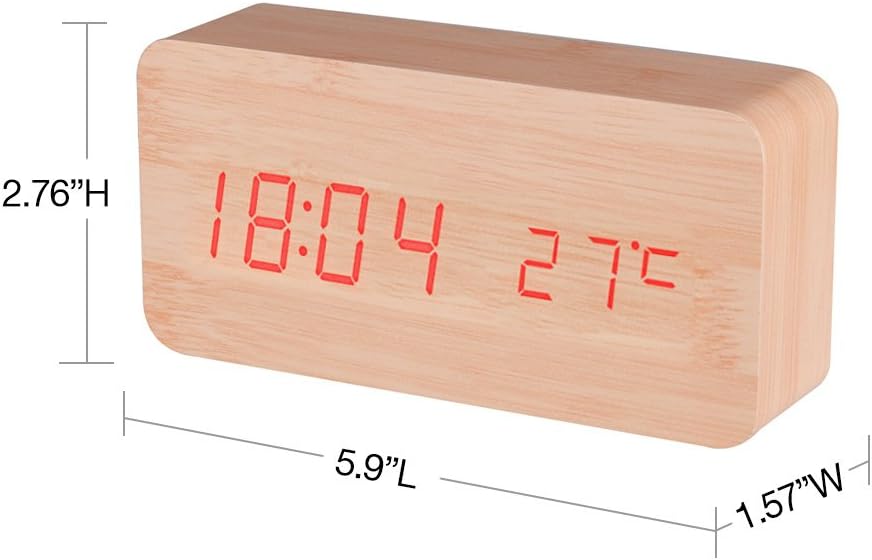
Product dimensions for the BALDR Wooden Digital Alarm Clock.

Rear panel of the clock with control buttons and power input.
Setup
Power Supply
The clock can be powered by either 4 AAA batteries (not included) or via the included USB cable. For continuous display and optimal performance, it is recommended to use the USB cable connected to a DC 5V/500mA power adapter (not included). Using both power sources allows the clock to function during power outages.
Initial Setup
Once powered on, the clock will typically display the time. You will need to set the correct time, date, and other preferences using the control buttons on the back.
Operating Instructions
The clock features 'SET', 'UP', and 'DOWN' buttons on the back for navigation and adjustments.
Time and Date Setting
- Press the SET button to enter time setting mode. The hour digits will flash.
- Use the UP and DOWN buttons to adjust the hour.
- Press SET again to move to minute adjustment, then year, month, and day.
- After setting the date, you can select 12-hour or 24-hour time format.
- Press SET one last time to exit setting mode.
Alarm Setting
The clock supports up to three independent alarms (A1, A2, A3).
- Press the UP button to cycle through display modes until you see 'A1', 'A2', or 'A3'.
- While an alarm is displayed, press SET to enter its setting mode. The hour will flash.
- Use UP and DOWN to set the desired alarm hour and minute.
- After setting the time, you can choose the alarm frequency: '--:E' (everyday), 'oA:E' (weekday only).
- Press SET to confirm and exit. To activate/deactivate an alarm, press UP until the alarm is displayed, then press DOWN to toggle it on/off.
Display Modes
The clock offers two display modes:
- DP-1 (Switch Display): Alternates between time/temperature and date display.
- DP-2 (Fixed Display): Shows only the time and temperature.
Press the UP button to switch between DP-1 and DP-2 modes.
Sound Control
When sound control is active, the display will turn off after a short period to conserve power. It will reactivate when a sound (like a clap) or touch is detected.
- To toggle sound control on/off, locate the sound control button (often labeled with a speaker icon or 'ON/OFF') on the back of the clock.
- Press this button to activate ('oN:Sd') or deactivate ('--:Sd') sound control.
Brightness Adjustment
The display has three brightness levels (L1, L2, L3).
- Press and hold the UP button for a few seconds to enter brightness adjustment mode.
- Use the UP or DOWN buttons to cycle through L1 (dimmest), L2 (medium), and L3 (brightest).
- Release the UP button to confirm your selection.
Temperature Unit Selection
The temperature can be displayed in Celsius (°C) or Fahrenheit (°F).
- Press the DOWN button to switch between Celsius and Fahrenheit display.
Instructional Video
This video demonstrates the key features and operations of the BALDR Wooden Digital Alarm Clock, including sound control, display modes, power supply, temperature selection, brightness adjustment, and alarm settings.
Maintenance
To ensure the longevity and proper functioning of your alarm clock, follow these maintenance guidelines:
- Cleaning: Wipe the clock gently with a soft, dry cloth. Avoid using abrasive cleaners, solvents, or chemical sprays, as these can damage the finish and electronic components.
- Battery Replacement: If using batteries, replace all 4 AAA batteries simultaneously when the display dims or becomes inconsistent. Ensure correct polarity.
- Placement: Place the clock on a stable, flat surface away from direct sunlight, extreme temperatures, high humidity, and strong magnetic fields.
Troubleshooting
If you encounter issues with your BALDR Wooden Digital Alarm Clock, please refer to the following common solutions:
- Display is blank: Check if the USB cable is securely connected or if the batteries need replacement. Ensure sound control is not active if you expect a continuous display without interaction.
- Alarm not sounding: Verify that the alarm is set correctly and activated (check for the alarm icon on the display). Ensure the volume is not set to minimum if applicable (this model does not specify volume control, so assume fixed).
- Incorrect time/date: Re-enter the time and date settings as described in the "Time and Date Setting" section.
- Temperature reading seems inaccurate: The internal sensor provides ambient room temperature. Allow some time for the clock to adjust to its environment. Avoid placing it near heat sources or vents.
- Sound control not responding: Ensure the sound control feature is enabled ('oN:Sd'). Try clapping closer to the clock or making a louder sound.
If problems persist, please contact customer support.
Specifications
| Feature | Detail |
|---|---|
| Brand | Baldr |
| Model Number | CL0929YR1 |
| Color | Bamboo Wood Red Light |
| Display Type | Digital |
| Material | Bamboo, Wood |
| Product Dimensions | 5.9"L x 1.57"W x 2.76"H |
| Item Weight | 7 ounces |
| Power Source | 4 AAA dry batteries or DC 5V/500mA USB cable |
| Special Features | Alarm, Large Display, Noise Reduction (Sound Control) |
| Time Mode | 12-Hour / 24-Hour |
| Brightness Levels | 3 (L1, L2, L3) |
| Alarms | 3 independent alarms |
Warranty and Support
For warranty information or technical support, please refer to the product packaging or contact BALDR customer service directly. Keep your purchase receipt as proof of purchase.


