
1. Product Overview
The NVX VUBT2 is a universal waterproof Bluetooth 4.0 audio receiver designed to add wireless audio streaming capabilities to various vehicles and vessels, including marine, boats, cars, and ATVs. It features a robust, water-resistant design and provides high-quality stereo audio output.
Key Features:
- Bluetooth Profile: A2DP (High-Quality, Stereo Audio)
- Bluetooth Core Specification: Version 4.0 with aptX
- Outputs: One Stereo Pair, Low-Level RCA Plugs
- Output Voltage: 2V RMS
- Signal to Noise Ratio: 93 dB (20 Hz - 20 kHz)
- Water Resistance: IPX67 rated for protection against dust and water immersion.
- Connectivity: 3.5mm audio input/output.
- Remote Turn-On: Amplifier remote turn-on feature.
2. Safety Information
Please read all instructions carefully before installation and use. Failure to follow these instructions may result in product damage, property damage, or personal injury.
- Ensure the vehicle's power is disconnected before installation to prevent electrical shorts.
- Use appropriate wiring gauges and fuses as recommended.
- Mount the device securely to prevent movement during operation.
- Do not expose the device to extreme temperatures or direct flame.
- While the device is waterproof (IPX67), ensure all connections are properly sealed and protected from direct water exposure to maintain integrity.
3. Package Contents
Verify that all items are present in your package:
- NVX VUBT2 Bluetooth Audio Receiver
- Power/Ground/Remote Wiring Harness with In-line Fuse
- 3.5mm to RCA Audio Cable
- Mounting Hardware (screws or adhesive pads)
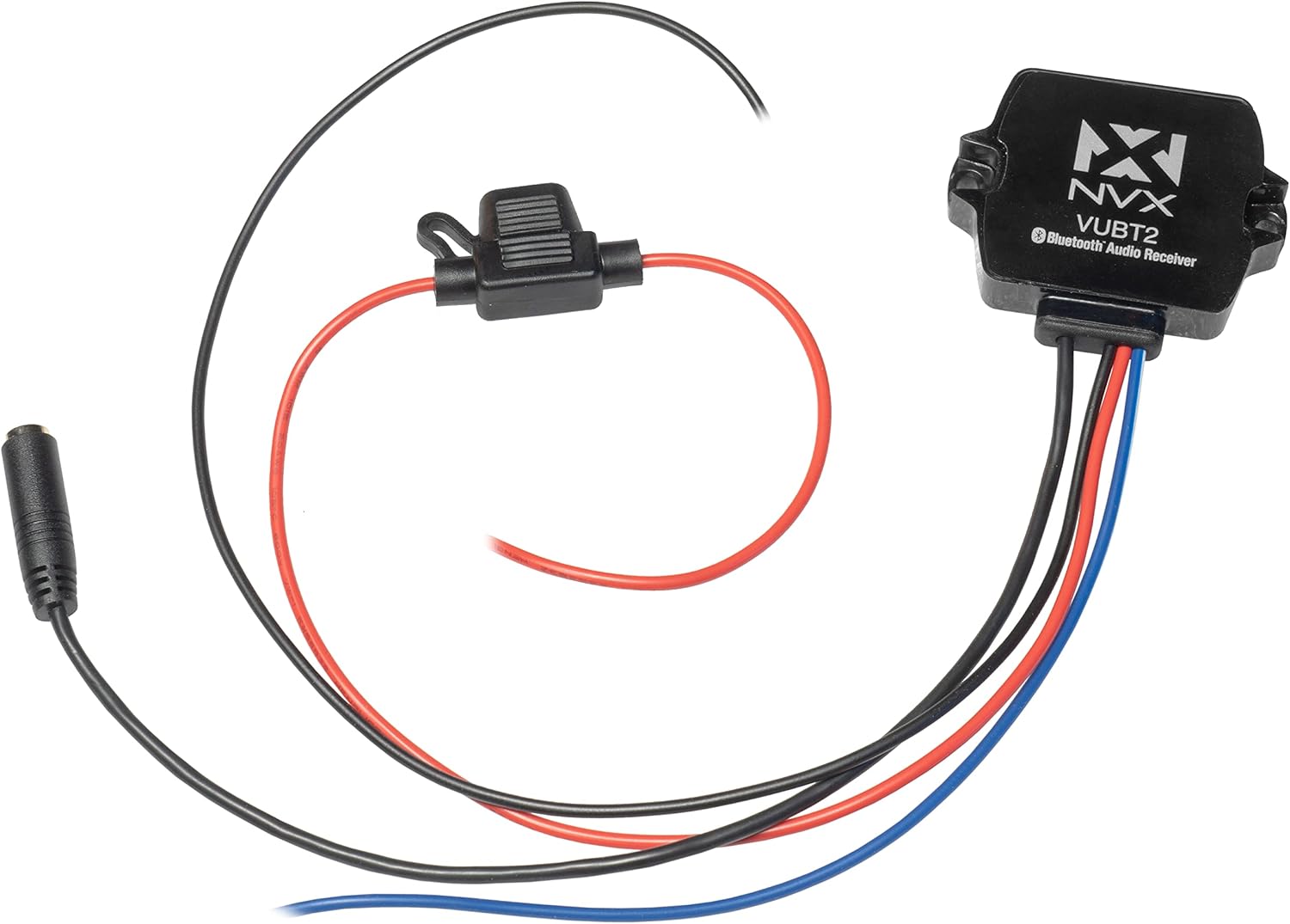
Image: The NVX VUBT2 Bluetooth Audio Receiver shown with its power/ground/remote wiring harness, in-line fuse, and 3.5mm to RCA audio cable.
4. Setup and Installation
4.1 Wiring Connections
The VUBT2 requires power, ground, and a remote turn-on connection. It outputs audio via RCA connections.
- Power (Red Wire): Connect the red wire to a switched 12V power source. This can be the accessory wire from your vehicle's ignition or a dedicated switch. The in-line fuse should be installed close to the power source.
- Ground (Black Wire): Connect the black wire to a solid chassis ground point. Ensure a clean, secure connection for optimal performance.
- Remote Turn-On (Blue Wire): Connect the blue wire to the remote turn-on input of your amplifier or other audio components. This will power on the VUBT2 when your system is activated.
- Audio Output (3.5mm to RCA): Connect the 3.5mm jack from the VUBT2 to the included 3.5mm to RCA cable. Then, connect the RCA plugs (red for right, white for left) to the audio input of your amplifier or head unit.

Image: The NVX VUBT2 Bluetooth receiver wired to an amplifier, demonstrating the remote turn-on and RCA audio connections.

Image: Close-up of the 3.5mm audio output connected to RCA cables, ready for connection to an audio system.
4.2 Mounting
The compact design of the VUBT2 allows for flexible mounting options. It can be mounted using screws through its integrated tabs or with adhesive pads (if included).
- Choose a location that is dry, secure, and allows for proper cable routing.
- Ensure the mounting surface is clean and flat if using adhesive.
- The device is IPX67 rated, making it suitable for exposed locations, but protecting connections is still recommended.

Image: The underside of the NVX VUBT2 unit, displaying the 3M adhesive backing for secure mounting in various applications.
5. Operating Instructions
5.1 Bluetooth Pairing
- Ensure the VUBT2 is powered on (your audio system is active).
- On your mobile device (smartphone, tablet, etc.), navigate to the Bluetooth settings.
- Scan for available Bluetooth devices. The VUBT2 will appear as "NVX VUBT2" or similar.
- Select the VUBT2 to pair. A confirmation tone or LED indicator may signal a successful connection.
- Once paired, your device will typically reconnect automatically when in range and the VUBT2 is powered on.
5.2 Audio Playback
After successful pairing, you can stream audio from your mobile device to your connected audio system. Control playback (play/pause, skip tracks, volume) directly from your paired device.

Image: A smartphone screen displaying music controls, illustrating how users can manage audio playback through the NVX VUBT2.
Video: An overview of the NVX VUBT2 Universal Waterproof Bluetooth 4.0 Audio Receiver, demonstrating its features and applications in various environments.
6. Maintenance
The NVX VUBT2 is designed for durability and minimal maintenance. Follow these guidelines to ensure longevity:
- Cleaning: Use a soft, damp cloth to wipe the exterior of the unit. Avoid harsh chemicals or abrasive cleaners.
- Water Resistance: While IPX67 rated, avoid prolonged submersion or high-pressure water jets directly on the unit or its connections. Regularly inspect wiring and connections for any signs of wear or damage that could compromise water resistance.
- Connections: Periodically check all wiring connections to ensure they are secure and free from corrosion.

Image: The NVX VUBT2 unit covered in water droplets, illustrating its IPX67 water-resistance rating for use in challenging environments.
7. Troubleshooting
| Problem | Possible Cause | Solution |
|---|---|---|
| No power to the VUBT2. |
|
|
| Cannot pair with Bluetooth device. |
|
|
| No audio output or distorted audio. |
|
|
| Bluetooth connection drops intermittently. |
|
|
8. Specifications
| Feature | Detail |
|---|---|
| Brand | NVX |
| Model Number | VUBT2 (4326582821) |
| Connectivity Technology | Bluetooth |
| Bluetooth Core Specification | Version 4.0 with aptX |
| Bluetooth Profile | A2DP (High-Quality, Stereo Audio) |
| Water Resistance Rating | IPX67 |
| Audio Output Type | RCA (Stereo Pair) |
| Output Voltage | 2V RMS |
| Signal to Noise Ratio | 93 dB (20 Hz - 20 kHz) |
| Number of Channels | 2 (Stereo) |
| Compatible Devices | Speakers, Amplifiers |
| UPC | 818060013812 |
| ASIN | B015XLMA08 |
9. Warranty Information
NVX products are designed and manufactured to the highest quality standards. For specific warranty details, including coverage period and terms, please refer to the warranty card included with your product or visit the official NVX website. Keep your proof of purchase for warranty claims.
10. Customer Support
If you encounter any issues or have questions regarding your NVX VUBT2 Bluetooth Audio Receiver that are not covered in this manual, please contact NVX customer support for assistance.
- Online Support: Visit the official NVX website for FAQs, support resources, and contact information.
- Seller Support: For purchase-related inquiries, contact the seller directly.
