
Product Overview
The V-Moda Crossfade Wireless headphones offer both wireless Bluetooth connectivity and a wired analog mode. This design provides flexibility for various listening scenarios, from mobile use to professional audio applications requiring zero latency. The headphones feature V-Moda's signature sound, a built-in microphone for calls, and a durable construction.

Image: V-Moda Crossfade Wireless Over-Ear Headphone in Gunmetal Black.
Key Features
- Dual Mode Connectivity: Seamlessly switch between wireless Bluetooth and wired analog modes. Wired mode ensures zero latency, ideal for gaming and DJing.
- Integrated Microphone: A hidden microphone is optimized for phone calls and voice recognition.
- Extended Battery Life: Enjoy up to 12 hours of continuous music and calls. Recharges fully in approximately 100 minutes. Unlimited listening in wired mode.
- High-Fidelity Audio: Equipped with dual-diaphragm 50mm drivers, refined from the Crossfade M-100, for consistent sound and immersive 3D soundstage.
- Durable and Comfortable Design: Constructed with steel and vegan leather, featuring memory foam ear cushions and a Steelflex headband for comfort and natural noise isolation.
- Simultaneous Device Pairing: Connect to two Bluetooth sources concurrently, such as a smartphone and a laptop or smartwatch.
What's in the Box
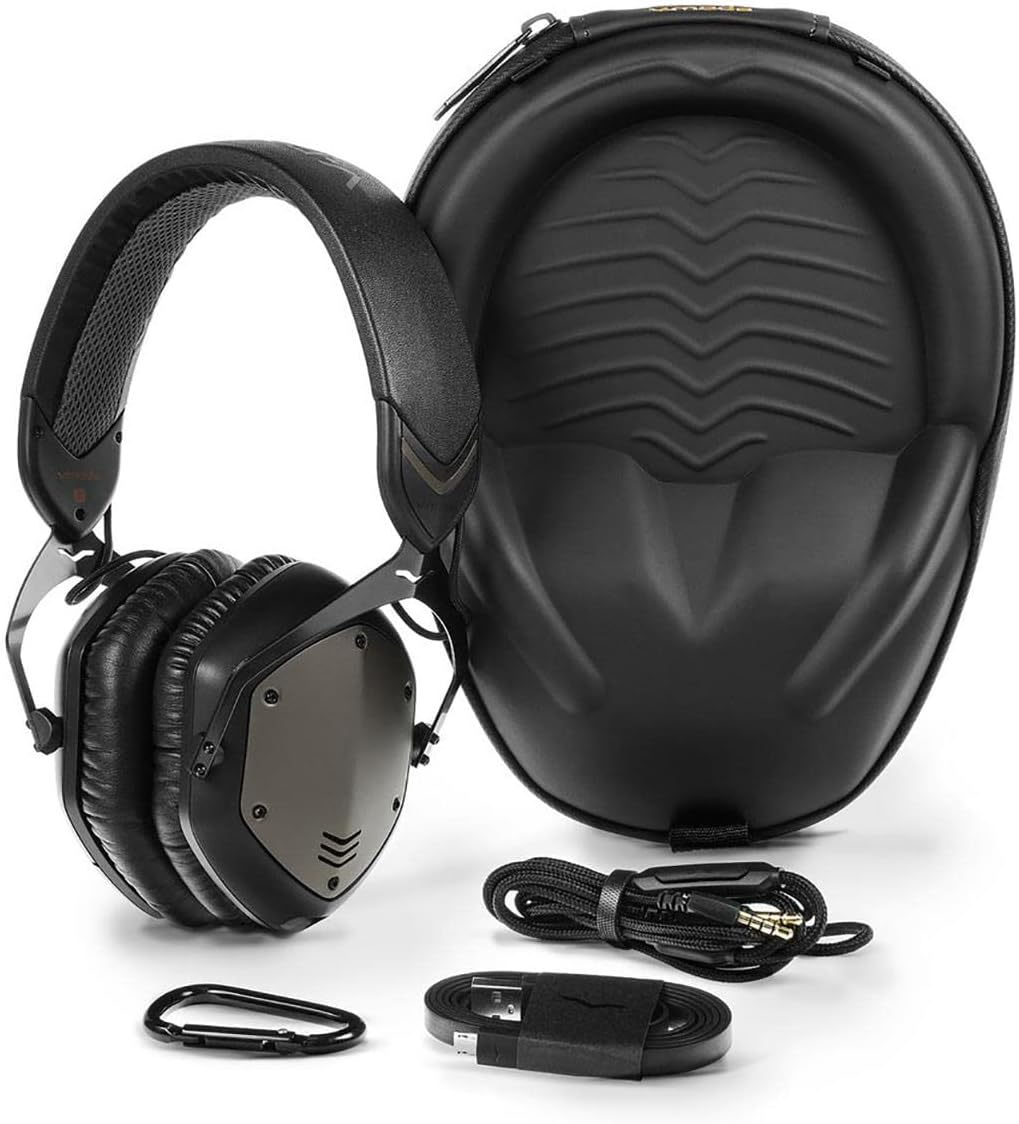
Image: The V-Moda Crossfade Wireless headphones, exoskeleton carrying case, and included accessories.
- Crossfade Wireless Headphones
- 1-Button SpeakEasy Mic Cable
- V-Micro USB Charging Cable
- Exoskeleton Carrying Case
- Carabiner Clip
- 1/4 inch Pro Adapter
- V-MODA Sticker
Setup and Connection
Charging the Headphones
Before first use, fully charge your Crossfade Wireless headphones. Use the included V-Micro USB cable to connect the headphones to a USB power source (e.g., computer USB port, USB wall adapter). The LED indicator on the headphones will show charging status. A full charge takes approximately 100 minutes and provides up to 12 hours of wireless playback.
Wireless (Bluetooth) Pairing
- Ensure the headphones are charged.
- Power on the headphones by sliding the power switch to the ON position.
- Activate Bluetooth on your source device (smartphone, laptop, smartwatch).
- On your device, search for available Bluetooth devices and select "V-MODA Crossfade Wireless".
- Once paired, the LED indicator on the headphones will confirm the connection.
The headphones can be paired with two devices simultaneously. To pair a second device, repeat the pairing process. The headphones will automatically connect to the last two paired devices when powered on.
Video: An overview of the V-Moda Crossfade Wireless headphones, highlighting features like Bluetooth connectivity and battery life.
Wired Connection
For a wired connection, plug the 1-Button SpeakEasy Mic Cable into the headphone jack on the Crossfade Wireless and the other end into your audio source. Inserting the cable automatically switches off the wireless electronics, enabling pure analog audio with zero latency. This is particularly useful for applications like gaming or DJing where latency is critical. The included 1/4 inch Pro Adapter can be used for compatibility with professional audio equipment.
Operating the Headphones
Controls
The Crossfade Wireless headphones feature ergonomic 3-button controls located on the earcup for easy management of music playback and calls. The built-in microphone is discreetly integrated for clear voice communication.
- Power On/Off: Slide the switch on the earcup.
- Volume Control: Use the '+' and '-' buttons.
- Play/Pause: Press the center button once.
- Skip Track: Press the center button twice for next track, three times for previous track.
- Answer/End Call: Press the center button once.
- Reject Call: Press and hold the center button.
- Voice Assistant: Press and hold the center button (functionality may vary by device).

Image: Detail of the earcup showing the control buttons and integrated microphone.
Maintenance and Care
Proper maintenance ensures the longevity and optimal performance of your V-Moda Crossfade Wireless headphones.
- Cleaning: Use a soft, dry cloth to wipe the headphones. For ear cushions, a slightly damp cloth can be used, but ensure they are completely dry before use. Avoid harsh chemicals or abrasive materials.
- Storage: When not in use, store the headphones in the included Exoskeleton Carrying Case to protect them from dust, scratches, and impacts.
- Cable Care: Handle cables gently. Avoid sharp bends or excessive pulling to prevent damage.
- Environmental Conditions: Avoid exposing the headphones to extreme temperatures, humidity, or direct sunlight for prolonged periods. While water resistant, avoid submerging them in water.
Troubleshooting
If you encounter issues with your headphones, refer to the following common solutions:
No Power / Not Charging
- Ensure the V-Micro USB cable is securely connected to both the headphones and the power source.
- Try a different USB port or power adapter.
- Verify the charging cable is not damaged.
No Sound / Poor Sound Quality (Wireless)
- Check if the headphones are powered on and successfully paired with your device.
- Increase the volume on both the headphones and your source device.
- Move closer to your source device to ensure you are within the 10-meter Bluetooth range.
- Disconnect and re-pair the headphones with your device.
- Ensure no other devices are interfering with the Bluetooth signal.
No Sound / Poor Sound Quality (Wired)
- Ensure the 1-Button SpeakEasy Mic Cable is fully inserted into both the headphones and the audio source.
- Test with a different audio cable if available.
- Verify the audio source is functioning correctly.
Microphone Not Working
- Ensure the 1-Button SpeakEasy Mic Cable is fully connected if using wired mode for calls.
- Check your device's audio settings to ensure the headphone microphone is selected as the input device.
- Clean any debris from the microphone opening.
Specifications
| Brand | V-Moda |
| Model Number | XFBT-GM |
| Ear Placement | Over Ear |
| Impedance | 30 Ohms |
| Driver Size | 50mm Dual-Diaphragm |
| Frequency Range | 20 Hz - 20,000 Hz |
| Connectivity Technology | Bluetooth, Wired |
| Bluetooth Version | 4.0 |
| Bluetooth Range | Up to 10 meters (33 feet) |
| Battery Life | Up to 12 hours (wireless) |
| Battery Charge Time | Approximately 100 minutes |
| Noise Control | Sound Isolation |
| Enclosure Material | Steel, Vegan Leather |
| Item Weight | 0.65 Pounds |
| Compatible Devices | Smartwatches, Bluetooth-enabled devices (smartphones, laptops, tablets), headphone amps, DACs |
Warranty and Support
V-Moda stands by the quality of its products. The Crossfade Wireless headphones come with a 1-Year Premier Warranty.
Additionally, V-Moda offers an Immortal Life Replacement Program. This program allows customers to receive a 50% discount on a replacement pair of headphones if their original V-Moda headphones are damaged, regardless of the cause. For detailed terms and conditions, please refer to the official V-Moda website or contact customer support.
For further assistance, technical support, or warranty claims, please visit the V-Moda official support channels.


