
MUSE M-1350 BTC
MUSE M-1350 BTC Portable Bluetooth Speaker
User Manual
Introduction
Thank you for choosing the MUSE M-1350 BTC Portable Bluetooth Speaker. This manual provides essential information for the safe and efficient operation of your device. Please read it thoroughly before use and retain it for future reference.
The MUSE M-1350 BTC is a versatile audio system featuring Bluetooth A2DP, MP3 CD player, FM PLL tuner, USB port with charging capability, and dual auxiliary inputs. It boasts a robust wooden casing and stands approximately 100cm tall, delivering 120W of power.

Front view of the MUSE M-1350 BTC Portable Bluetooth Speaker.
Safety Information
- Do not expose the unit to rain or moisture to prevent fire or electric shock.
- Ensure proper ventilation. Do not block any ventilation openings.
- Place the unit on a stable, flat surface.
- Only use attachments/accessories specified by the manufacturer.
- Unplug the unit during lightning storms or when unused for long periods.
- Refer all servicing to qualified service personnel.
Product Features and Components
The MUSE M-1350 BTC is designed with user convenience and high-quality audio in mind. Key features include:
- Bluetooth A2DP for wireless audio streaming.
- CD/MP3 player.
- PLL FM Tuner with 30 presets.
- USB port for MP3 playback and device charging.
- Two auxiliary input jacks.
- Integrated subwoofer for strong bass.
- Adjustable Bass & Treble, Loudness control.
- Alarm and Sleep functions.
- NFC for easy Bluetooth pairing.

Key features of the MUSE M-1350 BTC, highlighting Bluetooth connectivity, real wood casing, strong bass, and FM radio.

Detailed view of the top panel showing the integrated smartphone/tablet dock and CD player, alongside a note about the integrated subwoofer.
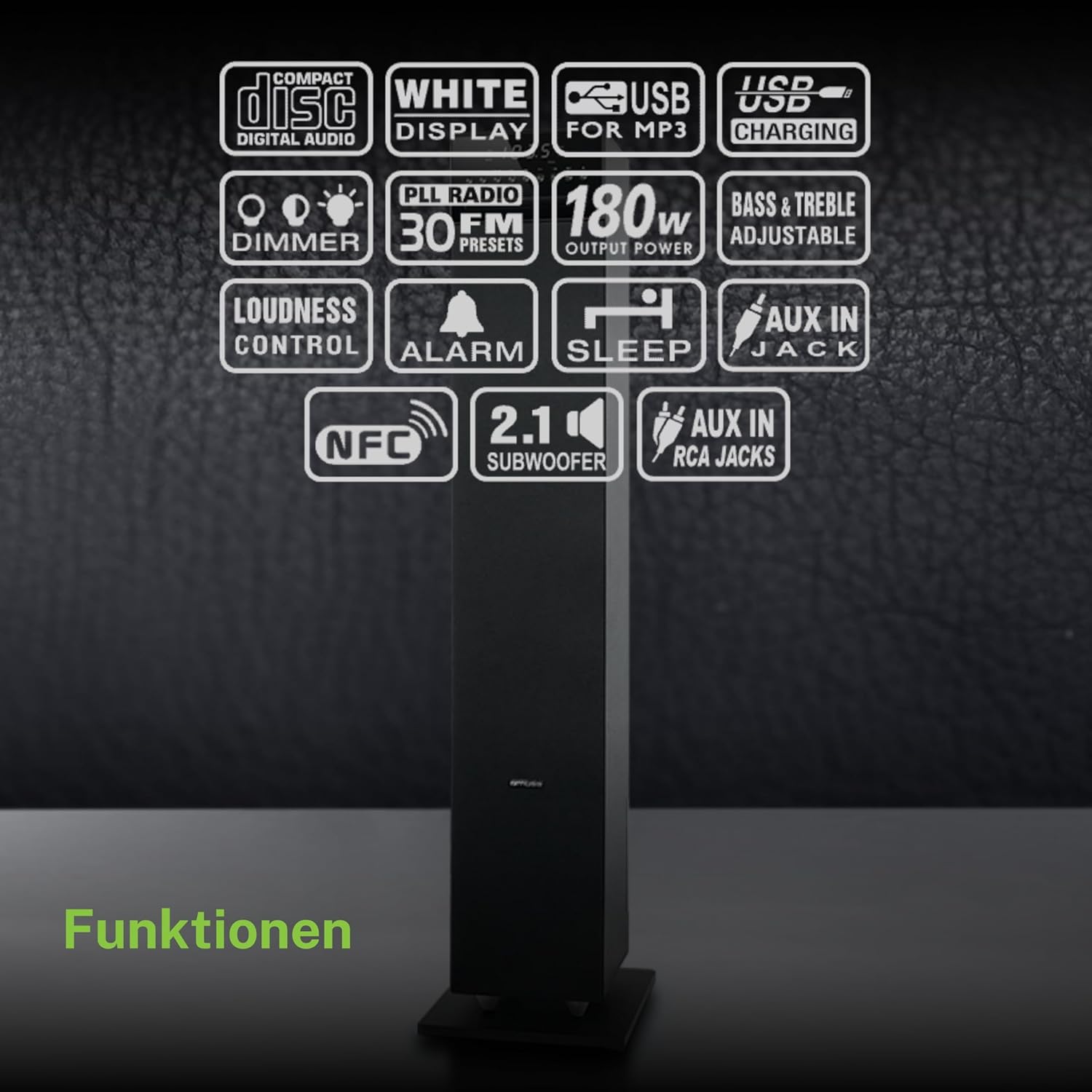
An overview of the various functions and connectivity options available on the MUSE M-1350 BTC, including CD playback, USB, Bluetooth, FM radio, and audio adjustments.
Setup
1. Unpacking
Carefully remove the speaker from its packaging. Check for any signs of damage during transit. Retain the packaging for future transport or storage.
2. Placement
Place the speaker on a firm, level surface. For optimal sound performance, position it in a location free from obstructions and away from direct heat sources or excessive moisture.

The MUSE M-1350 BTC speaker positioned in a living room environment, demonstrating its sleek design.
3. Power Connection
Connect the power cord to the AC inlet on the rear of the speaker, then plug the other end into a suitable wall outlet (AC 230V ~ 50Hz).
4. Connecting External Devices
- Bluetooth: Ensure Bluetooth is enabled on your device. The speaker will automatically enter pairing mode when Bluetooth is selected.
- AUX Input: Use a 3.5mm audio cable to connect external audio devices (e.g., MP3 players, smartphones) to the AUX IN jack.
- USB: Insert a USB flash drive into the USB port for MP3 playback.
Operating Instructions
1. Power On/Off
Press the POWER button on the top panel or remote control to turn the unit on or off.
2. Mode Selection
Press the MODE button repeatedly to cycle through available modes: CD, Bluetooth, FM Radio, USB, AUX.
3. Bluetooth Pairing
- Select Bluetooth mode on the speaker. The display will show "BT" and flash, indicating pairing mode.
- On your Bluetooth device, search for "MUSE M-1350 BTC" in the Bluetooth settings.
- Select the speaker to pair. Once connected, the display will stop flashing.
4. CD Playback
- Select CD mode.
- Insert a CD into the CD slot. The unit will automatically begin playback.
- Use the PLAY/PAUSE, SKIP, and STOP buttons for control.
5. FM Radio Tuning
- Select FM mode.
- Press and hold the SCAN button to automatically scan and store available stations.
- Use the PRESET buttons to navigate through stored stations.
6. USB Playback
- Insert a USB flash drive containing MP3 files into the USB port.
- Select USB mode. Playback will begin automatically.
- Use the PLAY/PAUSE, SKIP, and STOP buttons for control.
7. AUX Input
Connect your external audio device to the AUX IN jack. Select AUX mode on the speaker. Audio will be played through the speaker.
8. Audio Adjustments
- Volume: Use the VOLUME knob or +/- buttons on the remote.
- Bass/Treble: Adjust bass and treble levels using the dedicated controls on the remote or top panel.
- Loudness: Activate the Loudness function for enhanced bass and treble at low volumes.
Maintenance
Cleaning
Wipe the unit with a soft, dry cloth. Do not use abrasive cleaners, waxes, or solvents. For stubborn stains, a slightly damp cloth may be used, followed by a dry cloth.
Storage
If the unit is not used for an extended period, unplug it from the power outlet and store it in a cool, dry place, away from direct sunlight and extreme temperatures.
Troubleshooting
| Problem | Possible Cause | Solution |
|---|---|---|
| No power | Power cord not connected; Power outlet faulty | Ensure power cord is securely plugged in; Try a different outlet |
| No sound | Volume too low; Incorrect input mode selected; Device not connected properly | Increase volume; Select correct input mode (Bluetooth, CD, AUX, USB); Reconnect device |
| Bluetooth pairing fails | Speaker not in pairing mode; Device too far; Bluetooth not enabled on source device | Ensure speaker is in Bluetooth mode and flashing; Move device closer; Enable Bluetooth on your device |
| CD not playing | CD inserted incorrectly; CD is scratched/dirty; Incorrect mode | Reinsert CD correctly; Clean or replace CD; Select CD mode |
| Poor FM reception | Antenna not extended; Weak signal area | Fully extend the FM antenna; Reposition the speaker for better reception |
Specifications
| Feature | Detail |
|---|---|
| Model Name | M-1350 BTC |
| Brand | MUSE |
| Speaker Type | Tower |
| Connectivity Technology | Bluetooth, USB |
| Max Speaker Output Power | 120 Watts |
| Audio Output Mode | Stereo |
| Surround Sound Channel Configuration | 2.1 |
| Material | Wood |
| Color | Black |
| Product Dimensions (DxWxH) | 23.1 x 25.7 x 100.6 cm |
| Item Weight | 9.25 Kilograms |
| Total USB Ports | 1 |
| Compatible Devices | MP3 players, laptops, tablets, televisions, smartphones |
| Recommended Uses | For smartphone or tablet |

Technical drawing illustrating the precise dimensions of the MUSE M-1350 BTC speaker in millimeters.
Warranty and Support
This product comes with a manufacturer's warranty of 1 year from the date of purchase. Please retain your proof of purchase for warranty claims.
For technical support or service inquiries, please contact your retailer or the official MUSE customer service. Contact information can typically be found on the manufacturer's website or product packaging.
Related documentsM-1350 BTC


Ask a question about this manual
Ask about setup, troubleshooting, compatibility, parts, safety, or missing instructions. Manuals+ will review the question and use this page’s manual context to help answer it.