1. Introduction
The MR BEAMS MB700 LED Motion Sensor Mini Light is a versatile, battery-operated lighting solution designed for various indoor applications. Its compact size allows for easy installation in areas such as bathrooms, hallways, and staircases. The integrated motion and light sensors ensure that the light activates only when needed in dark environments, providing a gentle illumination without disturbing others.
2. Product Features
- Motion Sensor Activation: Detects movement up to 4.5 meters.
- Automatic Shut-off: Light turns off 20 seconds after motion ceases.
- Light Sensor: Activates only in dark conditions to conserve battery life.
- Luminous Flux: Provides 15 lumens of light.
- Battery Operated: Requires 4 AAA batteries (sold separately).
- Long LED Life: Approximately 30,000 hours.
- Durable Material: Constructed from ABS resin.
3. Package Contents
- MR BEAMS MB700 Mini Light Unit
Note: 4 AAA batteries are required and sold separately.
4. Setup and Installation
4.1 Battery Installation
- Locate the battery compartment on the back of the light unit.
- Open the battery compartment cover.
- Insert 4 new AAA batteries, ensuring correct polarity (+/-).
- Close the battery compartment cover securely.
4.2 Placement
The MR BEAMS MB700 Mini Light can be installed in various indoor locations where supplemental lighting is desired. Common areas include:
- Hallways
- Staircases
- Bathrooms
- Closets
- Under cabinets or shelves
Ensure the placement allows the motion sensor to have a clear line of sight to the area where movement is expected. Avoid placing the light in direct sunlight or near heat sources, as this may affect sensor performance.

Image: The MR BEAMS MB700 Mini Light shown installed in a bookshelf, a hallway, and on a staircase, demonstrating its versatility for various indoor lighting needs.
5. Operating Instructions
The MR BEAMS MB700 Mini Light operates automatically based on ambient light and motion detection.
- Automatic Activation: The built-in light sensor detects ambient light levels. The motion sensor will only become active when the surrounding environment is dark enough.
- Motion Detection: Once active, the motion sensor will detect movement within its range (up to 4.5 meters).
- Illumination: Upon detecting motion in a dark environment, the light will turn on, providing 15 lumens of illumination.
- Automatic Shut-off: If no further motion is detected for 20 seconds, the light will automatically turn off to conserve battery power.

Image: A direct front view of the MR BEAMS MB700 Mini Light, highlighting the central motion sensor and the LED light panel.

Image: An angled view of the MR BEAMS MB700 Mini Light, showing its compact profile and the side design details.
6. Maintenance
6.1 Cleaning
To clean the light unit, gently wipe the exterior with a soft, dry cloth. Do not use abrasive cleaners or solvents, as these may damage the finish or electronic components.
6.2 Battery Replacement
When the light output becomes dim or the unit stops activating, it is time to replace the batteries. Follow the battery installation steps outlined in Section 4.1.
Note: Battery life varies depending on the frequency of operation.
7. Troubleshooting
- Light does not turn on:
- Ensure batteries are correctly installed and not depleted. Replace if necessary.
- Check ambient light. The light sensor prevents activation in bright conditions. Test in a completely dark environment.
- Verify that the motion sensor is not obstructed and that movement is occurring within its detection range.
- Light stays on continuously:
- Check for continuous motion within the sensor's detection area.
- Ensure the light is not placed near a heat source or air vent that could trigger the sensor.
- Light is dim:
- Replace all 4 AAA batteries with new ones.
8. Specifications
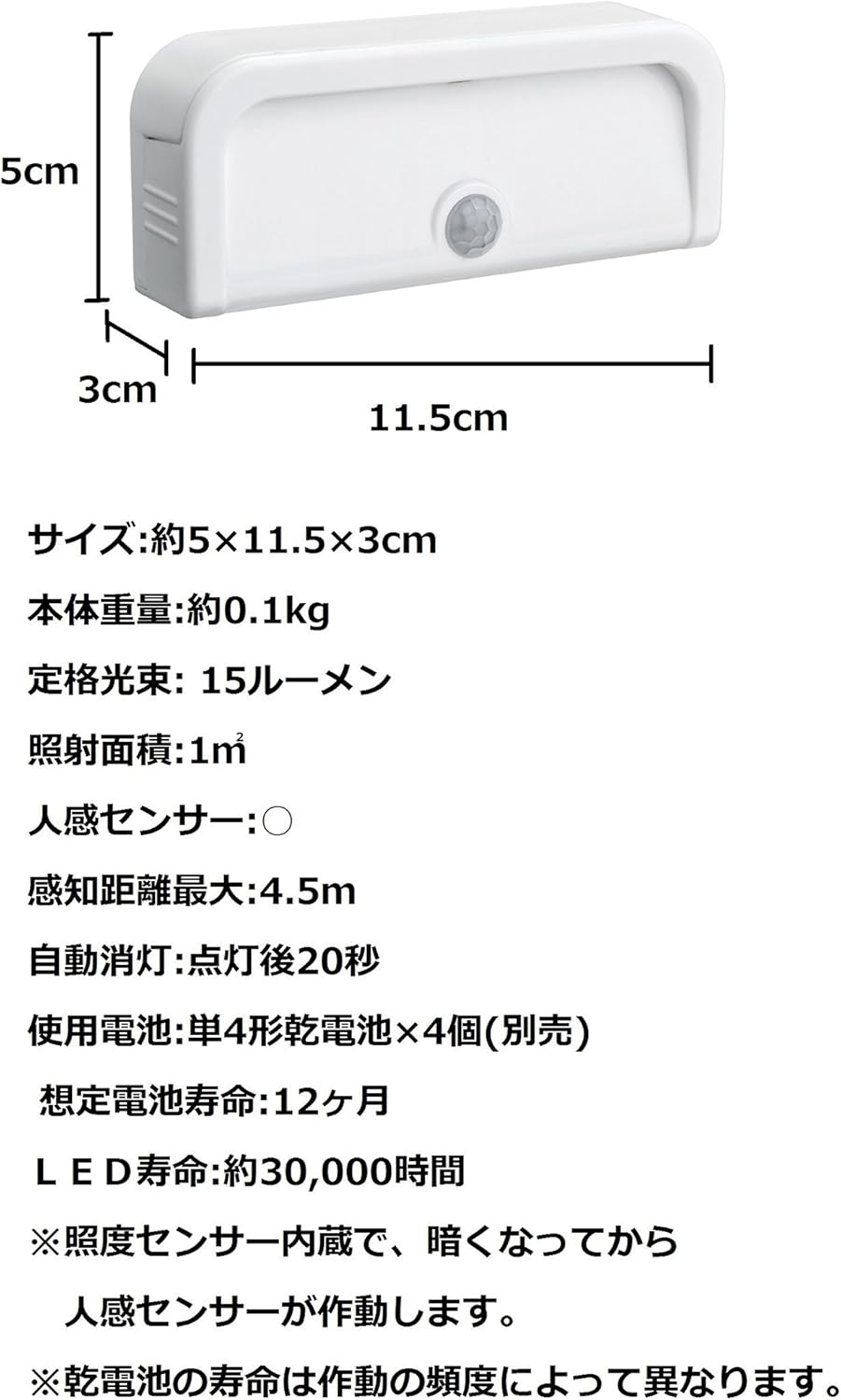
Image: A visual representation of the MR BEAMS MB700 Mini Light with its dimensions (5cm height, 11.5cm width, 3cm depth) and key specifications listed in Japanese, which are translated below.

Image: A diagram of the MR BEAMS MB700 Mini Light highlighting its features such as 15 lumens, motion sensor, 4.5m sensing distance, 1m² irradiation area, 20-second auto-off, and requirement for 4 AAA batteries.
| Specification | Detail |
|---|---|
| Model Number | MB700 |
| Dimensions (Approx.) | 5 cm (H) x 11.5 cm (W) x 3 cm (D) |
| Product Weight (Approx.) | 0.1 kg |
| Rated Luminous Flux | 15 lumens |
| Irradiation Area | 1 m² |
| Motion Sensor | Yes |
| Maximum Sensing Distance | 4.5 m |
| Auto-off Time | 20 seconds after last motion detected |
| Batteries Required | 4 x AAA (sold separately) |
| Estimated Battery Life | 12 months (varies with usage frequency) |
| LED Life | Approx. 30,000 hours |
| Material | ABS resin |
| Finish Type | Polished |
| Country of Origin | China |
9. Warranty and Support
For warranty information or technical support, please refer to the product packaging or contact the retailer where the product was purchased. Keep your proof of purchase for any warranty claims.


