
Introduction
This manual provides important information regarding the installation, operation, and maintenance of your Kidde KN-COP-DP-10YH Carbon Monoxide (CO) Detector. This device is designed to detect carbon monoxide gas and alert occupants to its presence. Please read this manual thoroughly before installation and retain it for future reference.
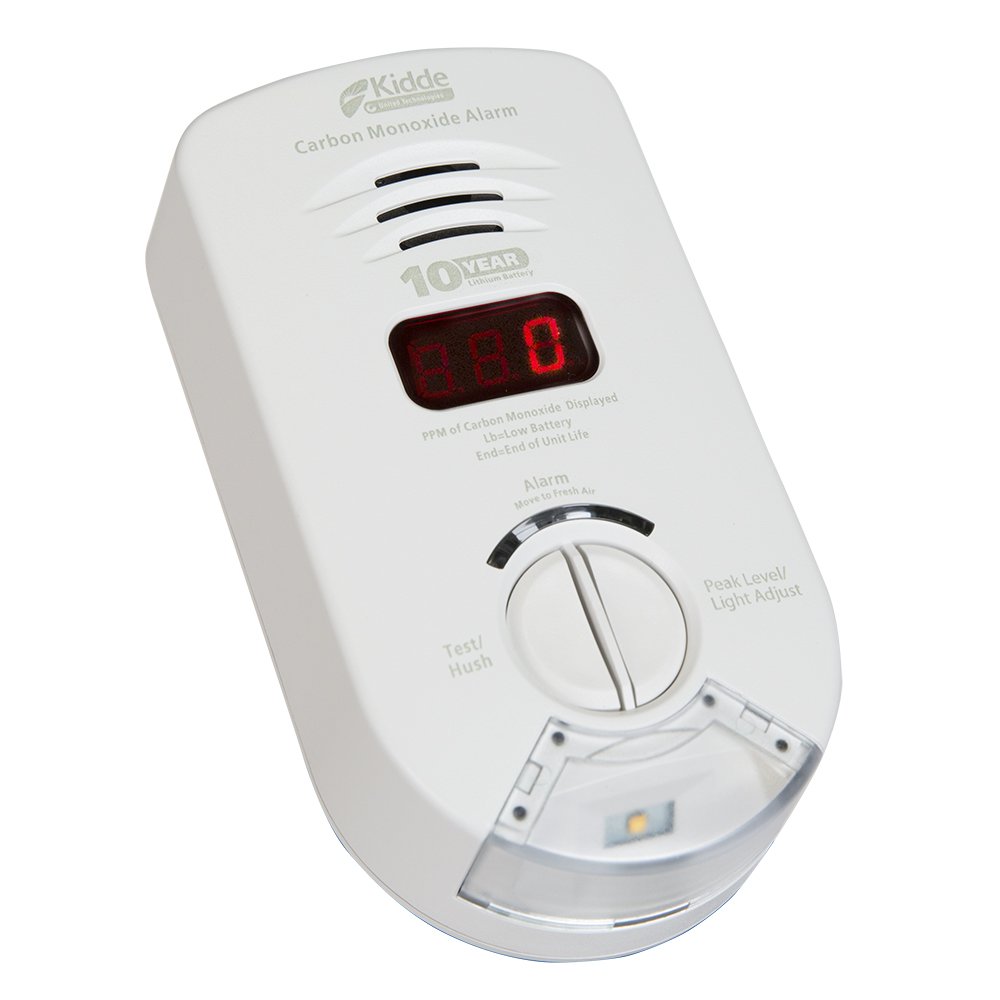
Image of the Kidde Carbon Monoxide Detector, showing its plug-in design and digital LED screen.
Safety Information
WARNING: This carbon monoxide alarm is designed to detect carbon monoxide gas from any source of combustion. It is NOT designed to detect smoke or fire. This alarm is not a substitute for a smoke alarm. This product is intended for use in ordinary indoor locations of family living units. It is not designed to measure compliance with occupational safety and health administration (OSHA) commercial or industrial standards.
- Never ignore the alarm. The alarm indicates the presence of carbon monoxide, which can be fatal.
- Do not paint over the unit. Paint can clog the sensor openings and interfere with the unit's ability to detect CO.
- Do not use cleaning agents or solvents on the unit.
- Test the alarm weekly to ensure proper operation.
- Replace the unit after 10 years from the date of manufacture or when the End-of-Life indicator appears.
Product Features
- Easy Installation: Simply plug into a standard 120V AC outlet.
- 10-Year Lithium Battery Backup: Provides continuous protection during power outages.
- Digital LED Display: Shows the level of carbon monoxide in parts per million (PPM) and updates every 15 seconds.
- Safety Light: Illuminates to help guide your way in low visibility conditions, particularly useful for individuals with hearing impairments.
- 85-Decibel Alarm: Sounds a loud alert when carbon monoxide is detected.
- Peak Level Memory: Records the highest CO level detected since the last reset or test.
- Test-Hush Button: Allows for easy testing of the alarm and temporary silencing of low battery chirps.
- Electrochemical Sensor: Advanced technology for accurate CO detection.
Setup
- Unpack the Detector: Carefully remove the CO detector from its packaging.
- Select Location: Choose a location where the detector can be plugged into a standard 120V AC outlet. For optimal protection, install CO alarms on every level of your home and near sleeping areas. Avoid placing the unit directly above or next to fuel-burning appliances.
- Plug In: Plug the CO detector directly into a standard, unswitched 120V AC wall outlet. Ensure the outlet is not controlled by a wall switch.
- Initial Power-Up: Upon plugging in, the unit will perform a self-test. The digital display will cycle through various indicators, and the alarm will sound briefly. This indicates the unit is functioning correctly.
- Activate Battery Backup: The 10-year lithium battery backup is automatically activated once the unit is plugged in.
Operating Instructions
Normal Operation
During normal operation, the digital LED display will typically show "0" PPM (parts per million) indicating no detectable carbon monoxide. The safety light may be on, depending on ambient light conditions and settings.
CO Alarm Conditions
When carbon monoxide is detected, the unit will:
- Sound an 85-decibel alarm pattern (4 quick beeps, pause, 4 quick beeps).
- Display the detected CO level in PPM on the digital LED screen.
- Activate the safety light.
If the alarm sounds, immediately move to fresh air and call emergency services.
Test/Hush Button
- Testing: Press and hold the Test/Hush button for a few seconds. The alarm will sound, and the display will show a test pattern. Release the button to stop the test. Test weekly.
- Hushing: If the alarm sounds due to a known, non-emergency CO source (e.g., temporary high CO from a nearby vehicle exhaust), press the Test/Hush button to temporarily silence the alarm for approximately 8 minutes. The unit will re-evaluate CO levels after this period. Do not use the hush feature if you suspect a genuine CO emergency.
Peak Level Memory
To view the highest CO level detected since the last reset, press the Test/Hush button briefly during normal operation. The display will show the peak CO level. The memory automatically clears after a certain period or upon a new higher peak detection.
Maintenance
- Weekly Testing: Press the Test/Hush button once a week to ensure the alarm and display are functioning correctly.
- Cleaning: Dust the alarm regularly with a soft cloth or vacuum cleaner brush attachment. Do not use water, cleaners, or solvents as they may damage the unit or sensor.
- Battery Backup: The unit features a sealed 10-year lithium battery backup. This battery is not user-replaceable. The unit will indicate a low battery condition with a chirp and a message on the display when replacement is needed.
- End-of-Life Indication: After approximately 10 years of operation, the unit will indicate its end-of-life with specific chirps and/or display messages, signaling that it needs to be replaced.
Troubleshooting
| Problem | Possible Cause | Solution |
|---|---|---|
| Alarm chirps periodically (e.g., every 30-60 seconds) | Low battery or End-of-Life. | If the unit is chirping and displaying a low battery or end-of-life message, the unit needs to be replaced. The battery is sealed and not user-replaceable. |
| Alarm sounds continuously with CO level displayed | Carbon Monoxide detected. | Immediately move to fresh air. Call emergency services. Do not re-enter the premises until it has been aired out and cleared by professionals. |
| Alarm sounds briefly during power-up, then stops | Normal self-test. | No action required. This is part of the normal startup sequence. |
| Display shows "Err" or other error code | Internal fault. | Unplug the unit for 30 seconds and plug it back in. If the error persists, the unit may be faulty and needs replacement. |
Specifications
- Model: KN-COP-DP-10YH
- Power Source: 120V AC (plug-in) with 10-year sealed lithium battery backup
- Sensor Type: Electrochemical
- Alarm Loudness: 85 dB at 10 feet
- Operating Temperature: 40°F (4.4°C) to 100°F (37.8°C)
- Operating Humidity: 10-95% relative humidity, non-condensing
- Dimensions: Approximately 1.5 x 3 x 5.6 inches
- Weight: Approximately 0.88 Pounds (14.1 ounces)
- Certifications: UL 2034, UL217, NFPA72, NFPA101, California State Fire Marshal, FHA, HUD compliant.
Warranty
This Kidde Carbon Monoxide Detector comes with a 10-year limited manufacturer's warranty on the alarm only. This warranty begins when the alarm is powered on. If the power-on date is unknown, it should be assumed that replacement is needed after 10 years from the manufacturing date printed on the unit. Please refer to the warranty documentation included with your product for full terms and conditions.
Support
For technical assistance, troubleshooting beyond this manual, or warranty claims, please contact Kidde Customer Service. Refer to the packaging or the official Kidde website for the most current contact information, including phone numbers and support hours.


