
Introduction
This manual provides instructions for the safe installation, operation, and maintenance of the Dabmar GM911-VG-MT Powder Coated Cast Aluminum Post Top Light Fixture. Please read this manual thoroughly before installation and retain it for future reference.
Important Safety Information
WARNING: Risk of electric shock. Disconnect power at the fuse or circuit breaker before installation or servicing.
- All electrical connections must be in accordance with local and National Electrical Code (NEC) standards.
- Consult a qualified electrician if you are unsure about wiring procedures.
- Ensure the fixture is properly grounded.
- Do not install near flammable materials.
- This fixture is designed for outdoor use.
Package Contents
Verify that all components are present before beginning installation:
- GM911-VG-MT Post Top Light Fixture (1)
- Mounting Hardware (if applicable, specific items may vary)
- Instruction Manual (this document)
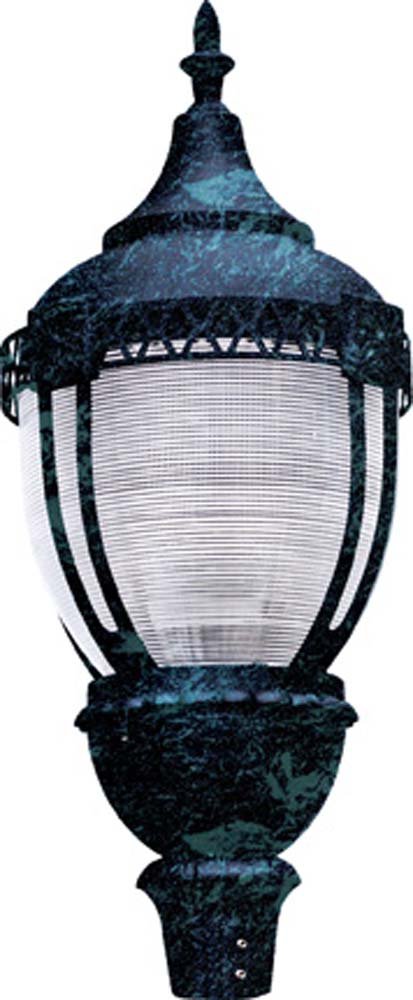
Image: The Dabmar GM911-VG-MT Post Top Light Fixture, showcasing its powder-coated cast aluminum construction and clear lens. This image represents the complete fixture as it appears out of the box.
Setup and Installation
- Prepare the Installation Site: Ensure the mounting post is securely installed and capable of supporting the fixture's weight. The post should have appropriate wiring access.
- Disconnect Power: Turn off power at the main circuit breaker or fuse box before starting any electrical work.
- Wire Connections:
- Connect the black wire from the fixture to the hot (black) supply wire.
- Connect the white wire from the fixture to the neutral (white) supply wire.
- Connect the green or bare copper wire from the fixture to the ground (green or bare copper) supply wire.
- Secure all connections with approved wire connectors.
- Mount the Fixture: Carefully place the fixture onto the mounting post. Secure it using the provided mounting hardware (e.g., screws, bolts) as per the specific design of your post and fixture. Ensure the fixture is level and stable.
- Install Bulb (if not pre-installed): Insert the appropriate bulb type (e.g., HID, LED, Incandescent) into the socket. Refer to the specifications section for recommended bulb types and wattage.
- Restore Power: Once installation is complete and all connections are secure, restore power at the circuit breaker.
- Test Operation: Turn on the light switch to verify proper operation of the fixture.
Operating Instructions
The Dabmar GM911-VG-MT Post Top Light Fixture operates by a standard electrical switch or an external control device (e.g., photocell, timer) connected to its power supply. Once installed and wired correctly, simply activate the connected switch or control device to turn the light on or off.
- Power On/Off: Use the wall switch or external control to energize or de-energize the fixture.
- Bulb Replacement: Ensure power is off before attempting to replace the bulb. Allow the bulb to cool completely before handling.
Maintenance
Regular maintenance ensures optimal performance and longevity of your light fixture.
- Cleaning: Periodically clean the exterior of the fixture and the lens with a soft, damp cloth. Do not use abrasive cleaners or solvents, as these can damage the finish or lens material. Ensure the fixture is off and cool before cleaning.
- Inspection: Annually inspect the wiring for any signs of wear, fraying, or damage. Check mounting hardware for tightness.
- Bulb Replacement: Replace bulbs as needed. Always use bulbs that match the specified wattage and type for the fixture. Refer to the specifications section.
Troubleshooting
| Problem | Possible Cause | Solution |
|---|---|---|
| Light does not turn on. |
|
|
| Light flickers. |
|
|
| Fixture gets excessively hot. |
|
|
If troubleshooting steps do not resolve the issue, contact a qualified electrician or Dabmar customer support.
Specifications
| Feature | Detail |
|---|---|
| Model | GM911-VG-MT |
| Brand | Dabmar |
| Material | Powder Coated Cast Aluminum (Body), Polycarbonate (Lens) |
| Voltage | 120 Volts |
| Max Wattage | 70 watts |
| Item Weight | 20 pounds |
| Package Dimensions | 28.45 x 18.5 x 18.5 inches |
| Lens Color | Clear |
| UPC | 849095043611 |
| ASIN | B01577KY2O |
Warranty Information
Dabmar products are typically covered by a limited warranty against defects in materials and workmanship. The specific warranty period and terms may vary. Please refer to the warranty card included with your product or visit the official Dabmar website for detailed warranty information.
Retain your proof of purchase for warranty claims.
Customer Support
For technical assistance, replacement parts, or warranty inquiries, please contact Dabmar customer support:
- Website: www.dabmar.com
- Phone: Refer to the Dabmar website or product packaging for current contact numbers.
When contacting support, please have your product model number (GM911-VG-MT) and date of purchase available.