
1. Introduction
Thank you for choosing the Remax RB-S2 Sports Bluetooth Headset. This manual provides essential information for the proper setup, operation, and maintenance of your device. Please read it thoroughly before use to ensure optimal performance and longevity of your headset.
2. Package Contents
- Remax RB-S2 Sports Bluetooth Headset
- USB Charging Cable
- Ear Tips (various sizes)
- User Manual
3. Product Overview
The Remax RB-S2 is a wireless in-ear headset designed for active lifestyles, featuring Bluetooth 4.0 connectivity and a magnetic design for convenient storage.

Figure 3.1: Remax RB-S2 Sports Bluetooth Headset, front view. A clear front view of the Remax RB-S2 Sports Bluetooth Headset, showcasing its in-ear design and connecting cable.

Figure 3.2: Remax RB-S2 Sports Bluetooth Headset in black and white variants. Two Remax RB-S2 headsets, one in black and one in white, highlighting the different color options available.
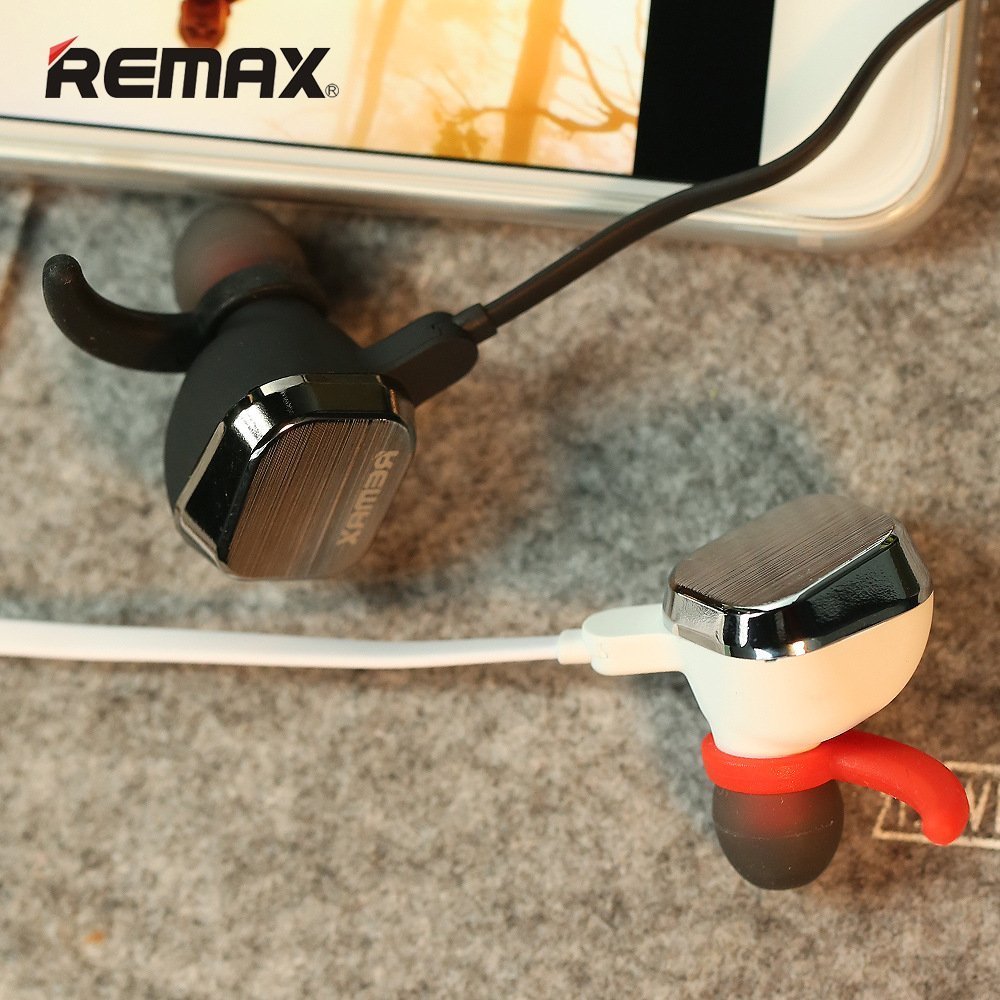
Figure 3.3: Close-up of Remax RB-S2 earbud with magnetic feature. A detailed close-up of the Remax RB-S2 earbud, showing the magnetic back for secure storage around the neck.

Figure 3.4: Remax RB-S2 in-line control panel. A close-up of the in-line control panel on the Remax RB-S2 headset, featuring volume buttons and a multi-function button.
4. Setup
4.1 Charging the Headset
- Connect the USB charging cable to the charging port on the headset.
- Connect the other end of the USB cable to a power source (e.g., computer USB port, USB wall adapter).
- The indicator light will illuminate during charging and turn off or change color when fully charged.
- Charging time is approximately 2 hours.
4.2 Bluetooth Pairing
- Ensure the headset is fully charged.
- Press and hold the Power Key (multi-function button) until the indicator light flashes red and blue alternately, indicating pairing mode.
- On your device (smartphone, tablet, etc.), enable Bluetooth and search for available devices.
- Select "RB-S2" from the list of found devices.
- Once paired, the indicator light will flash blue periodically, and you may hear a confirmation tone.
- The headset supports a transmission distance of up to 10 meters (33 feet) in an open environment.
5. Operating Instructions
5.1 Power On/Off
- Power On: Press and hold the Power Key for approximately 3 seconds until the blue indicator light flashes.
- Power Off: Press and hold the Power Key for approximately 3 seconds until the red indicator light flashes and then turns off.
5.2 Music Playback
- Play/Pause: Press the Power Key once.
- Next Track: Press and hold the Volume Up (+) button.
- Previous Track: Press and hold the Volume Down (-) button.
5.3 Call Management
- Answer/End Call: Press the Power Key once.
- Reject Call: Press and hold the Power Key for approximately 2 seconds.
- Redial Last Number: Double-press the Power Key.
5.4 Volume Adjustment
- Increase Volume: Press the Volume Up (+) button.
- Decrease Volume: Press the Volume Down (-) button.
5.5 Remote Camera Function
- When your phone's camera app is open, double-click the Volume Up (+) button to take a picture.
6. Maintenance
- Clean the headset regularly with a soft, dry cloth.
- Avoid exposing the headset to extreme temperatures, humidity, or corrosive substances.
- Do not attempt to disassemble or modify the headset, as this will void the warranty.
- Store the headset in a cool, dry place when not in use.
- Keep the charging port free of dust and debris.
7. Troubleshooting
| Problem | Solution |
|---|---|
| Headset does not power on. | Ensure the headset is fully charged. Press and hold the Power Key for a longer duration. |
| Cannot pair with device. | Ensure the headset is in pairing mode (flashing red and blue). Turn off and on Bluetooth on your device. Move closer to the headset (within 10 meters). |
| No sound or low volume. | Check volume levels on both the headset and your connected device. Ensure the headset is properly paired. |
| Intermittent connection. | Ensure no obstacles are between the headset and your device. Move away from sources of strong electromagnetic interference. Recharge the headset. |
| Remote camera function not working. | Ensure your phone's camera app is open and active. Some camera apps may not fully support this feature. |
8. Specifications
| Feature | Detail |
|---|---|
| Brand | Remax |
| Model | RB-S2 |
| Bluetooth Version | 4.0 |
| Material | Metal + Silicone |
| Transmission Distance | 10M |
| Standby Time | 160 hours |
| Talk Time | 5-8 hours |
| Music Playback Time | 4-6 hours |
| Charging Time | 2 hours |
| Microphone Sensitivity | -41 ± 1DB |
| Frequency Response | 20-20000HZ |
| Output Sensitivity | 92 ± 3DB |
| Impedance | 16 ± 10% |
| Rated Input Power | 10MW |
| Distortion | ≤1% |
| Cable Length | 75MM |
| Water Resistance Level | Waterproof |
| Item Weight | 180 g |
9. Warranty and Support
9.1 Warranty Information
The Remax RB-S2 Sports Bluetooth Headset comes with a 6-month limited warranty from the date of purchase. This warranty covers manufacturing defects. It does not cover damage caused by misuse, accidents, unauthorized modifications, or normal wear and tear. Please retain your proof of purchase for warranty claims.
9.2 Customer Support
For technical support, warranty claims, or any questions regarding your Remax RB-S2 headset, please contact our customer service team. Refer to the contact information provided on the product packaging or the official Remax website.


