
1. Product Overview
The Tekmar 519 Radiant Thermostat is designed to control a single stage of heating within a hydronic system. This non-programmable thermostat offers a straightforward and efficient method for managing the temperature of a specific zone. It features auto cycling to optimize system performance and includes a 079 Slab Sensor for monitoring and protecting slab temperatures against extreme conditions.
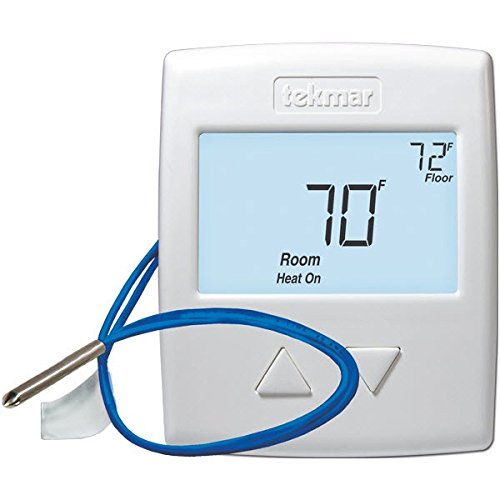
Figure 1: The Tekmar 519 Radiant Thermostat, a white rectangular device with a digital display and control buttons.
2. Installation and Setup
Proper installation is crucial for the optimal performance of your Tekmar 519 thermostat. If you are unsure about any steps, it is recommended to consult a qualified HVAC technician.
2.1 Safety Precautions
- Turn off power: Always disconnect power to the heating system at the main circuit breaker before installing or servicing the thermostat.
- Electrical wiring: Ensure all wiring complies with local electrical codes.
- Avoid water: Do not install the thermostat in locations where it may be exposed to water or excessive humidity.
2.2 Mounting the Thermostat
- Remove the old thermostat (if applicable) and label the existing wires.
- Mount the Tekmar 519 base plate to a suitable indoor wall location, away from direct sunlight, drafts, or heat sources.
- Connect the wires to the appropriate terminals on the thermostat base plate. Refer to the wiring diagram provided with your product packaging for specific connections.
- Install the 079 Slab Sensor according to its specific instructions, ensuring it is properly placed to monitor slab temperature.
- Secure the thermostat faceplate onto the base plate.
2.3 Initial Power-Up and Configuration
- Restore power to the heating system.
- The thermostat will power on and may display initial setup prompts.
- Follow the on-screen instructions to set the time, date, and any specific system parameters required for your hydronic setup.
3. Operating Instructions
The Tekmar 519 is a non-programmable thermostat, offering simple and direct control over your heating system.
3.1 Setting the Temperature
- Use the Up and Down arrow buttons on the thermostat to adjust the desired room temperature.
- The display will show the current room temperature and the setpoint.
3.2 Mode Selection
The thermostat typically operates in a single heating mode. If other modes are available (e.g., Off), use the Mode button to cycle through the options.
3.3 Auto Cycling Feature
The Tekmar 519 utilizes an auto cycling feature to calculate and execute the ideal number of heating cycles per hour. This helps to minimize short cycling, conserve energy, and reduce wear and tear on your heating system. This feature operates automatically in the background.
3.4 Slab Sensor Monitoring
The included 079 Slab Sensor continuously monitors the slab temperature to ensure it remains within safe operating limits and provides protection against extreme temperatures. This data is used by the thermostat to optimize radiant heating delivery.
4. Maintenance
Regular maintenance ensures the longevity and efficiency of your thermostat.
- Cleaning: Gently wipe the thermostat's exterior with a soft, damp cloth. Do not use abrasive cleaners or solvents.
- Battery Replacement: The thermostat may use batteries for backup power or primary operation. Refer to the product manual for your specific model's battery type and replacement instructions. Typically, a low battery indicator will appear on the display when replacement is needed.
- Annual Check-up: It is recommended to have your entire HVAC system, including the thermostat, inspected by a professional annually.
5. Troubleshooting
If you encounter issues with your Tekmar 519 thermostat, try the following steps:
| Problem | Possible Cause | Solution |
|---|---|---|
| No display/No power | No power to the thermostat; dead batteries. | Check the circuit breaker for your heating system. Replace batteries if applicable. |
| Heating system not responding | Incorrect mode selected; wiring issue; system malfunction. | Ensure the thermostat is set to "Heat" mode. Verify wiring connections. Contact a professional if the issue persists. |
| Inaccurate temperature reading | Thermostat location affected by drafts/heat sources; sensor malfunction. | Ensure the thermostat is not in direct sunlight or near heat/cold sources. Check slab sensor connection. |
| Slab overheating/underheating | Slab sensor issue; system calibration needed. | Verify slab sensor placement and connection. Consult the full product manual or a professional for calibration. |
6. Specifications
- Brand: Tekmar
- Model: 519
- Voltage: 24 Volts
- Control Type: Button Control
- Backlight: Yes
- Heat Stages: One Stage Heat
- Included Sensor: 079 Slab Sensor
- Date First Available: March 23, 2012
7. Warranty and Support
For detailed warranty information and technical support, please refer to the official Tekmar documentation included with your product or visit the Tekmar Store on Amazon or their official website.
It is recommended to keep your purchase receipt as proof of purchase for warranty claims.
8. Product Videos
No official seller videos are available for this product.


