
1. Product Overview
The Coast PX1 Flashlight is a versatile lighting tool designed for various distances and work scenarios. It features the Pure Beam Optic with Twist Focus technology, allowing users to seamlessly transition between a broad flood beam and a concentrated spot beam. Constructed from durable aluminum, the PX1 is impact and weather resistant, ensuring reliable performance in challenging conditions. This manual provides detailed instructions for the proper setup, operation, and maintenance of your PX1 flashlight.

The Coast PX1 flashlight, featuring a black aluminum body, red accents, and an adjustable pocket clip.
2. Key Features
- Pure Beam Focusing Optic with Twist Focus: Easily switch between a wide flood beam and a focused spot beam.
- Multiple Light Output Modes: Offers 565 lumens (high), 230 lumens (medium), and 125 lumens (low) for varied lighting needs.
- Durable Construction: Impact resistant, weather resistant (IP54 storm proof), and features a virtually unbreakable LED.
- Adjustable Pocket Clip: Reversible clip for secure attachment to pockets, belts, or hat brims.
- Dual Power Compatibility: Operates with 3 AAA alkaline batteries (included) or compatible rechargeable batteries.
3. Setup
3.1 Battery Installation
- Unscrew the tail cap of the flashlight by turning it counter-clockwise.
- Insert the three AAA alkaline batteries into the included battery carrier, ensuring correct polarity (+/-) as indicated on the carrier.
- Place the loaded battery carrier into the flashlight body.
- Screw the tail cap back on by turning it clockwise until it is securely tightened. Ensure it is adequately tightened for proper electrical contact and water resistance.
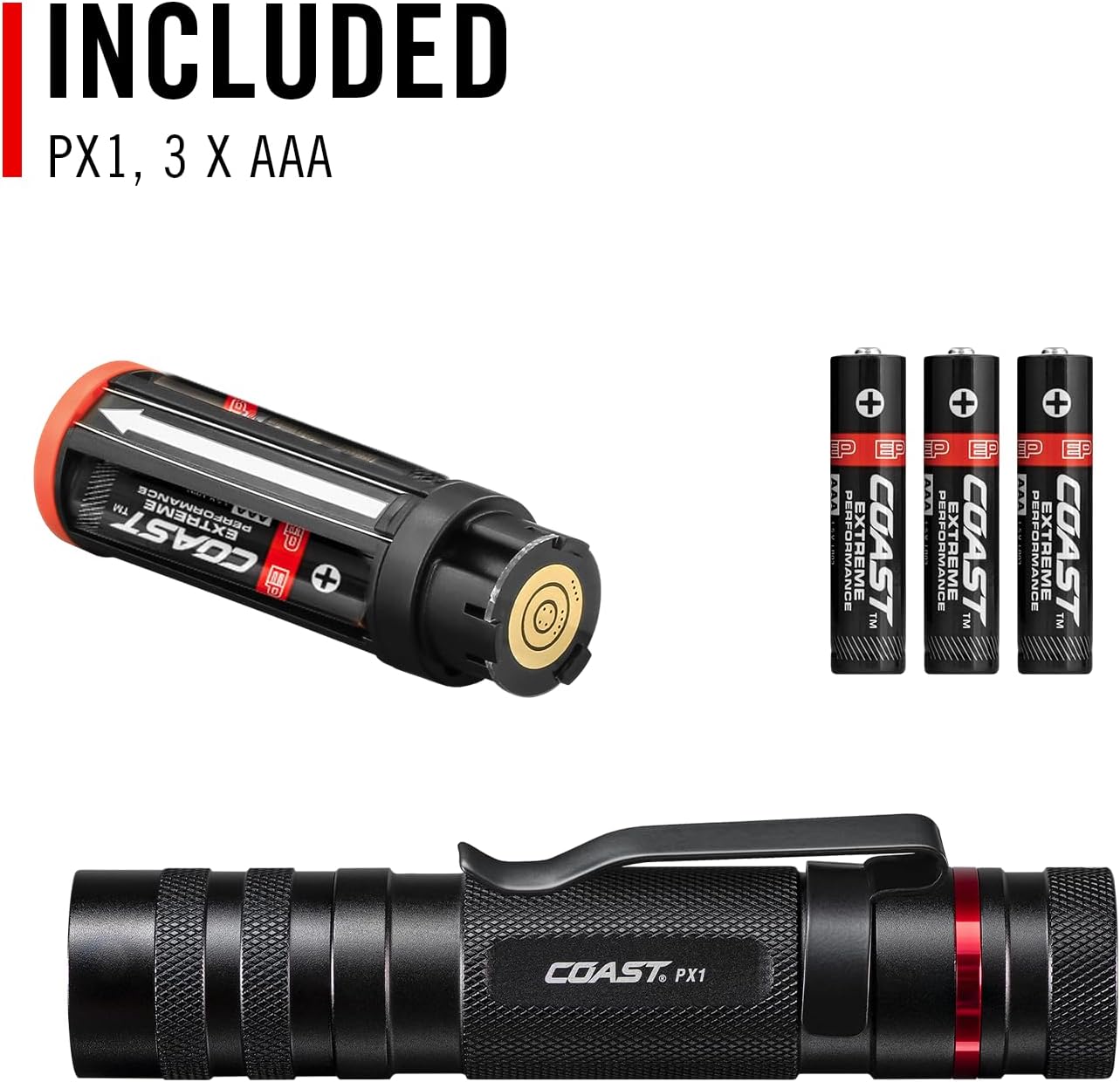
The components included with the PX1 flashlight: the flashlight itself, a battery carrier, and three AAA alkaline batteries.
4. Operation
4.1 Power On/Off and Light Modes
The PX1 flashlight features a Quick-Cycle Power Switch located on the tail cap. To operate:
- Press the switch once to turn the flashlight on to its highest setting (565 lumens).
- Quickly press the switch again to cycle to the medium setting (230 lumens).
- Press the switch a third time to cycle to the low setting (125 lumens).
- Press the switch a fourth time to turn the flashlight off.
- If the flashlight remains on any setting for more than 2 seconds, the next press will turn it off.
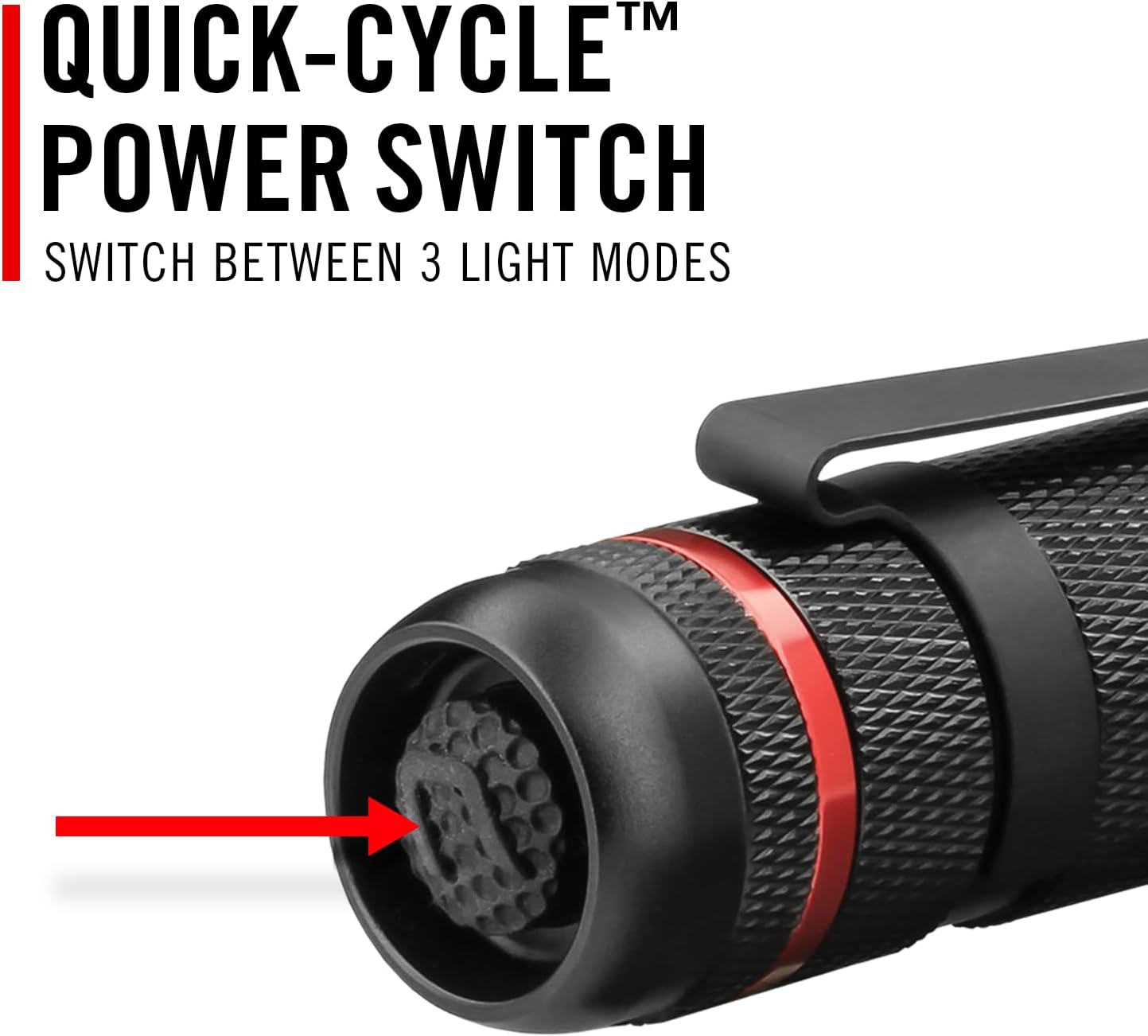
The tail cap of the PX1 flashlight, highlighting the Quick-Cycle Power Switch used to cycle through the three light modes.
4.2 Twist Focus (Pure Beam Optic)
The PX1 utilizes a Pure Beam Focusing Optic with a Twist Focus mechanism to adjust the beam pattern.
- To switch to a Flood Beam, twist the head of the flashlight counter-clockwise. This mode provides a wide, evenly distributed circle of light, ideal for illuminating a large area without dark spots.
- To switch to a Spot Beam, twist the head of the flashlight clockwise. This mode concentrates the light into a tight beam, reaching far downrange with a transitional halo for peripheral viewing.
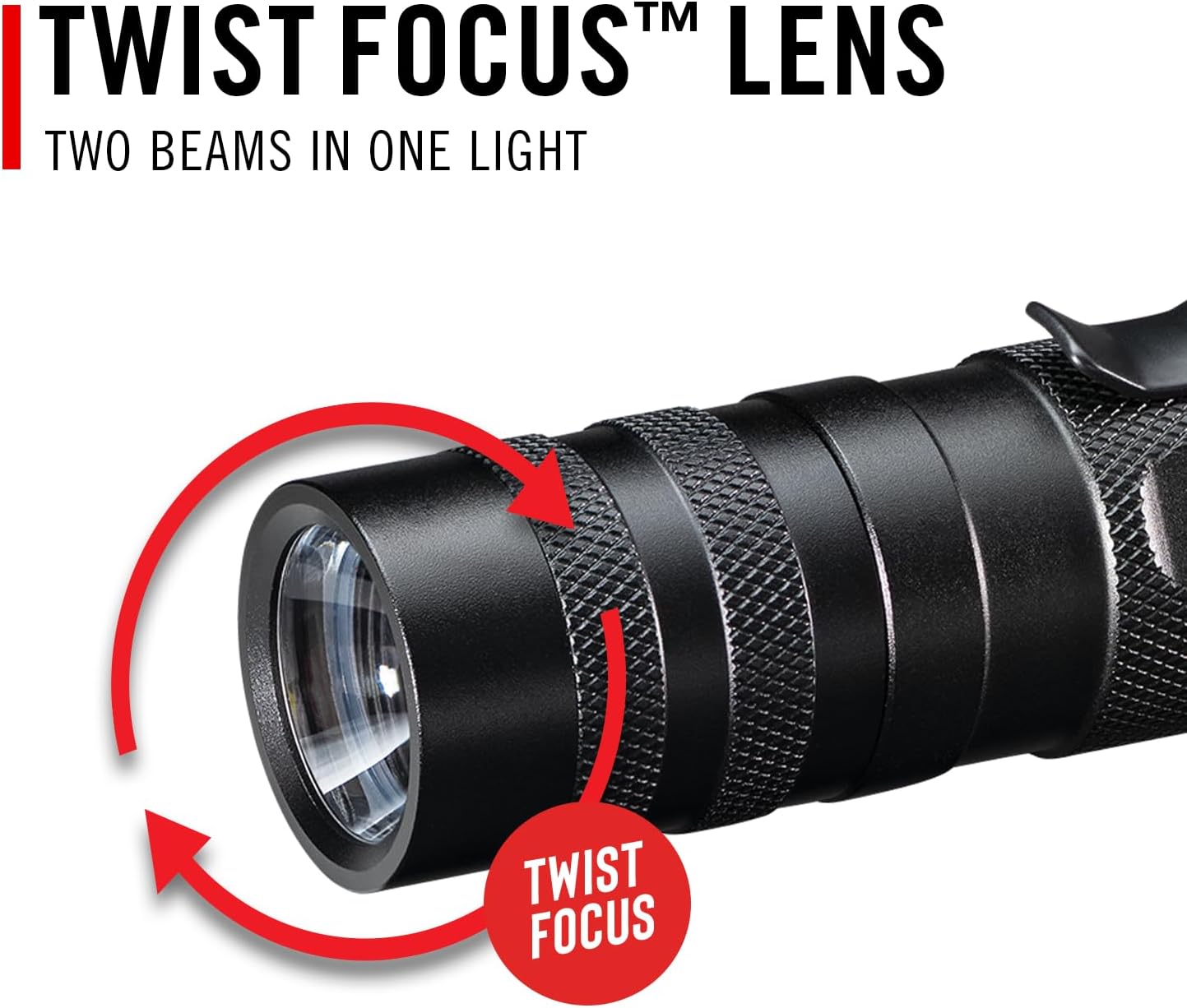
The front of the PX1 flashlight showing the twist focus mechanism, allowing adjustment between flood and spot beams.

An illustration demonstrating the Pure Beam Focusing System, which provides both a wide flood beam and a concentrated Bulls-Eye spot beam.
4.3 Adjustable Pocket Clip
The PX1 includes a reversible pocket clip for convenient carrying and hands-free use. The clip can be adjusted to secure the flashlight in a pocket, on a belt, or attached to the brim of a hat.

A detailed view of the PX1's adjustable pocket clip, designed for secure attachment to pockets or gear.
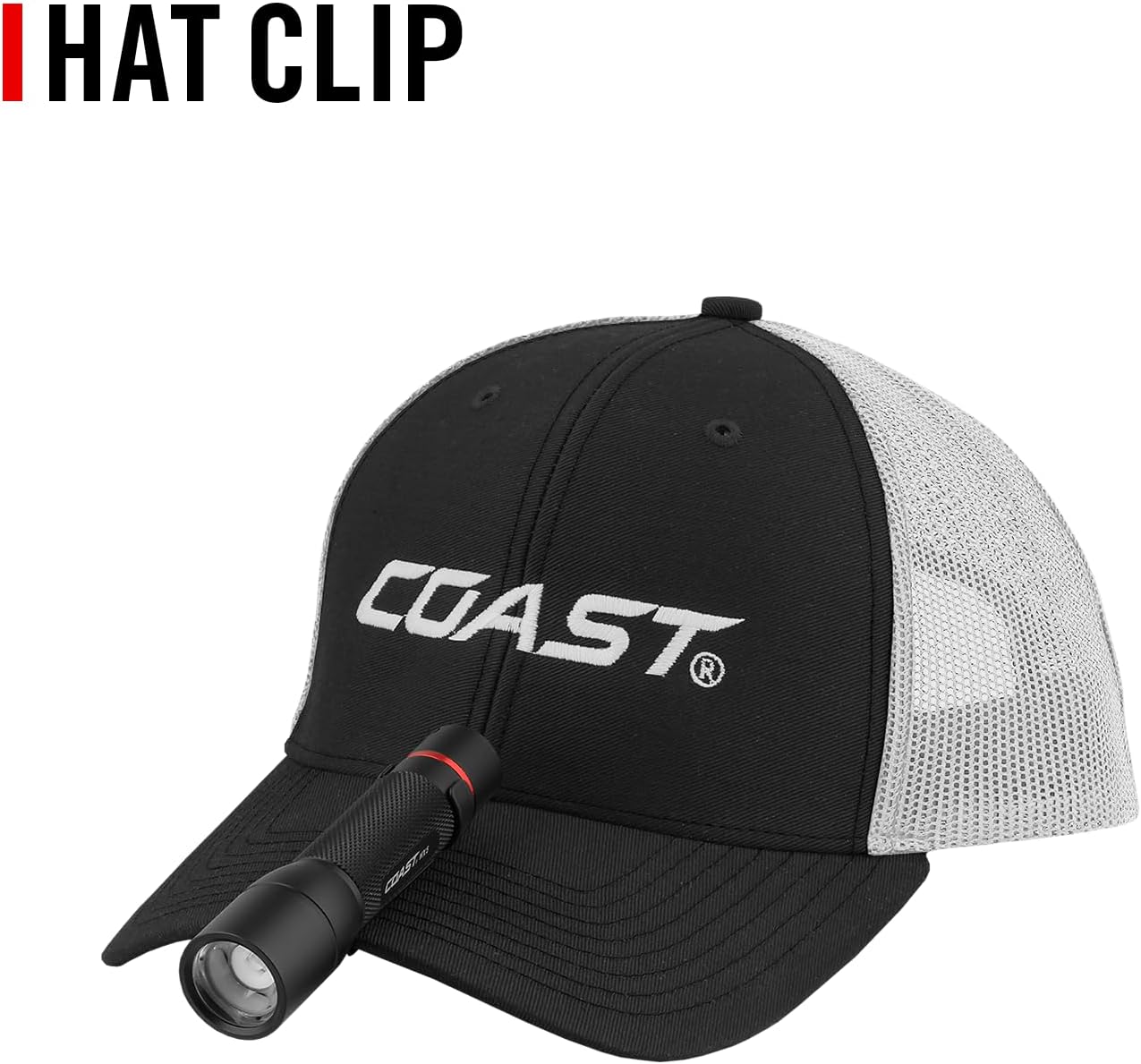
The PX1 flashlight attached to a baseball cap, demonstrating the versatility of its adjustable clip for hands-free use.
5. Maintenance
- Cleaning: Wipe the flashlight body with a soft, damp cloth. Do not use abrasive cleaners or solvents.
- Battery Replacement: Replace AAA batteries when the light output diminishes significantly. Always use fresh batteries of the same type.
- Storage: If storing the flashlight for an extended period, remove the batteries to prevent leakage and potential damage.
- O-Rings: Periodically inspect the O-rings for wear and tear. Lubricate with silicone grease if necessary to maintain water resistance.
6. Troubleshooting
6.1 Light Not Turning On
- Check Batteries: Ensure batteries are correctly inserted with proper polarity and are not depleted. Replace if necessary.
- Tail Cap Connection: Verify that the tail cap is fully tightened. A loose tail cap can prevent electrical contact.
- Clean Contacts: Inspect battery contacts and clean them if there is any corrosion or dirt.
6.2 Dim or Flickering Light
- Battery Level: Batteries may be low. Replace with fresh AAA batteries.
- Loose Connections: Ensure the tail cap and head assembly are securely tightened.
7. Specifications
| Feature | Detail |
|---|---|
| Model Number | 20865 |
| Light Output (High) | 565 Lumens |
| Light Output (Medium) | 230 Lumens |
| Light Output (Low) | 125 Lumens |
| Beam Distance (High) | 107 meters |
| Beam Distance (Low) | 30 meters |
| Runtime (High) | 3.5 hours |
| Runtime (Low) | 28 hours |
| Power Source | 3 x AAA Alkaline batteries (included) or rechargeable batteries |
| Material | Aluminum |
| Water Resistance Level | IP54 (Water Repellent) |
| Product Dimensions | 4.5"D x 1"W x 1"H |
| Item Weight | 4.2 ounces (0.12 Kilograms) |

A table detailing the performance specifications of the PX1 flashlight, including light output (lumens), beam distance, and runtime for high, medium, and low settings, certified to ANSI FL1 standards.

The PX1 flashlight held in a hand, illustrating its compact size with a length of 5.6 inches.

The PX1 flashlight with water droplets, showcasing its durable, storm-proof construction with an IP54 rating.

A diagram explaining the Dual Power feature, allowing the PX1 to operate with either widely available alkaline batteries or cost-effective rechargeable batteries.
8. Warranty and Support
The Coast PX1 Flashlight is backed by a Lifetime Warranty against defects in materials and workmanship. For warranty claims or technical support, please refer to the official Coast website or contact their customer service.
For more information, visit the Coast Store.


