
RATIONAL A628206.19E
Rational SelfCookingCenter 5 Senses Combi Oven
Model: A628206.19E
Brand: RATIONAL
Product Overview
The Rational SelfCookingCenter 5 Senses Model 62 A628206.19E is a natural gas-powered combi oven designed for professional kitchen environments. It offers versatile cooking capabilities, including roasting, steaming, stewing, and baking, all managed through an intuitive control panel. Constructed with durable 304 type stainless steel, both interior and exterior, this unit is built for longevity and ease of maintenance. Its advanced features like SelfCookingControl and Efficient LevelControl ensure consistent results and efficient operation, even when cooking multiple items simultaneously.
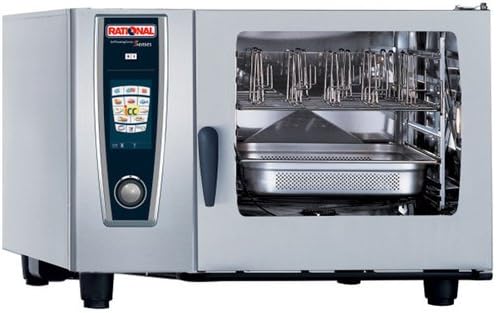
Front view of the Rational SelfCookingCenter 5 Senses Combi Oven, showcasing its stainless steel exterior, clear glass door, and user-friendly control panel with a central knob and various cooking mode icons. The interior is visible, equipped with racks for sheet pans.
Setup and Installation
This combi oven requires professional installation due to its natural gas connection and electrical requirements. Ensure that installation is performed by a qualified technician in accordance with all local and national codes and regulations.
- Location: Choose a stable, level surface with adequate ventilation and clearance from combustible materials.
- Gas Connection: Connect to a natural gas supply with the specified pressure and BTU rating (105,000 BTU).
- Electrical Connection: Ensure the correct voltage and amperage supply are available as per the product specifications.
- Water Connection: Connect to a potable water supply for steam generation and cleaning functions.
- Drainage: Establish proper drainage for wastewater.
- Initial Startup: Follow the professional installer's instructions for the first startup and calibration.
Refer to the comprehensive installation manual provided with the unit for detailed diagrams and safety instructions.
Operating Instructions
The SelfCookingCenter is designed for user-friendly operation, even for novice users, thanks to its SelfCookingControl and Efficient LevelControl features.
Control Panel Overview
The clear, self-explanatory control panel features a central rotary knob for navigation and selection, along with dedicated buttons for various cooking modes and functions. Icons on the display guide the user through the cooking process.
Basic Operation Steps
- Power On: Press the power button to turn on the oven.
- Select Cooking Mode: Use the rotary knob to navigate through the various cooking modes (e.g., roasting, steaming, baking, stewing). Press the knob to confirm your selection.
- Load Food: Place food items into the oven. The oven can hold up to six full-size sheet pans or twelve full-size steam table pans.
- Set Parameters: The SelfCookingControl will suggest optimal cooking parameters based on the selected food and desired outcome. You can adjust these as needed.
- Start Cooking: Press the start button to begin the cooking process.
- Efficient LevelControl: Utilize this feature to cook different food items simultaneously. The oven intelligently manages cooking times for each rack.
- Monitoring: The display provides real-time updates on the cooking progress.
- Completion: The oven will signal when cooking is complete. Carefully remove food using appropriate heat protection.
For detailed instructions on specific cooking programs and advanced features, consult the full operating manual.
Maintenance and Cleaning
Regular maintenance and cleaning are crucial for ensuring the longevity and optimal performance of your Rational SelfCookingCenter. The 304 type stainless steel construction facilitates easy cleaning.
Daily Cleaning
- Interior: After each use, allow the oven to cool slightly. Wipe down the interior surfaces, including racks and pan supports, with a damp cloth and mild, food-safe detergent. Rinse thoroughly and dry.
- Exterior: Clean the stainless steel exterior with a soft cloth and a non-abrasive stainless steel cleaner. Avoid harsh chemicals or abrasive pads that can scratch the surface.
- Door Seal: Inspect and clean the door seal regularly to ensure a tight seal during operation.
Periodic Maintenance
- Descaling: The oven may have an automatic descaling program. Follow the manufacturer's recommendations for descaling frequency and procedure, especially in areas with hard water.
- Filter Cleaning: Check and clean air filters as per the manual to ensure proper airflow and cooling of components.
- Professional Inspection: Schedule regular professional inspections and servicing by authorized technicians to ensure all components are functioning correctly and to address any potential wear and tear.
Always disconnect the oven from the power supply before performing any cleaning or maintenance procedures.
Troubleshooting
This section provides basic troubleshooting steps for common issues. For more complex problems, contact authorized service personnel.
| Problem | Possible Cause | Solution |
|---|---|---|
| Oven does not power on. | No power supply; tripped circuit breaker. | Check power cord connection; reset circuit breaker. |
| Oven not heating. | Gas supply off; igniter issue; temperature sensor fault. | Ensure gas supply is on; contact service for igniter or sensor issues. |
| Steam not generating. | Water supply off; clogged water filter; descaling needed. | Check water connection; clean/replace filter; perform descaling. |
| Error message on display. | System fault; sensor error. | Note the error code and consult the full manual or contact service. |
If the problem persists after attempting these solutions, please contact RATIONAL customer support or an authorized service technician.
Specifications
- Brand: RATIONAL
- Model Name: 62
- Item Model Number: A628206.19E
- Power Source: Natural Gas
- BTU Rating: 105,000 BTU
- Capacity: (6) Full Size Sheet Pans or (12) Full Size Steam Table Pans
- Material: 304 Type Stainless Steel (Interior & Exterior)
- Control Type: Knob
- Door Style: Side Swing
- Number of Shelves: 1 (standard, additional may be available)
- Manufacture Year: 2019
- First Available: January 14, 2016
- Certifications: NSF, Energy Star, CSA
Warranty and Support
For detailed information regarding the product warranty, please refer to the warranty card included with your purchase or visit the official RATIONAL website. Warranty terms and conditions may vary by region and purchase date.
If you require technical assistance, spare parts, or service, please contact RATIONAL customer support or your authorized dealer. Have your model number (A628206.19E) and serial number ready when contacting support.
RATIONAL Official Website: www.rational-online.com
Ask a question about this manual
Ask about setup, troubleshooting, compatibility, parts, safety, or missing instructions. Manuals+ will review the question and use this page’s manual context to help answer it.