1. Introduction
This manual provides detailed instructions for the installation, operation, and maintenance of the UHPPOTE YB-700A Electric Strike Lock. This device is designed for secure access control, featuring a fail-safe mechanism (unlocks when power is off) and robust construction. Please read this manual thoroughly before installation and use to ensure proper function and safety.
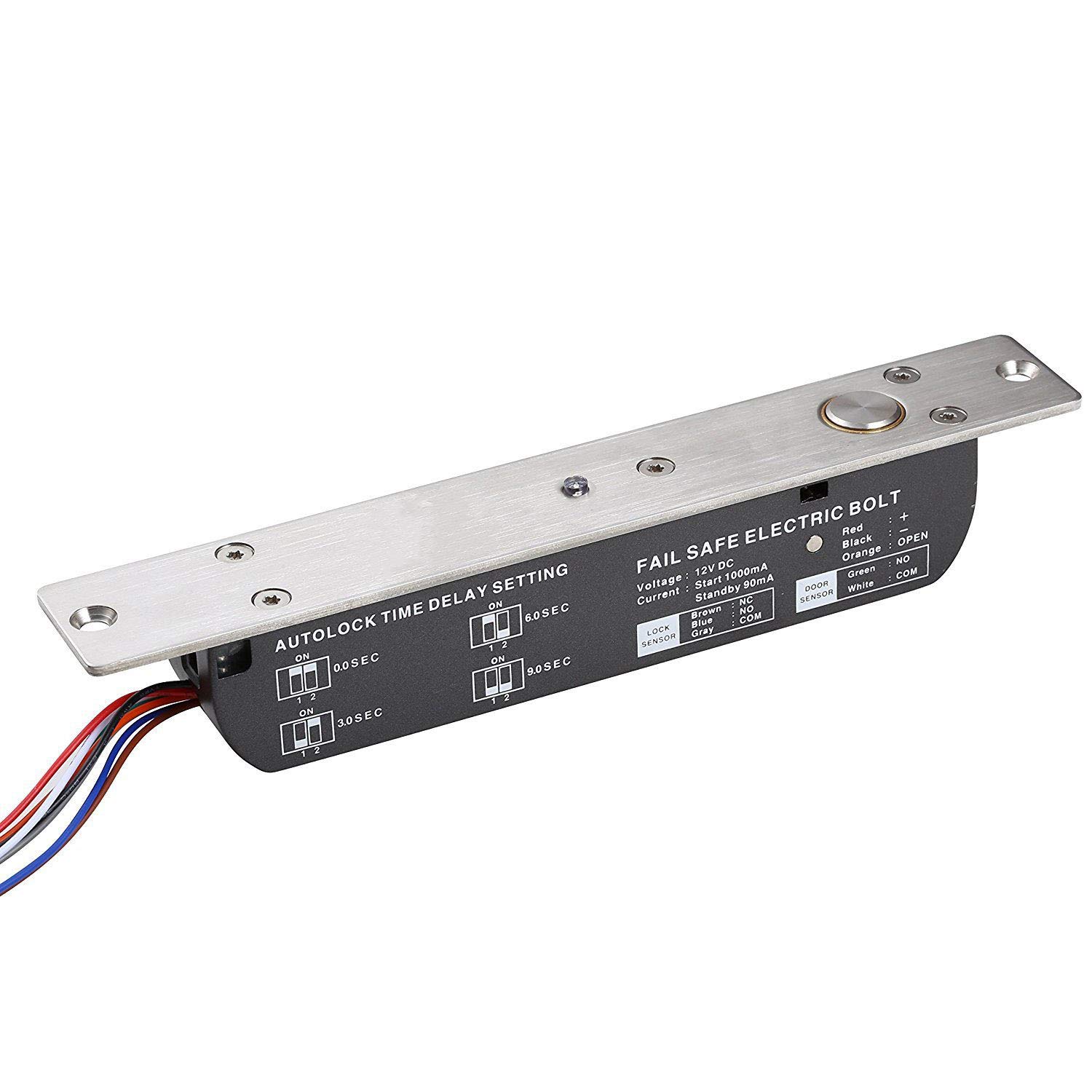
Figure 1: UHPPOTE YB-700A Electric Strike Lock. This image shows the top view of the electric strike lock, highlighting its metallic faceplate, bolt mechanism, and wiring connections.
2. Key Features
- Fail-Safe Operation: The lock automatically unlocks when power is interrupted, ensuring safety during emergencies.
- High Holding Force: Features a robust bolt with a holding force of 2000kg for enhanced security.
- Adjustable Automatic Lock Delay: Configurable delay settings of 0, 3, 6, or 9 seconds for automatic re-locking.
- Signal Output: Provides lock status signal (NO/NC/COM) and door status signal (NO/COM) for integration with access control systems.
- Wide Application: Suitable for various door types including wooden, glass, metal, and fireproof doors.
- Low Temperature Operation: Designed for low power consumption and stable operation, preventing overheating.
- Durable Construction: Bolt made of superior aluminum alloy and solid stainless steel; tested for 500,000 operations.
3. Safety Information
Always follow basic safety precautions to reduce the risk of fire, electric shock, and injury. Professional installation is recommended for electrical components. Ensure power is disconnected before performing any installation or maintenance. Do not attempt to repair the device yourself; refer to qualified service personnel.
4. Product Components
The package typically includes the following items:
- 1x UHPPOTE YB-700A Electric Strike Lock
- 1x User Manual (this document)
- 1x Installation Kit (screws and mounting accessories)

Figure 2: Angled view of the UHPPOTE YB-700A Electric Strike Lock. This perspective highlights the side profile and the robust construction of the lock body.
5. Installation and Wiring
5.1. Installation Steps
- Prepare Door Frame: Incise the location for the faceplate and magnetic plate on the door frame according to the lock's dimensions.
- Mount Extended Slice: Secure the extended slice (if applicable) to the door frame.
- Connect Power and Test: Connect the power supply line and test the lock's basic functionality before final mounting.
- Tighten Screws: Securely tighten all screws to fix the lock in place.
5.2. Wiring Diagram
Refer to the diagram below for correct wiring connections. Ensure all connections are secure and insulated.
- Red: +12V DC
- Black: - (Ground)
- Orange: OPEN (Input for unlocking)
- Blue: NC (Lock Signal - Normally Closed)
- Brown: NC (Lock Signal - Normally Closed)
- Gray: COM (Lock Signal - Common)
- Green: NO (Door Signal - Normally Open)
- White: COM (Door Signal - Common)

Figure 3: This image illustrates the wiring diagram, automatic lock delay settings (0, 3, 6, 9 seconds), and a four-step installation guide for the electric strike lock.
5.3. Automatic Lock Delay Adjustment
The automatic re-locking delay can be set to 0, 3, 6, or 9 seconds using the dip switches or jumpers on the lock circuit board, as indicated in the diagram above.
6. Operation
The UHPPOTE YB-700A operates as a fail-safe lock, meaning it will unlock when power is removed. When power is supplied, the bolt extends to secure the door. To unlock the door, a signal must be sent to the 'OPEN' input. The lock features an LED indicator:
- LED On: Indicates the lock is in a locked state.
- LED Off: Indicates the lock is in an unlocked state.
If no action is taken within the set delay time after unlocking, the lock will automatically re-lock.
7. Maintenance
The UHPPOTE YB-700A Electric Strike Lock is designed for durability and requires minimal maintenance. However, regular checks can prolong its lifespan:
- Cleaning: Periodically wipe the lock body and faceplate with a soft, dry cloth to remove dust and grime. Avoid using abrasive cleaners or solvents.
- Inspection: Check for any loose screws or wiring connections. Ensure the bolt moves freely without obstruction.
- Lubrication: Do not lubricate the internal mechanisms unless specifically instructed by the manufacturer.
8. Troubleshooting
If you encounter issues with your electric strike lock, consider the following common troubleshooting steps:
- Lock Not Engaging/Disengaging:
- Check power supply: Ensure the lock is receiving the correct 12V DC power.
- Inspect wiring: Verify all connections are secure and correctly wired according to the diagram.
- Check for obstructions: Ensure the door and frame are aligned and there are no physical obstructions preventing the bolt from extending or retracting.
- LED Indicator Not Functioning:
- Confirm power is supplied to the lock.
- Check for internal damage (if accessible and safe to do so).
- Automatic Re-lock Delay Issues:
- Verify the delay settings are correctly configured via the dip switches/jumpers.
If problems persist after attempting these steps, contact customer support or a qualified technician.
9. Specifications

Figure 4: Detailed dimensions of the UHPPOTE YB-700A Electric Strike Lock and its magnetic plate, shown in both millimeters and inches.
| Feature | Specification |
|---|---|
| Model Number | YB-700A |
| Lock Body Dimensions (L x W x H) | 215L x 35W x 38H (mm) / 8.46L x 1.38W x 1.5H (inches) |
| Magnetic Plate Dimensions (L x W x H) | 100L x 25W x 2.5H (mm) / 3.94L x 0.98W x 0.1H (inches) |
| Bolt Dimensions | 16mm diameter, 16mm throw, Stainless Steel |
| Voltage | DC12V |
| Starting Current | 1000mA |
| Standby Current | 90mA |
| Holding Force | 2000Kg |
| Automatic Lock Delay | 0 / 3 / 6 / 9 seconds |
| Signal Output | Lock Signal (NO/NC/COM), Door Signal (NO/COM) |
| Operating Temperature | -10°C to 55°C (14°F to 131°F) |
| Operating Humidity | 0~90% (non-condensing) |
| Durability | Tested for 500,000 operations |
| Material | Stainless steel, Aluminum alloy |
| Item Weight | 1 Kilogram |
| Certifications | CE & MA |
10. Warranty and Support
For warranty information or technical support, please contact your retailer or the manufacturer directly. Keep your purchase receipt as proof of purchase. Do not attempt to open or modify the device, as this may void the warranty.


