
1. Product Overview
The Sharp SPC851 Twin Bell Alarm Clock is a classic quartz analog timepiece designed for reliable timekeeping and a loud alarm. Its traditional twin bell style and luminous features make it both functional and aesthetically pleasing for any room.

Figure 1: Front view of the Sharp SPC851 Twin Bell Alarm Clock.
Key Features:
- Quartz Analog Movement: Provides accurate timekeeping.
- Twin Bell Style: Classic design with a loud, traditional alarm sound.
- Luminous Hands and Dial: Glow in the dark for easy viewing in low light conditions.
- Repeat Snooze: Allows for temporary silencing of the alarm.
- Touch-Activated Backlight: Illuminates the dial for clear visibility at night.

Figure 2: Close-up of the clock face highlighting the luminous hands and dial.

Figure 3: Visual representation of key features including easy-to-read dial, loud twin bell alarm, touch-activated backlight, and 1x AA battery operation.

Figure 4: Product dimensions of the Sharp SPC851 Twin Bell Alarm Clock.
2. Setup
2.1 Battery Installation
- Locate the battery compartment cover on the back of the clock.
- Remove the cover by sliding it down or lifting it off.
- Insert one (1) AA battery, ensuring the correct polarity (+/-) as indicated inside the compartment.
- Replace the battery compartment cover.
2.2 Setting the Time
- Locate the "TIME SET" knob on the back of the clock.
- Rotate the knob in either direction until the hour and minute hands display the current time.
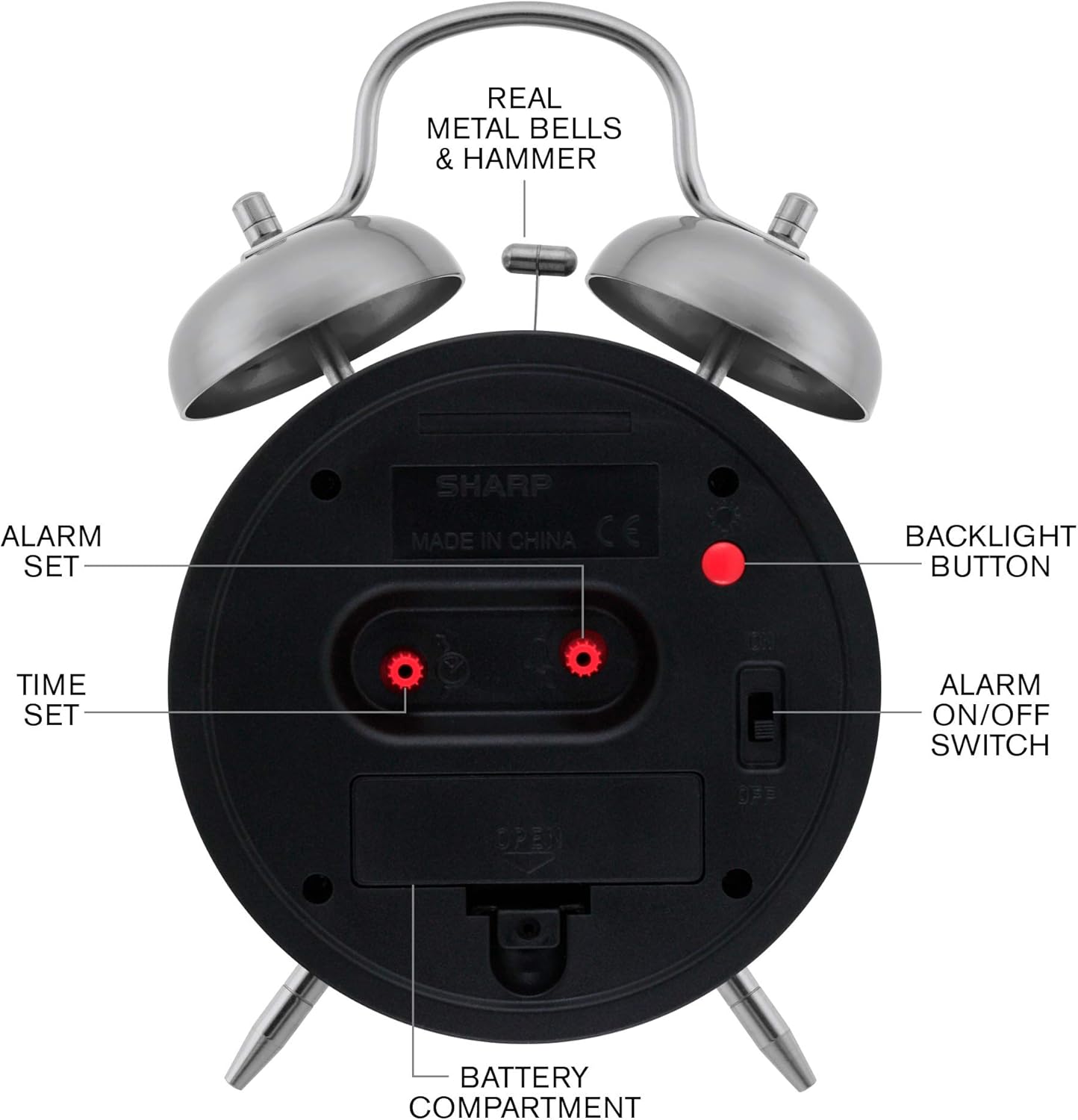
Figure 5: Rear view of the clock showing the time set, alarm set, backlight button, and alarm on/off switch.
3. Operating Instructions
3.1 Setting the Alarm
- Locate the "ALARM SET" knob on the back of the clock.
- Rotate this knob to move the small alarm hand (usually red or a distinct color) to your desired alarm time.
- Ensure the alarm hand is precisely aligned with the desired hour mark for accurate alarm activation.
3.2 Activating/Deactivating the Alarm
- To activate the alarm, slide the "ALARM ON/OFF" switch on the back of the clock to the "ON" position.
- To deactivate the alarm, slide the "ALARM ON/OFF" switch to the "OFF" position.
- When the alarm sounds, it will continue to ring loudly until the "ALARM ON/OFF" switch is moved to the "OFF" position.
3.3 Using the Backlight
- To illuminate the clock face in the dark, press and hold the "BACKLIGHT BUTTON" located on the back of the clock.
- Release the button to turn off the backlight.
4. Maintenance
4.1 Battery Replacement
Replace the AA battery approximately every six months, or when the clock's timekeeping becomes inaccurate or the alarm weakens. Always dispose of used batteries responsibly.
4.2 Cleaning
Wipe the clock with a soft, dry cloth. Do not use abrasive cleaners or immerse the clock in water.
5. Troubleshooting
5.1 Clock Not Keeping Accurate Time
- Check the battery: Ensure it is fresh and inserted with correct polarity.
- Replace the battery if it is old or weak.
5.2 Alarm Not Sounding
- Verify the "ALARM ON/OFF" switch is in the "ON" position.
- Ensure the alarm hand is correctly set to the desired alarm time.
- Check the battery: A weak battery may not have enough power to trigger the alarm.
6. Specifications
| Feature | Detail |
|---|---|
| Brand | Sharp |
| Model Number | SPC851 |
| Color | Teal |
| Display Type | Analog |
| Style | Traditional |
| Special Feature | Alarm, Luminous Hands, Backlight |
| Product Dimensions | 4.95"W x 6.9"H |
| Power Source | Battery Powered (1x AA battery required, not included) |
| Material | Glass, Metal, Plastic |
| Item Weight | 11.6 ounces |
7. Warranty and Support
For warranty inquiries or customer support, please contact: sales@us-myhome.com
You can also visit the official Sharp store for more information: Sharp Store on Amazon
8. Product Videos
Sharp Clocks - Keeps the Rhythm of Your Day
This video provides a general overview of Sharp clocks, showcasing their design and functionality.
