
Beetel BEETEL BLAST-1050
BEETEL BLAST-1050 Multimedia Speaker System
User Manual
1. Introduction
Thank you for choosing the BEETEL BLAST-1050 Multimedia Speaker System. This manual provides essential information for the proper setup, operation, and maintenance of your new speaker system. Please read this manual thoroughly before using the product to ensure optimal performance and safety. Keep this manual for future reference.
2. Safety Information
- Do not expose the unit to rain, moisture, or extreme temperatures.
- Do not open the speaker casing. There are no user-serviceable parts inside. Refer all servicing to qualified personnel.
- Ensure proper ventilation around the speakers to prevent overheating.
- Place the speakers on a stable, flat surface to prevent them from falling.
- Keep the speakers away from strong magnetic fields.
- Unplug the power cord from the wall outlet during lightning storms or when unused for long periods.
3. Package Contents
Please check the package for the following items:
- 1 x Main Subwoofer Unit
- 2 x Satellite Speakers
- 1 x Remote Control
- 1 x Audio Input Cable
- 1 x User Manual
4. Product Overview
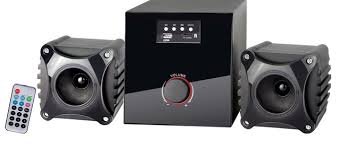
Image: The BEETEL BLAST-1050 speaker system, featuring a central subwoofer unit, two compact satellite speakers, and a remote control. The subwoofer has a large volume knob on the front and control buttons on the top panel.
4.1 Main Subwoofer Unit
The main unit houses the amplifier and subwoofer. It features front-panel controls for easy access.
- Volume Knob: Adjusts the overall volume level.
- Input Buttons: Selects audio input sources (e.g., AUX, USB, SD Card, FM).
- Display: Shows current mode and track information.
4.2 Satellite Speakers
The two satellite speakers provide stereo sound. They connect to the main subwoofer unit.
4.3 Remote Control
The remote control allows convenient operation of the speaker system from a distance, including power, volume, input selection, and playback controls.
5. Setup
5.1 Connecting the Speakers
- Place the main subwoofer unit on a stable surface.
- Position the two satellite speakers to the left and right of your listening area for optimal stereo separation.
- Connect the cables from the satellite speakers to the corresponding speaker output jacks on the rear panel of the main subwoofer unit. Ensure correct polarity (positive to positive, negative to negative).
- Connect the audio input cable from your audio source (e.g., computer, smartphone, TV) to the AUX input jack on the main subwoofer unit.
- Plug the power cord of the main subwoofer unit into a standard electrical outlet.
6. Operating Instructions
6.1 Powering On/Off
Press the Power button on the main unit or the remote control to turn the speaker system on or off.
6.2 Input Selection
Press the 'Input' or 'Mode' button on the main unit or remote control to cycle through available input sources (e.g., AUX, USB, SD Card, FM Radio).
6.3 Volume Control
Rotate the large volume knob on the front of the main unit clockwise to increase volume and counter-clockwise to decrease. Alternatively, use the 'Volume +' and 'Volume -' buttons on the remote control.
6.4 Using the Remote Control
The remote control provides full functionality. Point the remote control towards the main unit's sensor. Replace batteries when the remote's range decreases.
7. Maintenance
7.1 Cleaning
Wipe the speaker surfaces with a soft, dry cloth. Do not use abrasive cleaners, waxes, or solvents as they may damage the finish. Avoid spraying liquids directly onto the speakers.
7.2 Storage
If storing the speakers for an extended period, unplug them from the power outlet and store them in a cool, dry place, away from direct sunlight and extreme temperatures.
8. Troubleshooting
| Problem | Possible Cause | Solution |
|---|---|---|
| No power | Power cord not connected; Power outlet faulty; Unit is off. | Ensure power cord is securely plugged in; Test outlet with another device; Press the Power button. |
| No sound | Incorrect input selected; Volume too low; Audio cable not connected properly; Mute function active. | Select the correct input source; Increase volume; Check audio cable connections; Deactivate mute. |
| Distorted sound | Volume too high; Poor audio source quality; Speaker cables loose. | Reduce volume; Try a different audio source; Check speaker cable connections. |
| Remote control not working | Batteries drained; Obstruction between remote and unit; Remote not pointed correctly. | Replace batteries; Remove any obstructions; Point remote directly at the unit's sensor. |
9. Specifications
| Feature | Detail |
|---|---|
| Item Model Number | BEETEL BLAST-1050 |
| ASIN | B014PNO1TS |
| Manufacturer | BEETEL TELETECH LTD. |
| Item Weight | 2 kg |
| Package Dimensions | 27 x 24 x 17 cm |
| Date First Available | 31 August 2015 |
10. Warranty and Support
Please note that this product is indicated as NOT RETURNABLE as per the legal disclaimer. For any technical assistance or support inquiries, please contact Beetel customer service through their official channels. Refer to the product packaging or Beetel's official website for contact information.
Ask a question about this manual
Ask about setup, troubleshooting, compatibility, parts, safety, or missing instructions. Manuals+ will review the question and use this page’s manual context to help answer it.